Hello everybody,
Michael here, and today’s lesson will be a little different from my usual content. See, I won’t cover any coding technique per se, but as you may have guessed from the title, I’ll be discussing colors in programming. And no, this won’t be a preschooler’s lesson on color, nor will this be an art-class lesson on color-this is directed towards programmers (who will likely need to know how to use colors in their applications no matter what tool you use for development).
First of all, before we start discussing colors in programming, let’s get into a little history lesson. In 1666, Sir Issac Newton developed his theory that all colors are made up of mixtures of red, green, and blue light. Here’s a picture of that color wheel:

And here’s a more modern interpretation of the color wheel:
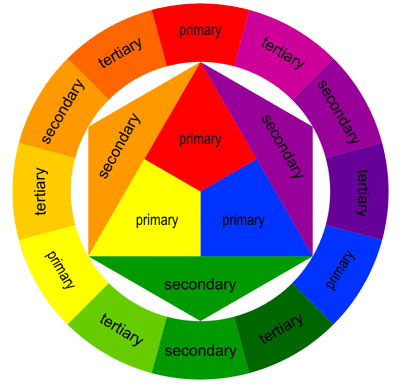
In programming (and in general), the three primary colors are red, green, and blue (which you can see from the color wheel above). Secondary colors, such as orange and purple, are created by mixing two primary colors together. Tertiary colors, such as light orange and dark green, are created by mixing a primary and a secondary color together.
Now that we’ve covered some very basic color theory concepts, let’s start discussing how to use colors in programming.
To really understand how colors are used in programming, we’ll cover four basic programming color schemes-RGB, HEX, HSL, and CMYK. Don’t worry-I’ll explain each of these color schemes in detail.
First, let’s discuss the RGB color scheme. As to what RGB stands for, it may be obvious to some of you, but for those who don’t know, RGB stands for red, green, blue. Remember how I said that Newton theorized that all colors are created from some mixture of red, green, and blue light? This color scheme exemplifies that theory, as it allows you to create colors based off a combination of red, green, and blue.
How would that work exactly? Well, RGB color values are usually specified as RGB(red, green, blue). The red, green, and blue parameters in the RGB() function defines the intensity of the red, green, or blue you want to use in a particular color; the intensity is represented as an integer between 0 and 255.
For instance, pure red would be represented by the RGB code RGB(255, 0, 0):

So how did RGB(255, 0, 0) generate a pure red? Well, since the red value is 255 and the green and blue values are 0, this indicates a pure red color will be generated, as the red value is as high as it can be-255.
Similarly, RGB(0, 255, 0) will generate a pure green and RGB(0, 0, 255) will generate a pure blue.
Now, how would you generate pure black and pure white? Here’s what pure black would look like:

To generate pure black, use the RGB code RGB(0, 0, 0). To generate pure white, use the RGB code RGB(255, 255, 255).
Now, what if you wanted to generate a color that wasn’t red, blue, green, black or white? Let’s say you wanted to create orange with the RGB color scheme. Here’s what pure orange would look like:

To create pure orange, I used the RGB code RGB(255, 165, 0).
Next, let’s discuss the HEX color scheme. In the HEX color scheme, colors are represented with hexadecimal numbers, which include the numbers 0-9 and the letters A-F (for a refresher on the hexadecimal numbering system, refer to this entry-Java Lesson 5: Java Numbering Systems-an oldie but a goodie).
The HEX color scheme is similar to the RGB color scheme since both color schemes generate colors from some combination of red, blue, and green. HEX colors are represented as #RRGGBB, with red (RR), green (GG) and blue (BB). Also, just like RGB colors, the intensities of the red, green, and blue colors are represented by a range of integers, but unlike the color intensities of RGB colors, HEX color intensities are represented by hexadecimal integers ranging from 00 (least intense) to FF (most intense). For instance, let’s say you wanted to generate pure red via the HEX color scheme. Here’s the hex code you would use-#FF0000. The hex code #FF0000 generates the same color as the RGB code RGB(255, 0, 0)-that’s because in both cases, the red in each color code is at its most intense value (255 for the RGB code, FF for the HEX code). Similar to the pure red example I just discussed, to generate pure green, use the HEX code #00FF00 and to generate pure blue, use the HEX code #0000FF.
- If you want to create a HEX color, then always remember to place the pound sign/hashtag/whatever you want to call it (#) in front of the color HEX code. If you don’t do this, the program you’re working with (whether Python, HTML, etc.) won’t know you’re trying to create a color.
Don’t believe me? Well, let’s take a look at the pure red, pure green, and pure blue generated from HEX:
Pure red:

Pure green:

Pure blue:

Now, what if you wanted to generate pure black and pure white using the HEX color scheme? For pure black, use the hex code #000000 and for pure white, use the hex code #FFFFFF.
Next, let’s discuss the HSL color scheme. This color scheme is different from the previous two because in the HSL color scheme, colors aren’t generated from a combination of red, green, and blue. HSL stands for hue, saturation, and lightness. Hue refers to a degree on the color wheel that is represented by an integer between 0 and 360-0 refers to red, 120 to blue, and 240 to green. Saturation refers to the percentage of grey in a certain color; it is represented as a percentage value from 0-100%. 0% means there is a shade of grey in a certain color while 100% means there is no grey in the color. Lightness refers to percentage of, well, light in a certain color. 0% means a pure black color while 100% means a pure white color.
So, what would pure red, pure green, and pure blue look like with the HSL color scheme. Let’s take a look:
Here’s how pure red looks with the HSL color scheme:

To generate pure red with the HSL color scheme, use the code HSL(0, 100%, 50%)-and yes, you’ll need to remember to include the percent signs.
Now, if you wanted to generate pure green with the HSL color scheme, use the code HSL(120, 100%, 50%). Likewise, if you wanted to generate pure blue with the HSL color scheme, use the code `HSL(200, 100%, 50%).
Now, what if you wanted to generate pure black and pure white with the HSL color scheme? To generate pure white, use the code HSL(0, 100%, 100%). To generate pure black, use the code HSL(0, 0%, 0%).
Last but not least, I’ll discuss the CMYK color scheme. The CMYK color scheme is similar to the RGB color scheme since both color schemes generate colors from combinations of other colors. However, unlike with RGB colors, CMYK colors are generated from a combination of cyan, magenta, yellow, and key black. Also, RGB colors are mainly used by computer screens to display content onscreen while CMYK colors are mainly used by printers to present printed content.
- In case you guys didn’t know, cyan is a shade of blue, magenta is a shade of pink, and key black refers to the type of black color used in printer ink cartridges.
CMYK colors are represented as percentages (from 0% to 100%) of cyan, magenta, yellow, and key black. To generate a CMYK color, use this code-CMYK(100%, 0%, 0%, 0%); this code generates pure cyan.
- When generating CMYK colors, always remember to include the percent signs!!
Now, what if you wanted to generate pure red? It’s a little different with the CMYK color scheme because, unlike with the RGB and HEX color schemes, colors aren’t being generated as a combination of red, green, and blue. Now, to generate pure red with the CMYK color scheme, use the code CMYK(0%, 100%, 100%, 0%). This code tells your program to use 0% cyan, 100% magenta, 100% yellow, and 100% key black to create the pure red.
To create pure green using the CMYK color scheme, use the code CMYK(100%, 0%, 100%, 0%). To create pure blue using the CMYK color scheme, use the code CMYK(100%, 100%, 0%, 0%).
Now, what if you wanted to create pure black and pure white with the CMYK color scheme? To create pure black, use the code CMYK(0%, 0%, 0%, 100%). This makes sense, as you’d need 100% key black to create pure black. Now, to create pure white, use the code CMYK(0%, 0%, 0%, 0%).
Now that I’ve discussed each of the color schemes, let’s discuss another important color-related tool in programming-color palettes. Color palettes are simply collections of colors used in a single medium-such as a website, a piece of art, a three piece suit collection, etc. For the purposes of this blog, we’ll focus on color palettes in a programming context. Color palettes are widely used in programming to set the design of a particular application (like the design company webpage). Many large companies, such as Google, Netflix, and Amazon, among others, use color palettes for their logos and websites.
Even sports teams use their own color palettes. The Cleveland Browns NFL team uses a 3-color color palette-brown, orange, and white (as you can see on their uniforms below):

- Sometimes I may use the term color schemes instead of color palettes, but these terms mean the same thing and can be used interchangeably.
Several programming tools have their own color palettes that are exclusive to that particular tool. For instance, Python’s MATPLOTLIB library has its own collection of color schemes-check out this link to find out more about MATPLOTLIB’s color schemes (referred to as colormaps on the site) https://matplotlib.org/stable/tutorials/colors/colormaps.html.
Now, last but not least, I want to share a neat color scheme finder/generator tool with you-it’s called coolors.co.

The reason I refer to this tool as a color scheme finder/generator is because this tool will not only allow you to find the perfect color scheme for whatever tool you’re building but also allow you to generate custom color schemes.
First, let’s click on the Explore button to explore some color schemes:

As you can see, you can scroll down the page to discover several different color schemes. Now, the great thing about each of these color schemes is that you don’t need to import them to whatever program you’re using; rather, all you need to do is simply hover over each color in a particular color scheme to get that color’s HEX code. Once you have all the HEX codes for all the colors in a certain color scheme, you can start incorporating the colors into your program.
However, what would you do if you wanted to find color palettes based off a single color (let’s use yellow for this example)? You would type in the name of a color in the Search bar and click Enter:

As you can see, searching for yellow returned several yellow color palettes. However, whenever you search for a color in the search bar, you won’t get only monochromatic color palettes. In case you didn’t know, monochromatic color palettes use different shades of a single color-in this case, monochromatic color palettes would use different shades of yellow. As you can see above, searching for yellow color palettes also returns color palettes with other colors, such as greens and blues.
Now, what if you wanted to generate a color palette for future use? Click on the Generate link to start generating color schemes:

As you can see, a randomly generated 5-color color palette appears, complete with the color names and hex codes ready for you to use on whatever application you are currently developing.
Now, press the spacebar (but don’t leave the Generate page) and watch what happens:

As you can see, when you press the spacebar, a new random 5-color color palette is generated, complete with color names and hex codes.
- Since the 5-color color palettes are generated at random, your results will certainly differ from mine.
Thanks for reading,
Michael