2025-26 NBA Season Predictions Revisited: Knicks Win & NBA Tank-a-thon 2026

Hello everyone,

Michael here, and I’m back with my annual NBA season reflection/predictions posts. As usual, I’ve got a juicy good three-part series for you starting with my NBA predictions revisited and reflected from the previous season (2025-26) followed by my regression model and predictions for the upcoming season (2026-27).

What a wild ride this past NBA season was…let’s reflect on the results of Michael’s Programming Bytes NBA season fortune telling (to revisit my previous season’s predictions, here’s where to go-And Now For Michael’s Programming Bytes 2025-26 NBA Season Predictions).

Yes, I know this isn’t my usual tech content, but I’ve had fun writing these posts for the past two NBA seasons and plan to keep this series as long as the blog’s running.

Let’s dive in!

Thoughts on the 2026 NBA Finals

First off, let’s look back on an amazing NBA Finals. The Spurs and the Knicks gave it their all through 5 games, but alas, the New York Knickerbockers (yes, Knicks is short for Knickerbockers) got their first championship since 1973, beating the Spurs in 5 games (and winning the title on the road).

Just like last year’s Pacers-Thunder Finals, this Finals was full of storylines in its own right, even though the winner was decided in five games. The trio of Victor Wembanyama, Stephon Castle, and De’Aaron Fox was a sight to behold, and even though they and the rest of the Spurs came up short in the championship, guys like Wemby and Castle have yet to hit their primes, so once they do, I see some deep playoff runs in the Spurs’ future.

Now, about the Knicks. Sure, the Spurs did a great job of powering through the Finals matchups…for the first half. Unfortunately for them, their playoff inexperience showed quite a bit during the Finals, as they lost some of their biggest leads (including a blown 29 point lead in game 4) late in the second half due to unfortunate mistakes on the Spurs’ part-like in the aforementioned game 4 when De’Aaron Fox tried to score a layup in the game’s final seconds but got blocked by OG Anunoby of the Knicks (he should’ve just tried to run out the clock that game, but that’s just my opinion). I mean, Wemby was lucky that he didn’t six flagrant foul postseason points, which would’ve caused him to miss crucial Finals matchups (he did come quite close to this in game 5).

I will say this though, Knicks, take a bow, you earned it. And also try to keep Jalen Brunson around for as long as you can, because even though he’s on the shorter end of NBA players (6’2″), nights like his 45-points in Game 5 show that even the small guys can excel (for context, Wemby is 7’4″).

Eastern Conference 2025-26 predictions revisited

Now, how did my Python regression model think the past season’s Eastern Conference was going to play out?

Play-OffsPlay-InsMaybe Next Year
1. Boston Celtics7. Miami Heat11. Toronto Raptors
2. Cleveland Cavaliers8. Orlando Magic12. Brooklyn Nets
3. Milwaukee Bucks9. Chicago Bulls13. Washington Wizards
4. New York Knicks10. Atlanta Hawks14. Charlotte Hornets
5. Indiana Pacers15. Detroit Pistons
6. Philadelphia 76ers

Since I also decided to add predictions from the brain of Michael himself, let’s see what he thought last season’s Eastern Conference was going to look like:

Play-OffsPlay-InsMaybe Next Year
1. New York Knicks7. Orlando Magic11. Toronto Raptors
2. Cleveland Cavaliers8. Milwaukee Bucks12. Philadelphia 76ers
3. Boston Celtics9. Atlanta Hawks13. Brooklyn Nets
4. Detroit Pistons10. Chicago Bulls14. Charlotte Hornets
5. Miami Heat15. Washington Wizards
6. Indiana Pacers

With both the model’s and my predictions revealed, let’s see how things actually played out for the 2025-26 Eastern Conference:

Play-OffsPlay-InsMaybe Next Year
1. Detroit Pistons7. Philadelphia 76ers (playoff)11. Milwaukee Bucks
2. Boston Celtics8. Orlando Magic (playoff)12. Chicago Bulls
3. New York Knicks9. Charlotte Hornets13. Brooklyn Nets
4. Cleveland Cavaliers10. Miami Heat14. Indiana Pacers
5. Toronto Raptors15. Washington Wizards
6. Atlanta Hawks

So, compared to the actual outcomes of the Eastern Conference, how accurate were my predictions and the model’s predictions:

  • Play-off teams (in top 6): 3/6 (model), 4/6 (me)
  • Play-in teams (7th-10th places): 2/4 (model), 1/4 (me)
  • Teams out of postseason picture (in bottom 5): 2/5 (model), 2/5 (me)
  • Teams with exact seeding regardless of finish: 1/15 (model), 2/15 (me)

By the way, the team that the model got the exact seeding for was the 8-seed Orlando Magic. The teams that I got the exact seeding for were the 13-seed Brooklyn Nets and 15-seed Washington Wizards (interesting I got two non-postseason teams’ seeding exactly right). As for the Eastern Conference playoff picture, both the model and I got 7 of the 15 teams in the right playoff positioning (meaning whether the team would make play-offs, play-ins, or neither regardless of seeding). Although I can proudly say that I did better than the model when it came to guessing who will make the play-offs (top 6).

Top 5 Eastern Conference takeaways

  • Even though the Miami Heat had another up-and-down season (despite improving to 43-39 this year) and yet another play-in appearance, I think the splashes they made in the offseason could make a big, big difference in their 2027 championship aspirations. Regardless if the Heat come out on top next season, GM Pat Riley certainly made some juicy swings during free agency with signings like Tim Hardaway Jr, Bobby Portis Jr and of course the superstar Heat fans were hoping to land…Giannis Antetokounmpo. I also think keeping Andrew Wiggins, Davion Mitchell, and of course, Mr. 83-point-game-on-a-Tuesday-in-March Bam Adebayo (that was certainly a bright spot in an up-and-down season). Now, whether Giannis is an improvement over whom he was traded for (Tyler Herro, Kel’el Ware, Jaime Jaquez Jr, and Kasparas Jakuconis) remains to be seen, as Giannis did have an injury-riddled year last season and turns 32 in December. Nonetheless, kudos to Pat Riley on what might be his last big superstar acquisition. Perhaps these big swings could, at last, get the Heat out of play-in limbo. Having a proven 4-time NBA champion with the Warriors dynasty in Klay Thompson certainly will make for some juicy storylines, even if Klay turns 37 this season.
  • Despite losing Jayson Tatum to an Achilles tear for the bulk of the season (which limited him to just 22 regular season games played), the Celtics still managed to pull off an impressive 56-26 record and a 2-seed in the East. Even without Tatum, the Celtics’ supporting players certainly compensated for his absence. Whether it’s Jaylen Brown’s (in what became his last season with the Celtics-more on that later) NBA-leading 736 field goals total this past season (that’s FIVE more than Shai Gilgeous-Alexander’s field goal total this season), Derrick White’s stellar defensive work (98 blocked shots this season, for one), the Celtics’ league-lowest turnovers-per-game rate (just 12.37), or any of the other accomplishments by the Celtics, they certainly proved their resilience…in the regular season. As for the play-offs, well, Boston certainly pulled a 2016-Warriors-in-the-Finals and blew a 3-1 lead…to the 7-seed, play-in Philadelphia 76ers-which brings me to my next point.
  • Even though the Sixers got swept by the championship Knicks in the Eastern Conference Semifinals, they certainly made a splash in the offseason. Along with keeping VJ Edgecombe, Tyrese Maxey (two players who certainly have a bright future in the league), and of course Joel Embiid, the Sixers sent Paul George off to the Celtics in exchange for Jaylen Brown and also made the biggest splash of the NBA free agency period when they signed LeBron James (Sr, not Jr) to a 2-year, $8 million deal right before his age-42 season. I mean, with a starting five of Embiid/Maxey/Edgecombe/Brown/James, I think they could be a dark horse contender this season (and certainly give the champion Knicks a run for their money). I’m still shocked the Celtics were willing to let go of Jaylen Brown of all people and trade him for a 36-year-old Paul George, but such is the cost of the NBA’s second apron I guess.
  • Now, regarding the Wizards, who’ve managed to do the impossible in that they’ve managed TWO bottom-of-the-East seasons in a row and THREE seasons where they were in the bottom 2 of the East (2023-24 was slightly better for the Wizards as they finished as the 14-seed), at least the model, myself, and the actual outcome agreed on one thing-they wouldn’t even crack play-in this year (though the model was a bit more generous giving the Wizards a 13-seed spot). Needless to say, every cloud has their silver linings. The mid-season acquisitions of Trae Young and Anthony Davis certainly added a strong veteran foundation-even if Davis has yet to play a game in a Wizards uniform and Young having barely played at all after he was traded from the Hawks. Other bright spots in an abysmal Wizards season include Alex Sarr and Kyshawn George. Personally, I’m looking forward to seeing what 6’9″ #1 overall pick AJ Dybansta could bring to the table. With the slow-but-steady rebuild going on in Wizards world, what could this mean for their playoff hopes next season? I still think there’s a lot of work to do and doubt the Wizards will be some sort of dark horse playoff contender for next season (leave that to the Sixers to play dark horse, in my opinion). Could the Wizards possibly sneak into the play-in? It’s likely, but I think that may be their 2026-27 ceiling. At least the Wizards got the #1 overall 2026 NBA draft pick for their troubles and in turn, received the aforementioned AJ Dybansta (perhaps their small forward of the future)?
  • I know the Giannis-to-Miami trade was THE story of 2026 free agency, and I already discussed how I think Miami may fare, but let’s reflect on the team at the other end of the trade-the Milwaukee Bucks. The Bucks finished just below the Heat (11-seed to the Heat’s 10-seed) and unlike the Heat, fell out of the postseason picture entirely-at least the Heat made it to overtime of the first play-in game against the Hornets before yet another early Heat postseason exit. As for the Bucks, did the loss of stars like Damian Lilliard and Brook Lopez hurt? I think so, and I don’t think former longtime Pacers (and fresh off the 2025 Finals) starter Myles Turner had a stellar first year with the Bucks given his lackluster per-game-points and declining minutes played throughout the season. The Giannis drama wasn’t much help for the Bucks, especially with the Bucks keeping him at the midseason trade deadline and Giannis’s left knee hyperextension injury that led the Bucks to bench him for the last 15 games of the season (much to the frustration of Giannis). Now, will the former Heat foursome of Tyler Herro/Kel’el Ware/Jaime Jaquez Jr/Kasparas Jakuconis be an improvement over Giannis and Bobby Portis Jr. We’ll see, but these four former Heat stars are still in the primes of the careers (Herro is the oldest of the bunch at 26) and have put up solid numbers during their Heat days.

Western Conference 2025-26 predictions revisited

Now that we’ve reflected on this past season in the Eastern Conference, let’s shift our focus to the West!

How did my Python regression model think the Western Conference was going to play out?

Play-OffsPlay-InsMaybe Next Year
1. Oklahoma City Thunder7. Golden State Warriors11. Houston Rockets
2. LA Clippers8. Phoenix Suns12. Utah Jazz
3. Denver Nuggets9. Sacramento Kings13. New Orleans Pelicans
4. Memphis Grizzlies10. Dallas Mavericks14. Portland Trail Blazers
5. Minnesota Timberwolves15. San Antonio Spurs
6. LA Lakers

Now let’s see how I thought the 2025-26 Western Conference was going to play out:

Play-OffsPlay-InsMaybe Next Year
1. Oklahoma City Thunder7. Golden State Warriors11. Dallas Mavericks
2. Houston Rockets8. LA Clippers12. Memphis Grizzlies
3. Minnesota Timberwolves9. Sacramento Kings13. Utah Jazz
4. Denver Nuggets10. San Antonio Spurs14. Portland Trail Blazers
5. Phoenix Suns15. New Orleans Pelicans
6. LA Lakers

Last but not least, let’s see how the 2025-26 Western Conference actually played out:

Play-OffsPlay-InsMaybe Next Year
1. Oklahoma City Thunder7. Phoenix Suns (playoff)11. New Orleans Pelicans
2. San Antonio Spurs8. Portland Trail Blazers (playoff)12. Dallas Mavericks
3. Denver Nuggets9. LA Clippers13. Memphis Grizzlies
4. LA Lakers10. Golden State Warriors14. Sacramento Kings
5. Houston Rockets15. Utah Jazz
6. Minnesota Timberwolves

Just as we discussed with my Eastern Conference predictions, let’s compare the model’s predictions, my predictions and the Western Conference’s actual outcomes:

  • Play-off teams (in top 6): 4/6 (model), 5/6 (me)
  • Play-in teams (7th-10th places): 2/4 (model), 2/4 (me)
  • Teams out of postseason picture (in bottom 5): 2/5 (model), 4/5 (me)
  • Teams with exact seeding regardless of finish: 2/15 (model), 1/15 (me)

When compared to my Eastern Conference predictions, my Western Conference predictions turned out much more accurate. In fact, I got 5/6 top-6 playoff teams along with 4/5 teams out of the post-season. The two seeds the model got right were the 1-seed Thunder and the 3-seed Nuggets (I just got the 1-seed Thunder).

Top 5 Western Conference takeaways

  • Let’s start with the defending champs heading into the season-the Oklahoma City Thunder. First of all, going 1-seed in the Western Conference for three years straight is no easy feat, so my kudos to OKC. What else to reflect on? 64-18 record, including the stellar 24-1 start (for their first 25 games). Sure, their win total did go down from their championship winning season (though many teams would kill for 64 or 68 wins), but they came back this season still stronger than ever. Keeping the championship-winning Big 3 of Shai Gilgeous-Alexander, Chet Holmgren and Jalen Williams certainly helped, as did playoff sweeps of the Suns (First Round) and Lakers (Semifinals). Even though the Thunder’s luck ran out in Game 7 of the Western Conference finals against the San Antonio Spurs (key players like Jalen Williams and Ajay Mitchell missed the bulk of the Western Conference Finals due to injuries), the Thunder still had a stellar season nonetheless-even with 31 different regular season starting lineups.
  • Every year, there are always some NBA teams that are quite the enigma. They’re not competitive enough to make deep playoff runs, and yet, they choose to run it back with the same crew. Case in point-the New Orleans Pelicans. 26 wins, 11-seed, not even making the play-ins and what do they do? Re-sign their 38-year-old center DeAndre Jordan to a 1-year veteran minimum and…that’s pretty much it. You would think the Pelicans would be much, much more motivated to shake things up, but lo and behold, they’re likely running it back with most of the same crew (save for Kevon Looney who left for the Lakers)-and new former Magic head coach Jamahl Mosley. For what it’s worth, Zion Williamson (yes, he’s still with the Pelicans) puts up solid numbers when healthy-averaging at least 21 points per game. Will this be the year Zion (and the Pelicans) get their big break? It will make for a juicy regular season storyline.
  • Another team that could fall under the category of “not competitive enough to make deep playoff runs but they still run it back with most of the same crew” could definitely be the Golden State Warriors. Yes, the second half of the 2010s was their dynasty years (with four straight years of Warriors-Cavaliers Finals) and yes, the Warriors still have Steph Curry, Draymond Green and Coach Steve Kerr from the dynasty days. However, Steph and Draymond aren’t getting any younger (now 38 and 36, respectively) and neither are many key Warriors players-like 36-year-old Jimmy Butler or 40-year-old Al Horford. Now I know the Warriors were hoping to land LeBron (think of all the nationally televised games and juicy storylines we could’ve gotten) but alas, LeBron took his talents to the City of Brotherly Love. With that said, the Warriors, like the Pelicans, will be running it back with most of the same crew-plus their lottery pick of Yaxel Lendeborg-that stumbled to a 10-seed play-in spot last season. Hopefully Jimmy Butler returns from the knee injury that ended his season back in February, or it could be a long year for the Warriors. After all, Steph Curry and Draymond Green are in the twilights of their basketball careers, so I think one last championship run for these two would end their NBA careers on a high note. I mean, even if one last ring for Steph and Draymond isn’t in the cards, perhaps a reunion with some old dynasty favorites like Klay Thompson and Kevon Looney would be fun to watch just for old time’s sake.
  • One team that surprised me quite a bit last year was the LA Clippers. A rough 6-21 start, losing Bradley Beal for the season after getting just six games with him, and rather unceremoniously (and disrespectfully) sending Clippers legend Chris Paul home after a December road game, and a still-ongoing salary cap circumvention scandal involving Kawhi Leonard doesn’t seem like it would bode well for the Clippers. But then, a Christmas miracle came for the Clippers-they would turn their fortunes around and end up with a 22-24 record by the end of January. But wait, by the time the season is all said and done, the Clippers somehow managed to obtain a winning record of 42-40 and wind up with a 9-seed play-in spot. Granted, they lost to the 10-seed Warriors in the 9/10 play-in game, but boy this was likely the mid-season turnaround of the 2025-26 NBA season. Now, the Clippers did send Kawhi back to Toronto for Gradey Dick and Brandon Ingram…that is, IF this Kawhi scandal does get resolved (that trade is still on hold and Kawhi is still with the Clippers as of this writing). I personally like the Clippers’ midseason trade with the Cavaliers for Darius Garland (in exchange for James Harden) and hope the Clippers’ eventually get Ingram and Dick.
  • Let’s also explore the tanking adventures for the two bottom teams in the Western Conference-the Kings and Jazz. Both teams once again had rough years, but as to who might have the brighter future (and might look way better next year), I’d have to go with the Jazz. I mean, I can’t help but feel sorry for the Kings’ luck in recent years, as their former coach Mike Brown (2026 Knicks), and former stars Tyrese Haliburton (2025 Pacers) and De’Aaron Fox (2026 Spurs) have gone on to enjoy NBA Finals and playoff success with other teams. Losing Domantis Sabonis, Zach LaVine AND DeAndre Hunter to season-ending injuries last season didn’t help them either, and neither did waiving one of their few bright spots from this past season-DeMar DeRozan. However, I still think the Jazz will come out as the more improved of these two teams because A-some stellar moves in both midseason and offseason (ahem Jaren Jackson Jr) and B-the draft of Darryn Peterson at No.2 overall-although I do think Darryn Peterson needs some more time to find his footing, in which case Keyonte George should tide the Jazz over at point guard. I’d also be interested to find out if the Jazz will keep Kevin Love around for another year, even with the third-lowest minutes per game on the Jazz (16.8) and only playing less than half the games this season (37).

And Now For Some Reflections On NBA Tank-a-Thon 2026

Look, I know it seems like there’s always those teams that can’t help but tank as hard as they can in any given season. However, the tank-a-thon was definitely in force throughout the 2025-26 season (for this definition, we’ll look at teams that finished 27-55 or worse).

  • For those unaware, tanking in sports refers to teams who are putting in as little effort as possible to undergo a long roster rebuild, don’t feel like trying at the end of the season once they’re officially eliminated from playoff contention, or, and perhaps most importantly, want a high draft pick to hopefully be able to draft their next franchise star.

So, who managed to crack tank-a-thon 2026? Unsurprisingly, we’ve got the bottom 3 teams from both the East and West.

  • Brooklyn Nets (20-62)
  • Indiana Pacers (19-63)
  • Washington Wizards (17-65)
  • Memphis Grizzlies (25-27)
  • Sacramento Kings (22-60)
  • Utah Jazz (22-60)

Look, in all fairness to the Pacers, this season always seemed like it was going to be a down year given Tyrese Halibuton’s Achilles tear at the end of the 2025 NBA Finals. With him back, plus with their midseason acquisitions of Ivica Zubac and Kobe Brown from the Clippers, I’ve got a good feeling that the Pacers will be back in playoff contention in no time.

Now as for the rest of the tankers, boy what a wash of a year they had. At least for the Wizards, Jazz and Grizzlies, things might finally start looking up for them after their miserable 2025-26 seasons, as they received the number 1, 2, and 3 picks, respectively in the 2026 NBA Draft, which turned into AJ Dybansta (Wizards), Darryn Peterson (Jazz) and Cam Boozer (Grizzlies). That’s certainly a bright spot for these three teams, especially after things like losing to Miami on Bam Adebayo’s 83-point game night (Wizards), getting a $500,000 NBA fine for sitting out healthy players in the name of the tank (Jazz, but Pacers got caught doing this too), and struggling to find a midseason trade partner for Ja Morant (Grizzlies) before ultimately trading him to the Portland Trail Blazers.

As for the Nets and Kings, well, the Kings were just terrible this year. Certainly losing Domantis Sabonis and Keegan Murray for large parts of the season due to injury didn’t help (Sabonis only played 19 games and Murray just 23). As much as the rest of the Kings tried to make things work with guys like DeMar DeRozan and Russell Westbrook, nothing really clicked amongst the Kings-also, what a disappointing way for Russell Westbrook to end his NBA career. Sadly, the Kings are still stuck with expensive contracts for Sabonis and Zack LaVine. The Nets, on the other hand, seem to want to “trust the process” (sound familiar Sixers fans?) and are in it for the long multi-year rebuild haul. Rookie Egor Demin was a bright spot for the Nets-even with a seemingly lackluster 28.5% 3-point shooting efficiency rate (Demin was eventually sidelined for the rest of the season in February with plantar fasciitis).

Now, NBA commissioner Adam Silver has some juicy ideas to mitigate the issue of tanking, some of which include (and it’ll be interesting to see some of these ideas in execution):

  • Silver’s new 3-2-1 system, where the three worst teams (Pacers, Nets, Wizards last season) will get a LOWER chance of getting the top 3 draft picks than the teams that finished 4th-10th record wise. Will this curb some teams’ tanking antics? We shall see.
  • If the NBA sees some overt tanking on a team’s part, they not only have the power to fine that team but also take away some of their draft lottery balls, which can further reduce their chances of getting a top pick. Yes, the NBA Draft uses lottery balls, much like a real lottery.
  • For what it’s worth, anti-tanking measures will be up for discussion once more in 2029 when it’s time to negotiate the new NBA Collective Bargaining agreement.

An update on the 2025 NBA gambling scandal

Last but not least, you might be wondering how the 2025 NBA gambling scandal that arose at the beginning of this season is playing out. Here are some quick updates:

  • The then-active coach Chauncey Billups and the then-active player Terry Rozier were both placed on leave by the NBA pending the outcome of their criminal proceedings. It’s safe to say at this point that Chauncey Billups’s coaching days are over, and he’s certainly unlikely to return to the Trail Blazers who have since hired former Timberwolves assistant coach Micah Nori as their new head coach. Terry Rozier was waived by the Heat at the end of the 2025-26 season, hasn’t signed with any other team since, and managed to get the Heat a compensatory second-round 2026 NBA Draft pick from the Hornets (Rozier’s game under investigation occurred while he was with the Hornets in 2023) which eventually got the Heat a rookie shooting guard in Ryan Conwell.
  • Damon Jones became the first defendant in the case to plead guilty. In his case, he pled guilty to two counts of wire fraud for his schemes to defraud major sportsbooks like DraftKings and FanDuel along with using his NBA connections to sell LeBron James’s injury insider information to bettors (Jones was working for the Lakers at the time).
  • Chauncey Billups’s federal trial is scheduled to start on November 2, 2026. Terry Rozier’s federal trial is set to start on February 8, 2027.
  • Two more former NBA players were arrested in connection to the scandal-Malik Beasley and Ed Davis. Much like Terry Rozier, Beasley also altered his performance while playing for the Bucks during a game in 2024 against the LA Clippers based off of prop bets for certain games he was playing in. Allegedly, Beasley’s motive was that he was struggling financially, due to gambling losses he accrued, relied on his former teammate Ed Davis for financial assistance, and used the money he won to pay off his debts to Davis.

Wow, what another wild NBA season. Coming up next-my predictions for the 2026-27 NBA season. After all the offseason shakeups this year, we’ll certainly see some juicy matchups with familiar faces in new places. Thanks for reading.

Michael

Wireshark Statistics Exploration

Hello everybody,

Michael here, and in this post, we’ll explore how to gather some juicy web traffic statistics for a Wireshark PCAP using the same PCAP that we used for the previous Wireshark post What To Look Out For In Wireshark.

Let’s begin!

Where can I find the statistics?

On the top ribbon in the PCAP file window, click the Statistics dropdown. In that dropdown menu, you’ll see several options that represent PCAP statistics you can analyze. Granted, I won’t go through all of the possible statistics you can analyze in this post (and there’s a lot you can analyze) but rather explore a few statistics I find most interesting.

Packet length

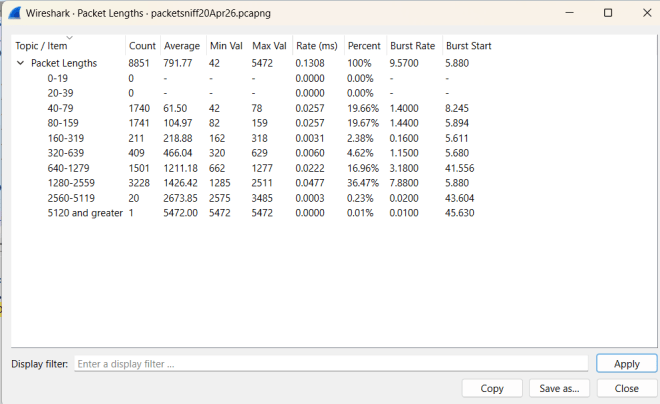
The first statistic I’ll analyze is packet length, which represents the byte-size (hey like my tagline) of each packet being transmitted in the PCAP. To analyze the packet length, go to Statistics->Packet Lengths and you should see a popup that looks like this:

In this table, you can see the frequency distribution of certain packet length ranges (0-19, 20-39 etc.). What can we take away from this table?

  • There are 8,851 total packets recorded in this PCAP.
  • The average packet length in this PCAP is 791.77 bytes.
  • The smallest packet in this PCAP is just 42 bytes while the largest packet in this PCAP is 5,472 bytes.
  • Most of the packets fall between 1,280 and 2,559 bytes (roughly 37% of all the packets).
  • The transfer rate of packet shows the average amount of packets that are transferred within a specific packet-byte range (the 40-79 and 80-159 packet-byte ranges have the highest average packet-transfer-per-millisecond rate at 0.0257 packets-per-millisecond)
  • The percent shows how many packets fall in a specific packet-byte range; as I mentioned earlier, roughly 37% (or 36.47% to be more specific) of the packets to be fall in the 1280-2259 byte range.
  • The burst rate is the ratio of the total number of packets transferred during a specific time interval (usually 5-milliseconds by default) to the number of intervals across a specific time window (usually 100-milliseconds by default).
  • The burst start is the amount of time (in seconds) from the beginning of the packet transfer to the time the packet burst occurs. It’s certainly worth noting that the highest packet-byte range (packets with at least 5120 bytes) has the slowest burst start (45.63 seconds)
  • Packet bursts occur when a lot of packets are transmitted over a short time period (or when the packets “burst” through the three-way handshake process over that short time period). Knowing about packet bursts helps detect things like high traffic over a network at a given time.

HTTP statistics

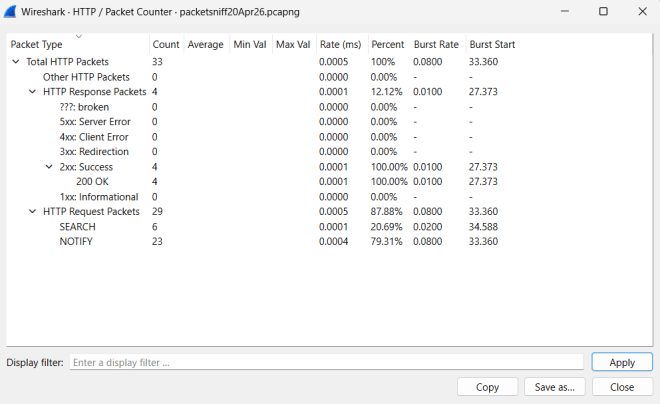
Another piece of juicy PCAP statistics I want to analyze are the HTTP statistics for a particular PCAP. To obtain this data, go to Statistics–>HTTP–>Packet Counter and you should see this popup:

Just like the previous data we analyzed, this data has most of the same features (burst rate, precent, etc.) with one notable difference-this data is breaking down packets by whether they were HTTP response or HTTP request packets along with further breaking down the HTTP response packets by response status and the HTTP request packets by request type. This data also only focuses on the HTTP packets captured, of which there were only 33 (of the 8,851 total packets).

What can we learn from this data?

  • Of the 33 total HTTP packets in this PCAP, only 4 were HTTP response and all of them indicated a successful response from the server (as shown by their 200 OK response status).
  • The majority of the HTTP packets in this PCAP (29) were HTTP request packets-6 of which sent out HTTP SEARCH requests to the server and the other 23 of which sent out HTTP NOTIFY requests to the server.
  • The HTTP response packets’ burst starts were roughly 6-7 seconds faster than the HTTP request packets’ burst starts. Perhaps in this case the response from the server is retrieved a little faster than the request is sent to the server.

Saving the data

Last but not least, let’s save the data!

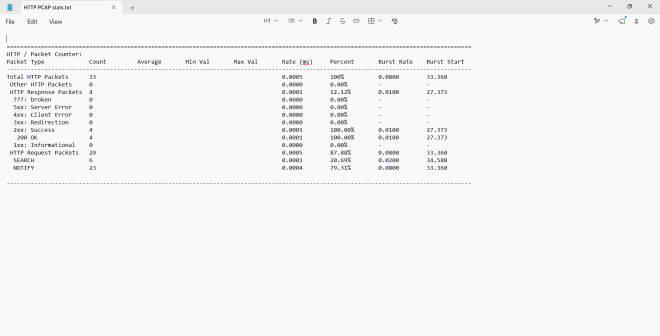
In the popup window, click Save as and follow the directions the interface gives you to save the data to your device. The default file format is TXT and I’ll admit Notepad does do a good job of presenting the data nicely.

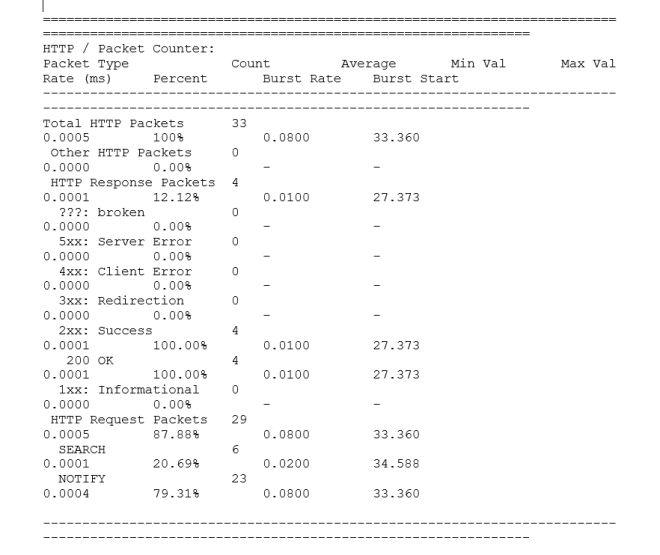
Oddly enough, trying to open the data file with another application like Microsoft Word doesn’t always ensure a polished-looking report:

Thanks for reading!

Michael

A MITRE 8 Years

Hello readers,

Michael here, and as you might’ve figured out from this post’s title, this is the yearly blog-a-versary post! Yes, Michael’s Programming Bytes is officially 8 years (and 204 posts) young!

Now, what juicy topic shall we be exploring for the 8th blog-a-versary? Well, since I’ve done a lot of cybersecurity content in 2026, let’s continue that trend by exploring a pretty useful cyber topic-the MITRE database. Yes, it’s more of a knowledge base than a cool hands-on activity, but I think it’s worth diving into!

What is this MITRE ATT&CK?

MITRE ATT&CK is essentially a giant continually-updated database of information on many common (and even some lesser-known) cyberattacks gathered from information on cybercriminals’ known adversarial behaviors. After all, the ATT&CK (there’s an ampersand for a reason) in MITRE ATT&CK stand for Adversarial Tactics, Techniques & Common Knowledge, which makes sense as the information in the MITRE ATT&CK database is based off of, well, cybercriminals’ knowns adversarial tactics, techniques, and common knowledge. The MITRE refers to the database’s creator-the MITRE corporation-which is an American non-profit based in both Bedford, Massachusetts and McLean, Virginia that manages various federally funded research and development centers that support various US government agencies such as the Department of Defense (DoD) and the Federal Aviation Administration (FAA).

Now, what about this MITRE ATT&CK database?

Where can we find this MITRE ATT&CK database? Here’s the link to access it-https://attack.mitre.org/. Once you click the link, here’s what the landing page looks like (as of this writing in June 2026):

As you can see, there’s a lot of juicy information in this free-to-access database, but I think the most important thing to focus on is the ATT&CK Matrix on the bottom half of the image.

  • Sorry to disappoint some eager readers, but I won’t be at the 2026 ATT&CKcon 7.0, but if this conference interests you, you should definitely learn more about it!

The matrix below is divided into 14 different categories of cybercriminal tactics, which include:

  • Reconnaissance-the cybercriminal is gathering their information about the target
  • Resource Development-the cybercriminal is gathering their resources to support their attack
  • Initial Access-the cybercriminal is trying to access your network
  • Execution-the cybercriminal is running the malicious code
  • Persistence-the cybercriminal has accessed your network and is trying to do whatever they can to keep that access
  • Privilege Escalation-the cybercriminal is trying to gain higher-level access to your network
  • Stealth-the cybercriminal is trying to make their actions appear normal
  • Defense Impairment-the cybercriminal is trying to dismantle the target’s security mechanisms so network defenders can’t see what’s happening
  • Credential Access-the cybercriminal is trying to steal usernames and passwords
  • Discovery-the cybercriminal is trying to figure out the ins and outs of your network environment
  • Lateral Movement-the cybercriminal is trying to work their way through your network environment
  • Collection-the cybercriminal is trying to gather all the data they can about their target to support their attack
  • Command and Control-the cybercriminal is trying to control compromised systems by communicating with them
  • Exfiltration-the cybercriminal is trying to steal data
  • Impact-the cybercriminal is trying to manipulate, interrupt and/or destroy your systems/data

Let’s explore attacker techniques

Now that we know the basic type of tactics cybercriminals can use in their exploits, let’s explore some techniques within those tactics.

To find the names of individual techniques for each attack tactic, either click on one of the 14 blue tactic category headers or simply look at the column below a certain tactic name to see all possible subtechniques.

As you can see, there are plenty of techniques for each tactic! But wait, some of these techniques also have a gray pause sign like icon right by them, which indicates that those particular techniques have their own sub-techniques. The number in parentheses right by some of the techniques indicates how many sub-techniques that technique encompasses. For instance, the reconnaissance technique Active Scanning has 3 different sub-techniques.

I want to learn more about the technique!

Perfect! Let’s explore a technique with some sub-techniques:

The Command and Scripting Interpreter technique, under the Execution tactic, has 13 different sub-techniques and involves the cybercriminal utilizing (and abusing) command-line and script interpreters (like IDEs such as Anaconda for Python) to conduct their attacks.

The 13 sub-techniques of the Command and Scripting Interpreter technique that are recognized by MITRE mainly include the command-line and scripting tools that cybercriminals use for their attacks, such as PowerShell (which is a command-line language) and Python (a favorite language of this blog’s 8-year run).

  • It’s certainly worth noting that all of these techniques and sub-techniques have their own distinct IDs. The ID of the Command and Scripting Interpreter technique is T1059 while the respective sub-technique IDs are T1059.001 to T1059.013.

I want to learn more about the sub-technique!

Now that we know how to research MITRE ATT&CK techniques and sub-techniques, let’s learn more about a specific sub-technique. In honor of this blog’s 8th launch anniversary-and the favorite programming language of this blog-let’s explore the Python sub-technique:

Under the Python sub-technique (or any MITRE ATT&CK sub-technique for that matter) you can find several procedures-or methods-on how cybercriminals would use Python to carry out attacks. Yes, there are several oddly-named methods such as Bronze Butler and Cinnamon Tempest. I mean, Cinnamon Tempest sounds more like a sugary breakfast cereal than a cyberattack technique.

What is Cinnamon Tempest, exactly?

As it turns out, Cinnamon Tempest is a China-based cybercriminal group that has been active since 2021. What else can we find out about them?

How about some associated group descriptions?

These three associated group descriptions-DEV-0401, Emperor Dragonfly, and BRONZE STARLIGHT-are simply aliases of the Cinnamon Tempest group.

  • Apparently Cinnamon Tempest was the name given to the group by Microsoft, who has a whole weather-based taxonomy for naming threat actor groups. Here’s the documentation that explains Microsoft’s unique threat actor naming system-https://learn.microsoft.com/en-us/unified-secops/microsoft-threat-actor-naming. The name tempest comes from the fact that, according to the Microsoft naming system, the group’s attacks are often financially motivated.
  • I also learned that a tempest refers to a violent, windy storm (I don’t think I’ve heard anyone I know use the word tempest to describe stormy weather, but I guess you learn something new everyday).

Now let’s discover some of Cinnamon Tempest’s most commonly used techniques:

It appears Cinnamon Tempest has a lot of tricks up their sleeve when it comes to executing cyberattacks. For instance, Cinnamon Tempest seems to favor using the PowerShell, Windows Command Shell and Python command/scripting interpreters to carry out their attacks.

Now, what software would Cinnamon Tempest use to carry out their attacks? Let’s take a look!

It appears that Cinnamon Tempest uses quite a few pieces of software to carry out their attacks. Let’s dive into one of these tools!

Unsurprisingly, a financially-motivated threat actor group would be developing ransomware like this.

  • Babuk is what’s known as RaaS (or ransomware-as-a-service). Babuk has been active since at least 2021 and its operators run a “leak site” to post stolen data from their exploits.
  • Software-as-a-service (or SaaS) is a software business model that lets people use software online without needing to install it on their devices. Common examples of SaaS that you’ve likely used are Google Drive, Dropbox and Microsoft Teams.
  • Ransomware-as-a-service (or RaaS) is a business model that’s basically the illicit version of SaaS, as RaaS lets cybercriminals pay for premade ransomware that they can use in their attacks. RaaS allows even cybercriminals who don’t know who to write powerful ransomware to execute their attacks quickly and easily.

Now that we’ve gone done the MITRE ATT&CK rabbit hole when it comes to attack techniques, let’s explore ways business and individuals can protect themselves from such attacks.

MITRE…DEF&ENSE?

Another area I wanted to explore in the MITRE ATT&CK database is cyber defense strategies, which can take the form of mitigations, assets, and detection strategies. To find out more about these cyber defense strategies, hover over the Defenses button and click on which type of cyber defense strategy you’d like to know more about.

MITRE…MIT&IGA&TIONS?

First, let’s explore mitigations, which encompass both the technological tools and concepts you can use to prevent a successful cyberattack.

Two of my personal favorite mitigations-and ones that are quite easy for businesses to implement-are multi-factor authentication and password policies. Multi-factor authentication simply involves using multiple means to access a specific account (like your bank accounts). With multi-factor authentication, even if a cybercriminal knows one way to get into your account (like your password), they can’t successfully hack into that account if they don’t have another way to get into the account (authentication codes sent by email/phone are a quite common second factor of authentication).

Password policies are also a great way to help reduce the likelihood of cyberattacks and they’re quite easy for businesses to implement. Some examples of good password policies include:

  • Don’t use your previous X amount of passwords (let’s say previous 10 passwords)
  • Rules on how many numbers/letters/special characters you need to use for the password
  • Having users change their password every 30-60 days

MITRE…ASS&ETS

Next, let’s explore assets-the tools business and individuals can use to reduce the likelihood of successful cyberattacks:

Firewalls are a great and commonly used asset by businesses to help prevent cyberattacks as they allow the business to establish control over their network traffic and block any suspicious traffic as they see fit.

MITRE…DET&ECT&IONS

Last but not least, let’s explore some cyberattack detection strategies!

As you can see, there are 918 total detection strategies as of June 2026!

Abuse of domain accounts is one such detection strategy, and it involves suspicious login behavior either from multiple devices at once, consistent login during a user’s non-working hours, or login from multiple distant locations simultaneously (this is referred to as impossible travel).

Impossible travel is one such well-known suspicious login behavior which involves a user appearing to login from multiple distant locations in such a short timespan that would make travel between these locations impossible. For instance, I’m writing the blog from a device in Nashville, Tennessee in the United States. If I also appear to log in to my WordPress blog account from, let’s say San Francisco, California 15 minutes after I log into my WordPress account from Nashville, Tennessee, then that would be quite suspicious as well as a form of impossible travel. After all, when I flew from Nashville to San Francisco, that took over four hours…by plane. Unless I was Doctor Strange trying to open portals left and right, then you can safely assume that’s suspicious behavior on “my” (or some cybercriminal’s) part.

Thank you readers!

Since this is the 8th anniversary of the launch of my little tech writing endeavor, I want to say thank you for following along throughout the years and the topics I’ve covered. This blog started out as a small data analytics job to help me establish a post-college coding portfolio and now has evolved to dive into topics like AI, natural language processing, predictive analytics, and web development, among other fun concepts. Plus, I can’t deny that this blog still makes for a great portfolio of my technical knowledge-an even more impressive portfolio than what I had at the time of this blog’s first anniversary in 2019.

Hopefully you learned something along the way, and keep calm and code on! Or, in the age of AI, keep calm and prompt on! Or, given my focus on cybersecurity content in 2026, keep calm and…mitigate on? Whatever the message, thank you once again for your support of this little endeavor that I began on June 13, 2018. Onto year 9!

What To Look Out For In Wireshark

Hello everyone,

Michael here, and in today’s post, we’ll continue exploring Wireshark by discussing errors, anomalies, and other juicy things to look out for during the packet transmission process.

To start, we’re going to keep using the packet capture I generated on April 20 for reference!

Where can I find a good PCAP analysis?

Now, how do we find some of those pesky packets in the PCAP analysis? Let’s use a feature called the Expert Information, which is Wireshark’s tool for automatic analysis of the PCAP file. To open up the Expert Information tool, click on Analyze–>Expert Information on the ribbon at the top of the window:

Once you click on Expert Information, you should see something like this:

The information will come color-coded in four possible colors:

  • Red (indicating errors like malformed packets)
  • Yellow (indicating warnings like connection resets)
  • Cyan (indicating notable events like a duplicate ACK-these are nothing to worry about)
  • Blue (indicating purely informational updates like connection establishment and completion)

In this PCAP, there are no red bits of information, so that means there were no errors detected in this PCAP. There are yellow, cyan and blue bits of information-the yellow sections are especially worth analyzing.

Warnings in Wireshark

In this PCAP, there are eight notable warnings, each with their own group, protocol and count (which counts how many times the warning occurred in the PCAP file).

The warning that occurred the most is Failed to decrypt handshake with a count of 125, which means that there was a failure to decrypt the three-way handshake 125 times in the PCAP. Granted, the PCAP has 8,851 frames in total, so a 1.41% decryption failure rate might not seem like much here, but I think it’s worth exploring:

To see exactly where in the PCAP the warning occurred, click on the chevron icon to the left of the word Warning (you can do this to see packet information for Error, Note and Chat sections too). Once you do so, you’ll see all the frames in the PCAP where the warning occurred along with a summary of what happened on that specific frame. You can also click on any of these rows to jump to that specific frame in the PCAP file (here’s my PCAP after jumping to frame 5646):

The description for the warning on frame 5646 is a protected payload. What could that mean? Let’s see more information on this frame to find out:

Just for context, let’s explain the QUIC protocol. The QUIC (Quick UDP Internet Connection) protocol is an Internet connection protocol established by Google that uses UDP rather than TCP, making for faster connections. UDP stands for User Datagram Protocol which is another type of Internet connection protocol that is faster than the standard TCP (Transmission Control Protocol) because UDP doesn’t go through the three-way handshake process when transmitting data from point A to point B (which also means there’s no guarantee of data transfer reliability with UDP).

With all that explained, what could be going on with this particular frame? This frame contains a protected payload that couldn’t be decrypted due to the fact that the special session cryptographic keys aren’t available (and I could do another deep dive on session keys later) and because of that, Wireshark couldn’t read the encrypted traffic.

Now let’s explore another notable event from the Expert Information panel-the Duplicate ACK (not a warning, but rather a note):

In this PCAP, there were 4 occurrences of a duplicate ACK (acknowledgement) during the three-way handshake process. What does this mean?

A duplicate ACK (acknowledgement) is a mechanism during the three-way handshake process where the server acknowledges that it received a data packet out-of-order.

Let’s illustrate this:

Let’s say there are 5 packets waiting to be sent to the server (1, 2, 3, 4, 5). For some reason packet 3 gets lost in transmission but packets 4 and 5 arrive just fine. Even though the sever gets packets 4 and 5 just fine, it will acknowledge the last successfully received packet number (in this case packet 2) over and over-duplicate ACKing that packet in other words-until the missing packet (packet 3) is received.

Assuming there are three consecutive duplicate ACKs for the same last received packet, the client will assume the packet has been lost and immediately retransmit the missing packet without waiting for any retransmission timer. This is an important part of data recovery during the three-way handshake.

Thanks for reading,

Michael!

The Three-Way Handshake In Action On Wireshark

Hello everyone,

Michael here, and in today’s post, we’ll explore how the three-way handshake can be seen on a Wireshark PCAP (packet capture) file!

If you want a basic intro to the three-way handshake, check out the post The Three-Way Handshake. For this post, I plan to use the PCAP I generated from the previous post Welcome to Wireshark.

Finding That SYN, ACK, SYN-ACK

Now, how exactly would we try to find the three-way handshake in our PCAP file? Take a look at the query space above all the captured traffic:

This input field above all the captured traffic is where you would run any packet capture filter query you want using Wireshark querying syntax (not sure if there’s a more formal name for this).

First thing’s first, let’s find the SYN!

Checking for the SYN

Now, how can we find all SYNs in this PCAP file? Here’s the Wireshark query to use: tcp.flags.syn == 1 && tcp.flags.ack == 0. Here’s what this query yields in the PCAP file:

As you can see, there are quite a few tasty SYNs getting ready to start their connections! Let’s analyze one of these SYNs-the 111th frame (the line numbers are referred to as frames in a packet capture).

Take a good look at the stuff on the bottom-left pane of the screen (where the arrow is pointing). There’s a whole lot of juicy information that can be found on these four sections! Let’s analyze some of this juicy information as it relates to frame 111:

Here are some particularly juicy bits of information from frame 111:

  • The Arrival Time, which is the timestamp that represents when exactly the packet was captured by Wireshark (April 20, 2026 at 11:54AM US Central time-I’m impressed that Wireshark gets the PCAP stuff right down to the time-zone on my local device).
  • Not only does Wireshark capture the packet’s arrival time according to my local device, it also captures arrival time in both UTC (Universal Coordinated Time) and epoch arrival time. Epoch time, in this case, represents the timestamp in seconds that have passed since epoch time (which in computer-speak, is midnight UTC on January 1, 1970).
  • The Time delta from previous captured frame, Time delta from previous displayed frame and Time since reference or first frame features are quite interesting to me. In any given Wireshark frame, these features represent how much time has passed since the previous captured frame (frame 110 in this case), how much time has passed since the previous displayed frame (frame 109 in this case), and how much time has passed since the first/reference frame (frame 1). As you can see from the picture above, these three numbers are relatively small-in fact, there were only 2/10,000ths of a second between frames 110 and 111. Pretty neat right!

One more thing I thought was worth acknowledging here-notice the 18402 -> 53 right before the SYN. This represents the fact that in frame 111, transmission is occurring from port 18402 to port 53. The request is coming from port 18402 and is being received by port 53.

Time for a tasty SYN-ACK!

Now that we’ve found our SYN, it’s time to find the tasty SYN-ACK! Here’s the filter query to use: tcp.flags.syn == 1 && tcp.flags.ack == 1.

Since we’re analyzing a three-way handshake starting from frame 111, in this example, frames 112-114 will be the SYN-ACK part of the handshake; in other words, this is the part where the server tries to communicate with the client.

At least in this example, it appears that the SYN-ACK part lasted three frames when it usually only takes a single frame to SYN-ACK. This appears to be a case where the server couldn’t successfully communicate with the client the first time, so a TCP retransmission is needed to successfully communicate with the client (the server seems to successfully communicate with the client on the third try).

Why did the SYN-ACK not work the first time in this example? It could be a number of reasons, such as a slow network connection or packet loss during the SYN-ACK.

Let’s ACK the request!

Last but not least, let’s ACK (acknowledge) the request! Here’s the filter query to use to find the ACK: tcp.flags.syn == 0 && tcp.flags.ack == 1

In our example, since frame 111 was the SYN, frames 112-114 were the SYN-ACK, frame 115 will be the ACK, indicating that the client successfully acknowledged the server’s request.

Thanks for reading, and I can’t wait to discover more Wireshark capabilities!

Michael

Welcome to Wireshark

Hello everyone,

Michael here, and in today’s post, we’re going to introduce a very special cybersecurity tool called Wireshark, which will give us a hands-on experience with the three-way handshake concept discussed in The Three-Way Handshake.

What is Wireshark?

Wireshark is a fascinating open-source cybersecurity tool that was launched in 1998 and is used to analyze network traffic and troubleshoot network issues through network packet analysis.

Here’s the link to download Wireshark-https://www.wireshark.org/download.html. Install the version that would work best with your OS-I work on a Windows laptop, so I’d install one of the Wireshark Windows versions.

  • As you would with any other software download, please follow the installation instructions to configure Wireshark to your preferences.

A little note before we begin!

This post is purely for educational purposes only! If you want to analyze network traffic, only do so over your own network-trying to packet-sniff (yes that’s the term for the Wireshark stuff) network traffic on other people’s or organization’s servers could land you in much hot water with the law.

If you can operate Wireshark (and other tools) inside a virtual machine, that’s even better!

Getting Started With Wireshark

Once you’ve installed Wireshark, let’s open it up to take a look at the interface:

Pretty sleek interface if I do say so myself!

It’s packet capture time!

Once we’ve opened up the interface, the next step would be to start capturing those packets! How can we do so?

First of all, you likely saw a section for packet capture filters (such as IPv4 only and IPv6 only) that can be used during the packet capture process. Do you need to use these filters?

  • If you just want to familiarize yourself with Wireshark’s packet capture process or plan to filter out your captured network traffic later, then I say you don’t need to use any packet capture filters.
  • If you want to monitor traffic on a particularly busy network or know that you only want to analyze specific traffic (e.g. traffic coming in/out of a certain IP)

To use a capture filter, select one from the dropdown that states Enter a capture filter. Otherwise, if you want to start an unfiltered packet capture, select Wi-Fi under the Capture section and click on this blue shark fin icon (the one I circled in red):

Watching the packets go by…

Once you’ve started the capture, this is what the interface will look like:

While you are surfing the internet, this interface will keep running and capturing packets until you click the red square right next to the shark fin icon-doing so will stop the packet capture. Click File–>Save to save the packet capture-the extension for Wireshark packet captures is .pcapng.

Thanks for reading!

Michael

200 (Posts) OK

Hello everyone,

Hard to believe it, but I have officially hit the 200-post mark on this blog! Crazy, right-I mean, 2018 doesn’t feel that far off?

Now, I know I mentioned in the last post that I had something special planned for post #200 so let’s see what we’ve got!

In honor of post #200, let’s use the Python requests library to send an HTTP request to this very blog:

import requests
response = requests.get('https://michaelsprogrammingbytes.com/')
response.status_code
200

Well, what do you know, it’s a 200 response, OK?

Let’s visit my blog’s GitHub repo while we’re at it:

import requests
response = requests.get('https://github.com/mfletcher2021/blogcode')
response.status_code
200

It appears my blog’s GitHub repo is also keeping it 200, OK?

How about we go back to June 13, 2018-the day this blog launched into the World Wide Web:

import requests
response = requests.get('https://michaelsprogrammingbytes.com/welcome/')
response.status_code
200

Even from post #1, this blog keeps it 200, OK!

Last but not least, let’s go send an HTTP request to my blog’s Medium home:

import requests
response = requests.get('https://medium.com/@michael71314')
response.status_code
403

Apparently, unlike the other three requests, my Medium page keeps it 403, Forbidden. Not cool Medium, not cool.

In case you didn’t figure it out from the date this post is released, I have one thing to say…

…HAPPY APRIL FOOL’S DAY

  • P.S.-Don’t worry, I’ll continue the milestone celebration with an actual big celebratory post-it’ll just be my 201st post! I just thought I could have a little fun with this post being both the annual April Fool’s Day post AND 200th overall post. As always, thanks for reading!

The Three-Way Handshake

Hello everyone,

Michael here, and to continue our cybersecurity explorations, let’s explore a common concept in cybersecurity-the three-way handshake (and don’t worry, I’ll certainly build upon this concept in subsequent posts)!

What is this three-way handshake?

The three-way handshake is a good cybersecurity concept to understand as it’s the central process to understand how data is transferred between devices on a network. The three-way handshake runs on the TCP, or transmission control protocol, which is the protocol used to ensure data can reliably be transferred between applications on an IP network.

Fair enough, but how does this three-way handshake work?

Now that we’ve explained the basics of the three-way handshake, let’s explore how it actually works:

Let’s explore what goes on during a three-way handshake:

  • First, the client tries to connect or SYN (synchronize) with the server by sending a segment with a SYN (synchronize sequence number-more on that later) to the server which lets the server know that the client wants to establish a connection.
  • Next comes the SYN-ACK (acknowledgement), where the server acknowledges the client’s request with its own synchronize sequence number along with an acknowledgement number (which is SYN number + 1)
  • Finally, the client acknowledges the server’s request by sending the acknowledgement number from the SYN-ACK step back to the server to establish a connection to begin the data transfer.

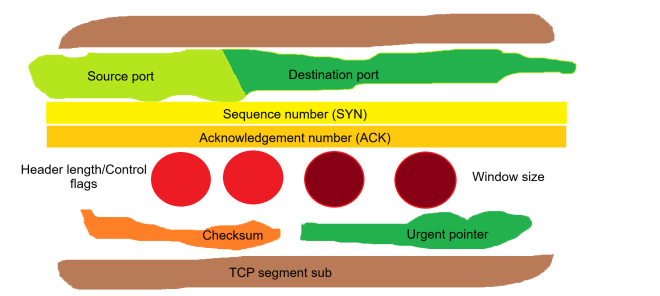
What exactly goes into a TCP segment?

The data that works its way through the three-way handshake takes the form of a TCP segment. What do TCP segments look like?

Using the (admittedly cheesy) analogy of a meatball sub, let’s see what a TCP segment is made of:

  • Source port/destination port (lettuce)-The ports that are used to send and receive applications, respectively
  • Sequence number (yellow cheese)-The synchronize sequence number sent out by the client to initiate a connection with the server
  • Acknowledgement number (orange cheese)-The acknowledgement number sent out by the server that confirms that the server received the data
  • Header length (bright red meatballs)-Specifies the length of the TCP header; the header contains all the information needed for successful data transfer, so by extension, the header encompasses all the information in the TCP segment.
  • Control flags (also bright red meatballs)-There are six TCP control flags to know:
    • SYN (synchronize)-used by the client to initialize a connection with the server
    • ACK (acknowledge)-used by the server to acknowledge that the data was successfully received from the client
    • FIN (finish)-used to indicate that the connection has completed and there is no more data to be transferred
    • RST (reset)-used to indicate that the connection has been terminated due to invalid or unrecoverable data
    • PSH (push)-tells the host to immediately push the data to the server without waiting for any additional data buffering on the client’s side
    • URG (urgent)-tells the server that the data being transferred is urgent and should be handled promptly
  • Window size (dark red meatballs)-this specifies the size of the server’s receiving window to the client; in other words, the window size tells the client exactly how much data the server can handle
  • Checksum (orange bell pepper)-this is a mechanism used to ensure data integrity and detect any possible data corruption during data transfer; checksums are 16-bit values used by both the client and server. If the checksum isn’t the same between the client and server, the data is discarded and a retransmission is requested.
  • Urgent pointer (green bell pepper)-this field points to the location of any urgent data in the TCP segment and is only used if the URG flag is set

Thanks for reading,

Michael

IPs, Python style pt.2

Hello everyone,

Michael here, and in this post, we’ll continue our exploration of IP addresses using Python’s IP address module!

IP address comparisons

Just as with numbers in Python, you can compare IP address objects in Python too. Here’s how to do it:

import ipaddress
ip1 = ipaddress.ip_address('192.168.1.1')
ip2 = ipaddress.ip_address('192.168.2.1')
ip3 = ipaddress.ip_address('192.168.3.1')
ip4 = ipaddress.ip_address('192.168.1.2')
ip5 = ipaddress.ip_address('192.168.1.3')
print(ip1 < ip2)
print(ip3 > ip2)
print(ip1 < ip4)
print(ip5 > ip4)
True
True
True
True

In this example, we have 5 different IP addresses and ran 4 different comparison operations to see how IP addresses compare to each other. All four of the statements tested returned true, which leads us to conclude:

  • When the first two octets of the IP address stayed the same (192.168), if the third octet of one IP address is greater than another (for instance with ip1 and ip2), then the IP address with the higher third octet (ip2) is “greater than” the IP address with the lower octet (ip1).
  • Similar logic applies to comparing the fourth octet of each IP address. Assuming the first three octets are the same, the fourth octet is then analyzed. In the case of ip5 and ip4, which have the same first three octets, ip5 would be greater than ip4 as the fourth octet of ip5 is “greater than” the fourth octet of ip4.

IP arithmetic

Comparing IP addresses isn’t the only neat thing we can do with the IP address module-in fact, let’s explore another fascinating application of the Python ipaddress module with some IP arithmetic:

print(ipaddress.IPv4Address(u'175.122.13.23') + 18)
print(ipaddress.IPv4Address(u'144.123.100.12') - 15)
print(ipaddress.IPv4Address(u'255.255.255.255') + 1)
print(ipaddress.IPv4Address(u'0.0.0.0') - 1)
175.122.13.41
144.123.99.253
AddressValueError: 4294967296 (>= 2**32) is not permitted as an IPv4 address
AddressValueError: -1 (< 0) is not permitted as an IPv4 address

In this example, we performed basic arithmetic operations on four different IPv4 addresses and while two of them managed to work just fine, the last two operations threw out an AddressValueError exception. Why might that be?

Well, the highest possible IPv4 address is 255.255.255.255. Trying to add even one more bit to this address gave us the AddressValueError exception simply because 255.255.255.255 is the highest possible IPv4 address and thus cannot have anymore bits added to it. Likewise, trying to deduct a bit from 0.0.0.0 also gave us the AddressValueError, as 0.0.0.0 is the lowest possible IPv4 address and trying to deduct a bit isn’t possible.

As for the two successful IPv4 address operations, the first one is quite simple as it simply involves adding 18 bits to the last octet to get 175.122.13.41. The second one on the other hand is a bit more challenging since you can’t have negative bits in an octet (12-15=-3). What would happen then? The previous octet would then be decremented.

Still a little confused? Take the last two octets of the second IP address-100.12-and basically decrement by 15. Decrementing by 12 would give us 100.0 while decrementing by 3 more would give us 99.253 (the first two octets remain unchanged). Since the last octet can’t be less than 0, the “counter” would then go back to 255 for the fourth octet and decrement from there.

Sorting IPs

The last ipaddress module capability I wanted to discuss here is how to sort a list of IPs. Let’s see how we can make that happen:

listOfIPs = ['0.0.0.0', '12.15.33.19', '12.15.34.19', '182.105.99.84', '182.106.100.85', '255.255.255.255']
sorted([ipaddress.ip_address(address) for address in listOfIPs])
[IPv4Address('0.0.0.0'),
IPv4Address('12.15.33.19'),
IPv4Address('12.15.34.19'),
IPv4Address('182.105.99.84'),
IPv4Address('182.106.100.85'),
IPv4Address('255.255.255.255')]

It’s quite simple to sort a list of IP addresses. First, let’s assume we have a list of six IPv4 addresses stored as strings in our listOfIPs. How can we sort this list of IPs if all the IPs are stored as strings?

List comprehension to the rescue! By converting each IP-stored-as-a-string to an actual IP address and sorting the list through the sorted() method, you’ll get a nice sorted list of IP addresses?

How does the code know how to perfectly sort these IP addresses? When it comes to sorting IP addresses, 0.0.0.0 and 255.255.255.255 are the lowest and highest possible IPv4 addresses, respectively. The other four IP addresses in between are sorted by the value of their octets in either right-to-left or left-to-right order, depending on the values of each IP address’s octets. In other words, 12.15.34.19 is greater than 12.15.33.19 because even though both IP addresses share the same fourth octet, the third octet of 12.15.34.19 (34) is greater than the third octet of 12.15.33.19 (33).

Similar logic applies to the IP addresses 182.105.99.84 and 182.106.100.85 because even though the first octet of both IP addresses is the same, the other three octets of 182.106.100.85 are still greater than the other three octets of 182.105.99.84.

Here’s the link to today’s code in GitHub-https://github.com/mfletcher2021/blogcode/blob/main/IP_addresses_pt_2.ipynb

Thanks for reading,

Michael

IPs, Python style pt. 1

Hello everybody,

Welcome back, and I hope you all had a wonderfully festive holiday season! I’m definitely ready to share some juicy programming content with you all in 2026-which will include the milestone 200th post!

To start off my 2026 slate of content, let’s explore IP addresses, Python style. More specifically, let’s explore some of the capabilities of Python’s ipaddress module!

Let’s get stuff started!

Before we dive in to all the fun Python IP address stuff, let’s first get ourselves set up on the IDE.

First things first, let’s pip install ipaddress (this will be the only module we’ll need for this lesson):

!pip install ipaddress

What kind of IP address are we looking at?

Once we’ve installed the ipaddress module, let’s explore its capabilities. First off, let’s see how IP address objects are created:

import ipaddress
ipaddress.ip_address('192.168.1.1')

IPv4Address('192.168.1.1')

By using the aptly-named ipaddress.ip_address method, you can return either an IPv4Address or IPv6Address object, depending on what you pass into the method.

Let’s try this method with an IPv6 address:

ipaddress.ip_address('2001:db8::1')

IPv6Address('2001:db8::1')

In this example, we pass in the IPv6 address 2001:db8::1 and the ip_address() method returns the IP address as an IPv6Address object.

  • The IPv6 address 2001:db8::1 is IPv6 shorthand for 2001:0db8:0000:0000:0000:0000:0000:0001. IPv6 shorthand tends to leave out any leading 0s in any section of the IP address along with using :: as common shorthand for 0000:0000:0000:0000:0000.

Is this IP address in the network?

Next up, let’s not only create an IP network object but also check if it’s in a network:

#creating the IP network
NETWORK = ipaddress.ip_network('10.0.0.0/16')

#creating IP address object
IPV4 = ipaddress.ip_address('10.1.13.38')

print(IPV4 in NETWORK)

False

From the IP address package, we can create a NETWORK object that represents an IP address network along with an IPv4 address object. For this example, we’ll use the 10.0.0.0 IP network with subnet /16 and check if the IP address 10.1.13.38 is in the network. In this case, the IP address isn’t in the network.

How many IPs are in my network?

Now that we know how to create a network object, let’s see how we can find out all the possible hosts in the IP network we just created:

for host in NETWORK.hosts():
    print(host)

Streaming output truncated to the last 5000 lines.
10.0.236.119
10.0.236.120
10.0.236.121
10.0.236.122
10.0.236.123
10.0.236.124
10.0.236.125
10.0.236.126
10.0.236.127
10.0.236.128
(output truncated for brevity)

It’s quite simple actually. All we need to do is use a standard Python for loop and iterate through the hosts property of the network object we created.

Notice the line at the top of the output-Streaming output truncated to the last 5000 lines. Even though we only see 5000 of the possible IP addresses, there are definitely more. How can we know how many IP addresses are in a network?

So, how many IP addresses are in a network?

How can we find out exactly how many IP addresses are in a given network? Here’s a simple formula to find out:

Yes, this is the formula to find out how many IP addresses can exist on a given network. Simply take 2 to the power of (32-CIDR) to get the answer-CIDR referring to the subnet mask in CIDR notation.

For instance, /16 contains 65,536 possible IP addresses while /24 has room for only 256 possible IP addresses. Also, in case you were wondering, networks with a /1 subnet can be quite massive-leaving room for 2,147,483,648 (roughly 2.1 billion) possible IP addresses. On the other hand, networks with a /31 subnet only leave room for 2 possible IP address. Then again, it’s highly unlikely networks would be so small or so big-subnets between /8 and /24 tend to be the most common.

Here’s the GitHub notebook for this post-https://github.com/mfletcher2021/blogcode/blob/main/IP_addresses.ipynb

Thanks for reading, and be sure to check out my next post where we will explore more uses of Python’s handy ipaddress module. I’m certainly looking forward to all the juicy techie content I have planned for you all in 2026!