Michael here, and in this post, we’ll explore how to gather some juicy web traffic statistics for a Wireshark PCAP using the same PCAP that we used for the previous Wireshark post What To Look Out For In Wireshark.
Let’s begin!
Where can I find the statistics?
On the top ribbon in the PCAP file window, click the Statistics dropdown. In that dropdown menu, you’ll see several options that represent PCAP statistics you can analyze. Granted, I won’t go through all of the possible statistics you can analyze in this post (and there’s a lot you can analyze) but rather explore a few statistics I find most interesting.
Packet length
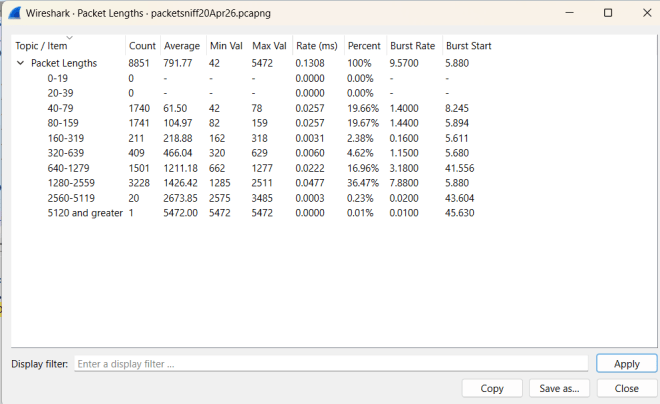
The first statistic I’ll analyze is packet length, which represents the byte-size (hey like my tagline) of each packet being transmitted in the PCAP. To analyze the packet length, go to Statistics->Packet Lengths and you should see a popup that looks like this:
In this table, you can see the frequency distribution of certain packet length ranges (0-19, 20-39 etc.). What can we take away from this table?
There are 8,851 total packets recorded in this PCAP.
The average packet length in this PCAP is 791.77 bytes.
The smallest packet in this PCAP is just 42 bytes while the largest packet in this PCAP is 5,472 bytes.
Most of the packets fall between 1,280 and 2,559 bytes (roughly 37% of all the packets).
The transfer rate of packet shows the average amount of packets that are transferred within a specific packet-byte range (the 40-79 and 80-159 packet-byte ranges have the highest average packet-transfer-per-millisecond rate at 0.0257 packets-per-millisecond)
The percent shows how many packets fall in a specific packet-byte range; as I mentioned earlier, roughly 37% (or 36.47% to be more specific) of the packets to be fall in the 1280-2259 byte range.
The burst rate is the ratio of the total number of packets transferred during a specific time interval (usually 5-milliseconds by default) to the number of intervals across a specific time window (usually 100-milliseconds by default).
The burst start is the amount of time (in seconds) from the beginning of the packet transfer to the time the packet burst occurs. It’s certainly worth noting that the highest packet-byte range (packets with at least 5120 bytes) has the slowest burst start (45.63 seconds)
Packet bursts occur when a lot of packets are transmitted over a short time period (or when the packets “burst” through the three-way handshake process over that short time period). Knowing about packet bursts helps detect things like high traffic over a network at a given time.
HTTP statistics
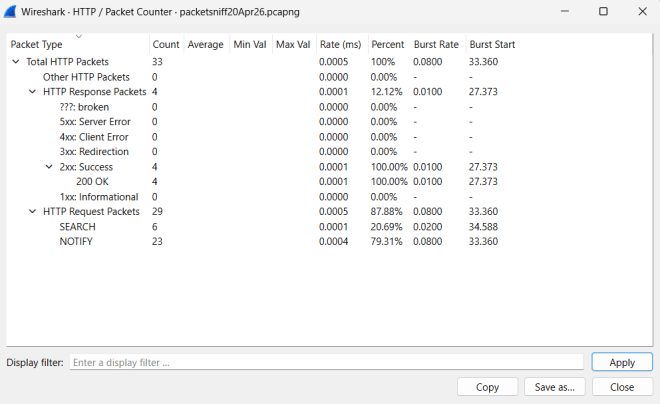
Another piece of juicy PCAP statistics I want to analyze are the HTTP statistics for a particular PCAP. To obtain this data, go to Statistics–>HTTP–>Packet Counter and you should see this popup:
Just like the previous data we analyzed, this data has most of the same features (burst rate, precent, etc.) with one notable difference-this data is breaking down packets by whether they were HTTP response or HTTP request packets along with further breaking down the HTTP response packets by response status and the HTTP request packets by request type. This data also only focuses on the HTTP packets captured, of which there were only 33 (of the 8,851 total packets).
What can we learn from this data?
Of the 33 total HTTP packets in this PCAP, only 4 were HTTP response and all of them indicated a successful response from the server (as shown by their 200 OK response status).
The majority of the HTTP packets in this PCAP (29) were HTTP request packets-6 of which sent out HTTP SEARCH requests to the server and the other 23 of which sent out HTTP NOTIFY requests to the server.
The HTTP response packets’ burst starts were roughly 6-7 seconds faster than the HTTP request packets’ burst starts. Perhaps in this case the response from the server is retrieved a little faster than the request is sent to the server.
Saving the data
Last but not least, let’s save the data!
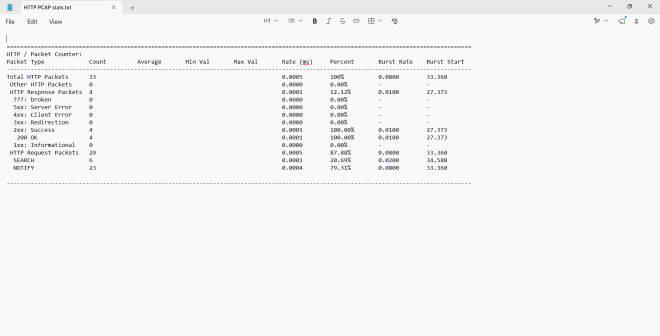
In the popup window, click Save as and follow the directions the interface gives you to save the data to your device. The default file format is TXT and I’ll admit Notepad does do a good job of presenting the data nicely.
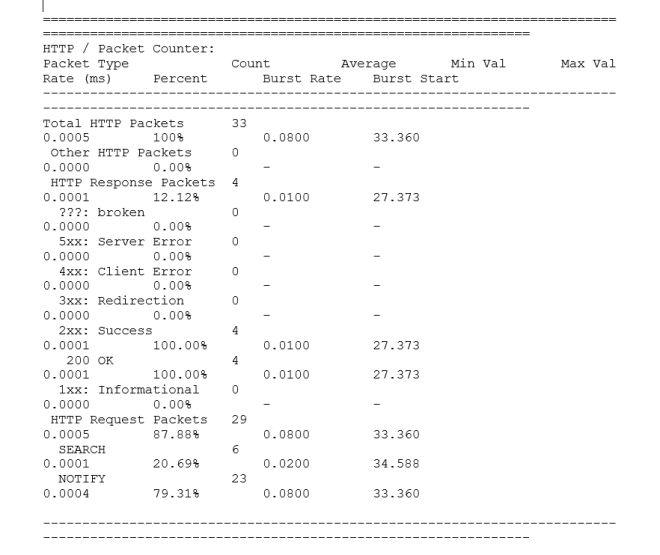
Oddly enough, trying to open the data file with another application like Microsoft Word doesn’t always ensure a polished-looking report:
Michael here, and as you might’ve figured out from this post’s title, this is the yearly blog-a-versary post! Yes, Michael’s Programming Bytes is officially 8 years (and 204 posts) young!
Now, what juicy topic shall we be exploring for the 8th blog-a-versary? Well, since I’ve done a lot of cybersecurity content in 2026, let’s continue that trend by exploring a pretty useful cyber topic-the MITRE database. Yes, it’s more of a knowledge base than a cool hands-on activity, but I think it’s worth diving into!
What is this MITRE ATT&CK?
MITRE ATT&CK is essentially a giant continually-updated database of information on many common (and even some lesser-known) cyberattacks gathered from information on cybercriminals’ known adversarial behaviors. After all, the ATT&CK (there’s an ampersand for a reason) in MITRE ATT&CK stand for Adversarial Tactics, Techniques & Common Knowledge, which makes sense as the information in the MITRE ATT&CK database is based off of, well, cybercriminals’ knowns adversarial tactics, techniques, and common knowledge. The MITRE refers to the database’s creator-the MITRE corporation-which is an American non-profit based in both Bedford, Massachusetts and McLean, Virginia that manages various federally funded research and development centers that support various US government agencies such as the Department of Defense (DoD) and the Federal Aviation Administration (FAA).
Now, what about this MITRE ATT&CK database?
Where can we find this MITRE ATT&CK database? Here’s the link to access it-https://attack.mitre.org/. Once you click the link, here’s what the landing page looks like (as of this writing in June 2026):
As you can see, there’s a lot of juicy information in this free-to-access database, but I think the most important thing to focus on is the ATT&CK Matrix on the bottom half of the image.
Sorry to disappoint some eager readers, but I won’t be at the 2026 ATT&CKcon 7.0, but if this conference interests you, you should definitely learn more about it!
The matrix below is divided into 14 different categories of cybercriminal tactics, which include:
Reconnaissance-the cybercriminal is gathering their information about the target
Resource Development-the cybercriminal is gathering their resources to support their attack
Initial Access-the cybercriminal is trying to access your network
Execution-the cybercriminal is running the malicious code
Persistence-the cybercriminal has accessed your network and is trying to do whatever they can to keep that access
Privilege Escalation-the cybercriminal is trying to gain higher-level access to your network
Stealth-the cybercriminal is trying to make their actions appear normal
Defense Impairment-the cybercriminal is trying to dismantle the target’s security mechanisms so network defenders can’t see what’s happening
Credential Access-the cybercriminal is trying to steal usernames and passwords
Discovery-the cybercriminal is trying to figure out the ins and outs of your network environment
Lateral Movement-the cybercriminal is trying to work their way through your network environment
Collection-the cybercriminal is trying to gather all the data they can about their target to support their attack
Command and Control-the cybercriminal is trying to control compromised systems by communicating with them
Exfiltration-the cybercriminal is trying to steal data
Impact-the cybercriminal is trying to manipulate, interrupt and/or destroy your systems/data
Let’s explore attacker techniques
Now that we know the basic type of tactics cybercriminals can use in their exploits, let’s explore some techniques within those tactics.
To find the names of individual techniques for each attack tactic, either click on one of the 14 blue tactic category headers or simply look at the column below a certain tactic name to see all possible subtechniques.
As you can see, there are plenty of techniques for each tactic! But wait, some of these techniques also have a gray pause sign like icon right by them, which indicates that those particular techniques have their own sub-techniques. The number in parentheses right by some of the techniques indicates how many sub-techniques that technique encompasses. For instance, the reconnaissance technique Active Scanning has 3 different sub-techniques.
I want to learn more about the technique!
Perfect! Let’s explore a technique with some sub-techniques:
The Command and Scripting Interpreter technique, under the Execution tactic, has 13 different sub-techniques and involves the cybercriminal utilizing (and abusing) command-line and script interpreters (like IDEs such as Anaconda for Python) to conduct their attacks.
The 13 sub-techniques of the Command and Scripting Interpreter technique that are recognized by MITRE mainly include the command-line and scripting tools that cybercriminals use for their attacks, such as PowerShell (which is a command-line language) and Python (a favorite language of this blog’s 8-year run).
It’s certainly worth noting that all of these techniques and sub-techniques have their own distinct IDs. The ID of the Command and Scripting Interpreter technique is T1059 while the respective sub-technique IDs are T1059.001 to T1059.013.
I want to learn more about the sub-technique!
Now that we know how to research MITRE ATT&CK techniques and sub-techniques, let’s learn more about a specific sub-technique. In honor of this blog’s 8th launch anniversary-and the favorite programming language of this blog-let’s explore the Python sub-technique:
Under the Python sub-technique (or any MITRE ATT&CK sub-technique for that matter) you can find several procedures-or methods-on how cybercriminals would use Python to carry out attacks. Yes, there are several oddly-named methods such as Bronze Butler and Cinnamon Tempest. I mean, Cinnamon Tempest sounds more like a sugary breakfast cereal than a cyberattack technique.
What is Cinnamon Tempest, exactly?
As it turns out, Cinnamon Tempest is a China-based cybercriminal group that has been active since 2021. What else can we find out about them?
How about some associated group descriptions?
These three associated group descriptions-DEV-0401, Emperor Dragonfly, and BRONZE STARLIGHT-are simply aliases of the Cinnamon Tempest group.
Apparently Cinnamon Tempest was the name given to the group by Microsoft, who has a whole weather-based taxonomy for naming threat actor groups. Here’s the documentation that explains Microsoft’s unique threat actor naming system-https://learn.microsoft.com/en-us/unified-secops/microsoft-threat-actor-naming. The name tempest comes from the fact that, according to the Microsoft naming system, the group’s attacks are often financially motivated.
I also learned that a tempest refers to a violent, windy storm (I don’t think I’ve heard anyone I know use the word tempest to describe stormy weather, but I guess you learn something new everyday).
Now let’s discover some of Cinnamon Tempest’s most commonly used techniques:
It appears Cinnamon Tempest has a lot of tricks up their sleeve when it comes to executing cyberattacks. For instance, Cinnamon Tempest seems to favor using the PowerShell, Windows Command Shell and Python command/scripting interpreters to carry out their attacks.
Now, what software would Cinnamon Tempest use to carry out their attacks? Let’s take a look!
It appears that Cinnamon Tempest uses quite a few pieces of software to carry out their attacks. Let’s dive into one of these tools!
Unsurprisingly, a financially-motivated threat actor group would be developing ransomware like this.
Babuk is what’s known as RaaS (or ransomware-as-a-service). Babuk has been active since at least 2021 and its operators run a “leak site” to post stolen data from their exploits.
Software-as-a-service (or SaaS) is a software business model that lets people use software online without needing to install it on their devices. Common examples of SaaS that you’ve likely used are Google Drive, Dropbox and Microsoft Teams.
Ransomware-as-a-service (or RaaS) is a business model that’s basically the illicit version of SaaS, as RaaS lets cybercriminals pay for premade ransomware that they can use in their attacks. RaaS allows even cybercriminals who don’t know who to write powerful ransomware to execute their attacks quickly and easily.
Now that we’ve gone done the MITRE ATT&CK rabbit hole when it comes to attack techniques, let’s explore ways business and individuals can protect themselves from such attacks.
MITRE…DEF&ENSE?
Another area I wanted to explore in the MITRE ATT&CK database is cyber defense strategies, which can take the form of mitigations, assets, and detection strategies. To find out more about these cyber defense strategies, hover over the Defenses button and click on which type of cyber defense strategy you’d like to know more about.
MITRE…MIT&IGA&TIONS?
First, let’s explore mitigations, which encompass both the technological tools and concepts you can use to prevent a successful cyberattack.
Two of my personal favorite mitigations-and ones that are quite easy for businesses to implement-are multi-factor authentication and password policies. Multi-factor authentication simply involves using multiple means to access a specific account (like your bank accounts). With multi-factor authentication, even if a cybercriminal knows one way to get into your account (like your password), they can’t successfully hack into that account if they don’t have another way to get into the account (authentication codes sent by email/phone are a quite common second factor of authentication).
Password policies are also a great way to help reduce the likelihood of cyberattacks and they’re quite easy for businesses to implement. Some examples of good password policies include:
Don’t use your previous X amount of passwords (let’s say previous 10 passwords)
Rules on how many numbers/letters/special characters you need to use for the password
Having users change their password every 30-60 days
MITRE…ASS&ETS
Next, let’s explore assets-the tools business and individuals can use to reduce the likelihood of successful cyberattacks:
Firewalls are a great and commonly used asset by businesses to help prevent cyberattacks as they allow the business to establish control over their network traffic and block any suspicious traffic as they see fit.
MITRE…DET&ECT&IONS
Last but not least, let’s explore some cyberattack detection strategies!
As you can see, there are 918 total detection strategies as of June 2026!
Abuse of domain accounts is one such detection strategy, and it involves suspicious login behavior either from multiple devices at once, consistent login during a user’s non-working hours, or login from multiple distant locations simultaneously (this is referred to as impossible travel).
Impossible travel is one such well-known suspicious login behavior which involves a user appearing to login from multiple distant locations in such a short timespan that would make travel between these locations impossible. For instance, I’m writing the blog from a device in Nashville, Tennessee in the United States. If I also appear to log in to my WordPress blog account from, let’s say San Francisco, California 15 minutes after I log into my WordPress account from Nashville, Tennessee, then that would be quite suspicious as well as a form of impossible travel. After all, when I flew from Nashville to San Francisco, that took over four hours…by plane. Unless I was Doctor Strange trying to open portals left and right, then you can safely assume that’s suspicious behavior on “my” (or some cybercriminal’s) part.
Thank you readers!
Since this is the 8th anniversary of the launch of my little tech writing endeavor, I want to say thank you for following along throughout the years and the topics I’ve covered. This blog started out as a small data analytics job to help me establish a post-college coding portfolio and now has evolved to dive into topics like AI, natural language processing, predictive analytics, and web development, among other fun concepts. Plus, I can’t deny that this blog still makes for a great portfolio of my technical knowledge-an even more impressive portfolio than what I had at the time of this blog’s first anniversary in 2019.
Hopefully you learned something along the way, and keep calm and code on! Or, in the age of AI, keep calm and prompt on! Or, given my focus on cybersecurity content in 2026, keep calm and…mitigate on? Whatever the message, thank you once again for your support of this little endeavor that I began on June 13, 2018. Onto year 9!
Michael here, and in today’s post, we’ll continue exploring Wireshark by discussing errors, anomalies, and other juicy things to look out for during the packet transmission process.
To start, we’re going to keep using the packet capture I generated on April 20 for reference!
Where can I find a good PCAP analysis?
Now, how do we find some of those pesky packets in the PCAP analysis? Let’s use a feature called the Expert Information, which is Wireshark’s tool for automatic analysis of the PCAP file. To open up the Expert Information tool, click on Analyze–>Expert Information on the ribbon at the top of the window:
Once you click on Expert Information, you should see something like this:
The information will come color-coded in four possible colors:
Red (indicating errors like malformed packets)
Yellow (indicating warnings like connection resets)
Cyan (indicating notable events like a duplicate ACK-these are nothing to worry about)
Blue (indicating purely informational updates like connection establishment and completion)
In this PCAP, there are no red bits of information, so that means there were no errors detected in this PCAP. There are yellow, cyan and blue bits of information-the yellow sections are especially worth analyzing.
Warnings in Wireshark
In this PCAP, there are eight notable warnings, each with their own group, protocol and count (which counts how many times the warning occurred in the PCAP file).
The warning that occurred the most is Failed to decrypt handshake with a count of 125, which means that there was a failure to decrypt the three-way handshake 125 times in the PCAP. Granted, the PCAP has 8,851 frames in total, so a 1.41% decryption failure rate might not seem like much here, but I think it’s worth exploring:
To see exactly where in the PCAP the warning occurred, click on the chevron icon to the left of the word Warning (you can do this to see packet information for Error, Note and Chat sections too). Once you do so, you’ll see all the frames in the PCAP where the warning occurred along with a summary of what happened on that specific frame. You can also click on any of these rows to jump to that specific frame in the PCAP file (here’s my PCAP after jumping to frame 5646):
The description for the warning on frame 5646 is a protected payload. What could that mean? Let’s see more information on this frame to find out:
Just for context, let’s explain the QUIC protocol. The QUIC (Quick UDP Internet Connection) protocol is an Internet connection protocol established by Google that uses UDP rather than TCP, making for faster connections. UDP stands for User Datagram Protocol which is another type of Internet connection protocol that is faster than the standard TCP (Transmission Control Protocol) because UDP doesn’t go through the three-way handshake process when transmitting data from point A to point B (which also means there’s no guarantee of data transfer reliability with UDP).
With all that explained, what could be going on with this particular frame? This frame contains a protected payload that couldn’t be decrypted due to the fact that the special session cryptographic keys aren’t available (and I could do another deep dive on session keys later) and because of that, Wireshark couldn’t read the encrypted traffic.
Now let’s explore another notable event from the Expert Information panel-the Duplicate ACK (not a warning, but rather a note):
In this PCAP, there were 4 occurrences of a duplicate ACK (acknowledgement) during the three-way handshake process. What does this mean?
A duplicate ACK (acknowledgement) is a mechanism during the three-way handshake process where the server acknowledges that it received a data packet out-of-order.
Let’s illustrate this:
Let’s say there are 5 packets waiting to be sent to the server (1, 2, 3, 4, 5). For some reason packet 3 gets lost in transmission but packets 4 and 5 arrive just fine. Even though the sever gets packets 4 and 5 just fine, it will acknowledge the last successfully received packet number (in this case packet 2) over and over-duplicate ACKing that packet in other words-until the missing packet (packet 3) is received.
Assuming there are three consecutive duplicate ACKs for the same last received packet, the client will assume the packet has been lost and immediately retransmit the missing packet without waiting for any retransmission timer. This is an important part of data recovery during the three-way handshake.
Michael here, and in today’s post, we’ll explore how the three-way handshake can be seen on a Wireshark PCAP (packet capture) file!
If you want a basic intro to the three-way handshake, check out the post The Three-Way Handshake. For this post, I plan to use the PCAP I generated from the previous post Welcome to Wireshark.
Finding That SYN, ACK, SYN-ACK
Now, how exactly would we try to find the three-way handshake in our PCAP file? Take a look at the query space above all the captured traffic:
This input field above all the captured traffic is where you would run any packet capture filter query you want using Wireshark querying syntax (not sure if there’s a more formal name for this).
First thing’s first, let’s find the SYN!
Checking for the SYN
Now, how can we find all SYNs in this PCAP file? Here’s the Wireshark query to use: tcp.flags.syn == 1 && tcp.flags.ack == 0. Here’s what this query yields in the PCAP file:
As you can see, there are quite a few tasty SYNs getting ready to start their connections! Let’s analyze one of these SYNs-the 111th frame (the line numbers are referred to as frames in a packet capture).
Take a good look at the stuff on the bottom-left pane of the screen (where the arrow is pointing). There’s a whole lot of juicy information that can be found on these four sections! Let’s analyze some of this juicy information as it relates to frame 111:
Here are some particularly juicy bits of information from frame 111:
The Arrival Time, which is the timestamp that represents when exactly the packet was captured by Wireshark (April 20, 2026 at 11:54AM US Central time-I’m impressed that Wireshark gets the PCAP stuff right down to the time-zone on my local device).
Not only does Wireshark capture the packet’s arrival time according to my local device, it also captures arrival time in both UTC (Universal Coordinated Time) and epoch arrival time. Epoch time, in this case, represents the timestamp in seconds that have passed since epoch time (which in computer-speak, is midnight UTC on January 1, 1970).
The Time delta from previous captured frame, Time delta from previous displayed frame and Time since reference or first frame features are quite interesting to me. In any given Wireshark frame, these features represent how much time has passed since the previous captured frame (frame 110 in this case), how much time has passed since the previous displayed frame (frame 109 in this case), and how much time has passed since the first/reference frame (frame 1). As you can see from the picture above, these three numbers are relatively small-in fact, there were only 2/10,000ths of a second between frames 110 and 111. Pretty neat right!
One more thing I thought was worth acknowledging here-notice the 18402 -> 53 right before the SYN. This represents the fact that in frame 111, transmission is occurring from port 18402 to port 53. The request is coming from port 18402 and is being received by port 53.
Time for a tasty SYN-ACK!
Now that we’ve found our SYN, it’s time to find the tasty SYN-ACK! Here’s the filter query to use: tcp.flags.syn == 1 && tcp.flags.ack == 1.
Since we’re analyzing a three-way handshake starting from frame 111, in this example, frames 112-114 will be the SYN-ACK part of the handshake; in other words, this is the part where the server tries to communicate with the client.
At least in this example, it appears that the SYN-ACK part lasted three frames when it usually only takes a single frame to SYN-ACK. This appears to be a case where the server couldn’t successfully communicate with the client the first time, so a TCP retransmission is needed to successfully communicate with the client (the server seems to successfully communicate with the client on the third try).
Why did the SYN-ACK not work the first time in this example? It could be a number of reasons, such as a slow network connection or packet loss during the SYN-ACK.
Let’s ACK the request!
Last but not least, let’s ACK (acknowledge) the request! Here’s the filter query to use to find the ACK: tcp.flags.syn == 0 && tcp.flags.ack == 1
In our example, since frame 111 was the SYN, frames 112-114 were the SYN-ACK, frame 115 will be the ACK, indicating that the client successfully acknowledged the server’s request.
Thanks for reading, and I can’t wait to discover more Wireshark capabilities!
Michael here, and to continue our cybersecurity explorations, let’s explore a common concept in cybersecurity-the three-way handshake (and don’t worry, I’ll certainly build upon this concept in subsequent posts)!
What is this three-way handshake?
The three-way handshake is a good cybersecurity concept to understand as it’s the central process to understand how data is transferred between devices on a network. The three-way handshake runs on the TCP, or transmission control protocol, which is the protocol used to ensure data can reliably be transferred between applications on an IP network.
Fair enough, but how does this three-way handshake work?
Now that we’ve explained the basics of the three-way handshake, let’s explore how it actually works:
Let’s explore what goes on during a three-way handshake:
First, the client tries to connect or SYN (synchronize) with the server by sending a segment with a SYN (synchronize sequence number-more on that later) to the server which lets the server know that the client wants to establish a connection.
Next comes the SYN-ACK (acknowledgement), where the server acknowledges the client’s request with its own synchronize sequence number along with an acknowledgement number (which is SYN number + 1)
Finally, the client acknowledges the server’s request by sending the acknowledgement number from the SYN-ACK step back to the server to establish a connection to begin the data transfer.
What exactly goes into a TCP segment?
The data that works its way through the three-way handshake takes the form of a TCP segment. What do TCP segments look like?
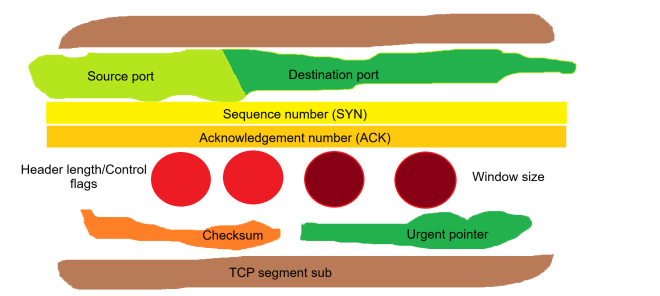
Using the (admittedly cheesy) analogy of a meatball sub, let’s see what a TCP segment is made of:
Source port/destination port (lettuce)-The ports that are used to send and receive applications, respectively
Sequence number (yellow cheese)-The synchronize sequence number sent out by the client to initiate a connection with the server
Acknowledgement number (orange cheese)-The acknowledgement number sent out by the server that confirms that the server received the data
Header length (bright red meatballs)-Specifies the length of the TCP header; the header contains all the information needed for successful data transfer, so by extension, the header encompasses all the information in the TCP segment.
Control flags (also bright red meatballs)-There are six TCP control flags to know:
SYN (synchronize)-used by the client to initialize a connection with the server
ACK (acknowledge)-used by the server to acknowledge that the data was successfully received from the client
FIN (finish)-used to indicate that the connection has completed and there is no more data to be transferred
RST (reset)-used to indicate that the connection has been terminated due to invalid or unrecoverable data
PSH (push)-tells the host to immediately push the data to the server without waiting for any additional data buffering on the client’s side
URG (urgent)-tells the server that the data being transferred is urgent and should be handled promptly
Window size (dark red meatballs)-this specifies the size of the server’s receiving window to the client; in other words, the window size tells the client exactly how much data the server can handle
Checksum (orange bell pepper)-this is a mechanism used to ensure data integrity and detect any possible data corruption during data transfer; checksums are 16-bit values used by both the client and server. If the checksum isn’t the same between the client and server, the data is discarded and a retransmission is requested.
Urgent pointer (green bell pepper)-this field points to the location of any urgent data in the TCP segment and is only used if the URG flag is set
Michael here, and in this post, we’ll continue our exploration of IP addresses using Python’s IP address module!
IP address comparisons
Just as with numbers in Python, you can compare IP address objects in Python too. Here’s how to do it:
import ipaddress
ip1 = ipaddress.ip_address('192.168.1.1')
ip2 = ipaddress.ip_address('192.168.2.1')
ip3 = ipaddress.ip_address('192.168.3.1')
ip4 = ipaddress.ip_address('192.168.1.2')
ip5 = ipaddress.ip_address('192.168.1.3')
print(ip1 < ip2)
print(ip3 > ip2)
print(ip1 < ip4)
print(ip5 > ip4)
True
True
True
True
In this example, we have 5 different IP addresses and ran 4 different comparison operations to see how IP addresses compare to each other. All four of the statements tested returned true, which leads us to conclude:
When the first two octets of the IP address stayed the same (192.168), if the third octet of one IP address is greater than another (for instance with ip1 and ip2), then the IP address with the higher third octet (ip2) is “greater than” the IP address with the lower octet (ip1).
Similar logic applies to comparing the fourth octet of each IP address. Assuming the first three octets are the same, the fourth octet is then analyzed. In the case of ip5 and ip4, which have the same first three octets, ip5 would be greater than ip4 as the fourth octet of ip5 is “greater than” the fourth octet of ip4.
IP arithmetic
Comparing IP addresses isn’t the only neat thing we can do with the IP address module-in fact, let’s explore another fascinating application of the Python ipaddress module with some IP arithmetic:
AddressValueError: 4294967296 (>= 2**32) is not permitted as an IPv4 address
AddressValueError: -1 (< 0) is not permitted as an IPv4 address
In this example, we performed basic arithmetic operations on four different IPv4 addresses and while two of them managed to work just fine, the last two operations threw out an AddressValueError exception. Why might that be?
Well, the highest possible IPv4 address is 255.255.255.255. Trying to add even one more bit to this address gave us the AddressValueError exception simply because 255.255.255.255 is the highest possible IPv4 address and thus cannot have anymore bits added to it. Likewise, trying to deduct a bit from 0.0.0.0 also gave us the AddressValueError, as 0.0.0.0 is the lowest possible IPv4 address and trying to deduct a bit isn’t possible.
As for the two successful IPv4 address operations, the first one is quite simple as it simply involves adding 18 bits to the last octet to get 175.122.13.41. The second one on the other hand is a bit more challenging since you can’t have negative bits in an octet (12-15=-3). What would happen then? The previous octet would then be decremented.
Still a little confused? Take the last two octets of the second IP address-100.12-and basically decrement by 15. Decrementing by 12 would give us 100.0 while decrementing by 3 more would give us 99.253 (the first two octets remain unchanged). Since the last octet can’t be less than 0, the “counter” would then go back to 255 for the fourth octet and decrement from there.
Sorting IPs
The last ipaddress module capability I wanted to discuss here is how to sort a list of IPs. Let’s see how we can make that happen:
sorted([ipaddress.ip_address(address) for address in listOfIPs])
[IPv4Address('0.0.0.0'),
IPv4Address('12.15.33.19'),
IPv4Address('12.15.34.19'),
IPv4Address('182.105.99.84'),
IPv4Address('182.106.100.85'),
IPv4Address('255.255.255.255')]
It’s quite simple to sort a list of IP addresses. First, let’s assume we have a list of six IPv4 addresses stored as strings in our listOfIPs. How can we sort this list of IPs if all the IPs are stored as strings?
List comprehension to the rescue! By converting each IP-stored-as-a-string to an actual IP address and sorting the list through the sorted() method, you’ll get a nice sorted list of IP addresses?
How does the code know how to perfectly sort these IP addresses? When it comes to sorting IP addresses, 0.0.0.0 and 255.255.255.255 are the lowest and highest possible IPv4 addresses, respectively. The other four IP addresses in between are sorted by the value of their octets in either right-to-left or left-to-right order, depending on the values of each IP address’s octets. In other words, 12.15.34.19 is greater than 12.15.33.19 because even though both IP addresses share the same fourth octet, the third octet of 12.15.34.19 (34) is greater than the third octet of 12.15.33.19 (33).
Similar logic applies to the IP addresses 182.105.99.84 and 182.106.100.85 because even though the first octet of both IP addresses is the same, the other three octets of 182.106.100.85 are still greater than the other three octets of 182.105.99.84.
Welcome back, and I hope you all had a wonderfully festive holiday season! I’m definitely ready to share some juicy programming content with you all in 2026-which will include the milestone 200th post!
To start off my 2026 slate of content, let’s explore IP addresses, Python style. More specifically, let’s explore some of the capabilities of Python’s ipaddress module!
Let’s get stuff started!
Before we dive in to all the fun Python IP address stuff, let’s first get ourselves set up on the IDE.
First things first, let’s pip install ipaddress (this will be the only module we’ll need for this lesson):
!pip install ipaddress
What kind of IP address are we looking at?
Once we’ve installed the ipaddress module, let’s explore its capabilities. First off, let’s see how IP address objects are created:
By using the aptly-named ipaddress.ip_address method, you can return either an IPv4Address or IPv6Address object, depending on what you pass into the method.
In this example, we pass in the IPv6 address 2001:db8::1 and the ip_address() method returns the IP address as an IPv6Address object.
The IPv6 address 2001:db8::1 is IPv6 shorthand for 2001:0db8:0000:0000:0000:0000:0000:0001. IPv6 shorthand tends to leave out any leading 0s in any section of the IP address along with using :: as common shorthand for 0000:0000:0000:0000:0000.
Is this IP address in the network?
Next up, let’s not only create an IP network object but also check if it’s in a network:
#creating the IP network
NETWORK = ipaddress.ip_network('10.0.0.0/16')

#creating IP address object
IPV4 = ipaddress.ip_address('10.1.13.38')

print(IPV4 in NETWORK)

False
From the IP address package, we can create a NETWORK object that represents an IP address network along with an IPv4 address object. For this example, we’ll use the 10.0.0.0 IP network with subnet /16 and check if the IP address 10.1.13.38 is in the network. In this case, the IP address isn’t in the network.
How many IPs are in my network?
Now that we know how to create a network object, let’s see how we can find out all the possible hosts in the IP network we just created:
for host in NETWORK.hosts():
    print(host)

Streaming output truncated to the last 5000 lines.
10.0.236.119
10.0.236.120
10.0.236.121
10.0.236.122
10.0.236.123
10.0.236.124
10.0.236.125
10.0.236.126
10.0.236.127
10.0.236.128
(output truncated for brevity)
It’s quite simple actually. All we need to do is use a standard Python for loop and iterate through the hosts property of the network object we created.
Notice the line at the top of the output-Streaming output truncated to the last 5000 lines. Even though we only see 5000 of the possible IP addresses, there are definitely more. How can we know how many IP addresses are in a network?
So, how many IP addresses are in a network?
How can we find out exactly how many IP addresses are in a given network? Here’s a simple formula to find out:
Yes, this is the formula to find out how many IP addresses can exist on a given network. Simply take 2 to the power of (32-CIDR) to get the answer-CIDR referring to the subnet mask in CIDR notation.
For instance, /16 contains 65,536 possible IP addresses while /24 has room for only 256 possible IP addresses. Also, in case you were wondering, networks with a /1 subnet can be quite massive-leaving room for 2,147,483,648 (roughly 2.1 billion) possible IP addresses. On the other hand, networks with a /31 subnet only leave room for 2 possible IP address. Then again, it’s highly unlikely networks would be so small or so big-subnets between /8 and /24 tend to be the most common.
Thanks for reading, and be sure to check out my next post where we will explore more uses of Python’s handy ipaddress module. I’m certainly looking forward to all the juicy techie content I have planned for you all in 2026!
Michael here, and in my last post for 2025, I’m going to dive into a topic I really haven’t explored much throughout this blog’s 7-and-a-half-year run-cybersecurity.
So how will I start my cybersecurity series of entries? I’ll first dive into one of the most basic cybersecurity concepts out there-IP addresses.
And now, let’s explain IP addresses
First of all, what is an IP address? An IP-or Internet Protocol-address is a unique identifier for a computer device on an Internet network.
Not only do IP addresses serve as unique identifiers for devices on an Internet network, but they also provide where a device is located in an Internet network (and this has certainly proved helpful in many criminal proceedings), help make Internet communication possible by routing data packets to their correct locations, and enable you to visit any website by helping you connect to the website’s server.
What’s my IP address?
Every device connected to the Internet has its own unique IP address, including yours. How can you find your IP address?
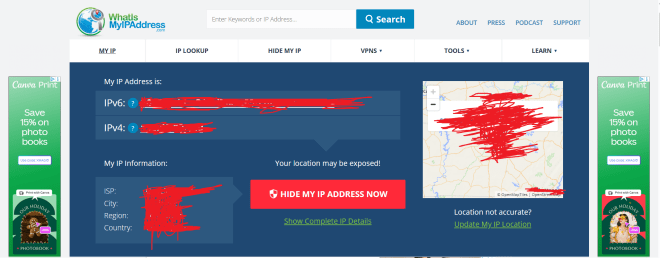
If you want to know your device’s IP address, go to this site-https://whatismyipaddress.com/. Here’s what the results were for my device’s IP address (and yes, I redacted my IP address information):
What can you deduce just from the information on this homepage? Let’s explain:
You can see both the IPv4 (IP version 4) and IPv6 (IP version 6) addresses for the device. Don’t worry, I’ll get into the differences between IPv4 and IPv6 later in this post.
You can also see the ISP (Internet Service Provider such as AT&T) along with the user’s current city, region and country. Even though the ISP field is a constant for the user, the user’s city, region, and country will reflect where the user is at the current moment, even if it’s not the user’s home city.
The map shows you where a user is currently located.
The two versions of IP addresses
As I mentioned above, your device will more often than not have both an IPv4 and an IPv6 address. However, you may be wondering what the differences are between these two types of IP addresses. Let’s dive in!
IP version 4
First off, let’s explore the world of IPv4 addresses. What exactly do they look like?
In this example, I’m showing the structure of IPv4 addresses using the most common IPv4 address-192.168.1.1 (which is a common default IP address for many home routers). Here are some things to know about the structure of IPv4 addresses:
IPv4 addresses are 32-bit/4-byte addresses, with each byte being represented by an octet (each of the 4 numbers represent one octet).
The reason each number in the IPv4 address is called an octet is because each number is stored as an 8-bit binary number.
Since each octet can be represented by a number from 0 to 255, there are roughly 4.2 billion possible combinations for IPv4 addresses (255^4).
IP version 6
Granted, 4.2 billion possible IP address combinations sounds like a lot, but given the amount of devices connected to the Internet these days, let’s just say we’ll need a lot more unique identifiers!
This is where IPv6 comes in. Let’s break down the structure of IPv6 addresses:
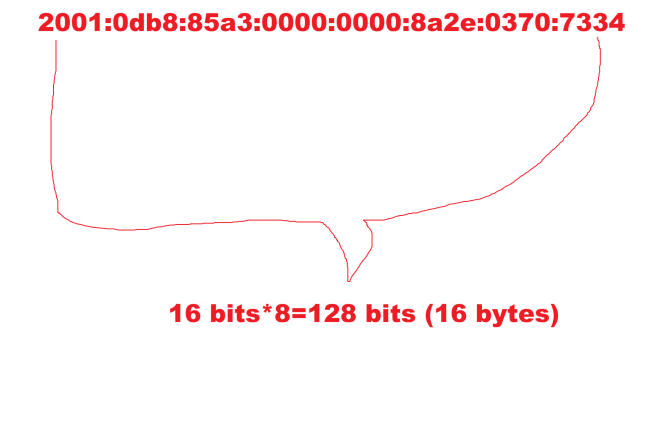
In this example, I’m showing the structure of IPv6 addresses, which is quite different from the structure of IPv4 addresses. Here’s a breakdown of the structure of IPv6 addresses:
Unlike IPv4 addresses, IPv6 addresses are stored in 8 sections of 16 bits apiece with each section being represented by a hexadecimal number.
In total, IPv6 addresses are 128 bits long.
Since each section of the IPv6 address can have up to 65,536 possible values, and there are 8 sections in an IPv6 address, there are 3.4*10^38 possible combinations for an IPv6 address. Just for context, that number is 340 undecillion (one with 66 zeroes)-this allows for a considerably larger range of IP addresses under IPv6 since IPv4 only allows for 4.2 billion possible IP addresses.
It’s subnetting time!
One more concept I want to discuss regarding IP addresses is subnetting. What are subnets in the world of IP addresses?
All IP addresses exist on a network on the wider Internet. However, these networks where IP addresses exist can be quite large. How can we make device-to-device communication more efficient on these networks?
Subnets (or subnet masks) help make device-to-device communication more manageable by splitting a network into two parts-a network ID and a host (or device) ID. Subnets are represented as 32-bit numbers that look like standard IPv4 addresses (e.g.: 255.255.255.0). The main benefit of subnets is that they allow devices to know which other devices are in their same network and which devices are in different networks and adjusts device-to-device communication accordingly.
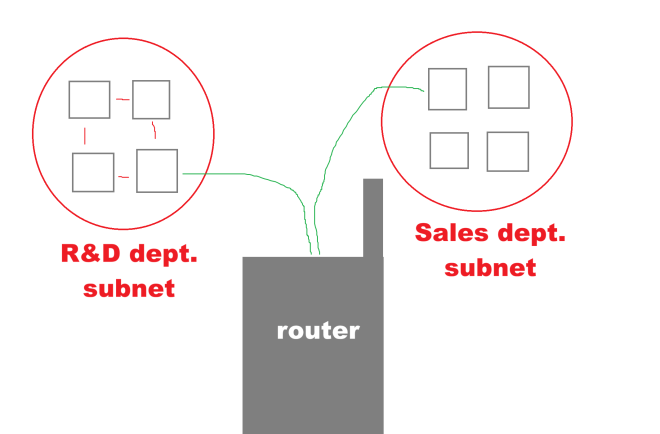
Let’s illustrate how subnets work:
Let’s say we’ve got two departments of a certain company-R&D (research and development) and sales and each department is part of the larger company’s Internet network. Let’s also assume that the R&D and the sales departments have their own distinct subnets. If one device on the R&D subnet wanted to send some information to another device on the R&D subnet, the first device would simply need to send a direct message to the second device. However, if a device on the R&D network wanted to send some information to a device on the Sales subnet, you’d be getting the handy-dandy router (or default gateway) to assist you in directing the information to the right network.
Now, how might subnetting work in the context of IP addresses? Let’s take the following two IP addresses-184.122.1.14 and 184.122.1.33 and let’s use the following subnet mask-255.255.255.0. Are these two IPs on the same subnet? Yes!
These two IPs are on the same subnet as the subnet (255.255.255.0) indicates that the first three octets of each IP must match, which they do!
CIDR, not CIDER
I did mention that subnets are written like standard IPv4 addresses (e.g.:255.255.255.0) but did you know there’s a convenient shorthand way to represent those subnets.
Introducing CIDR (not CIDER) notation, which stands for Classless Inter-Domain Routing Notation! The one thing you should know about CIDR notation is that it serves as an effective shorthand way of writing subnet masks.
How do you calculate a subnet mask in CIDR notation?
It’s actually pretty easy! Just convert each octet in the subnet into its binary form and count how many 1s appear. Since the subnet mask 255.255.255.0 has 24 ones in binary form, the subnet mask in CIDR notation can be represented as /24.
In other words, CIDR notation is represented as /[number of binary ones found in subnet].
Does IPv6 use subnets?
Yes and no. While IPv6 doesn’t use the same subnetting as IPv4, it does use something called prefixing, which works quite similar to subnetting in IPv4.
Both IPv4 and IPv6 use CIDR notation, but IPv6 tends to mostly work with the /64 mask as IPv6 addresses use the 64-bit-network/64-bit-host split.
Thank you for reading and following along on another great year of coding and tech! From C# to Tesseract readings to NBA predictions to IP addresses and even a little fun with HTML, I’ve certainly had fun with the content slate this year! Have a very merry and festive holiday season with your loved ones and see you in:
Yes dear readers, I’ve got so much awesome content to come in 2026 (including this blog’s 200th post)! Who knows what I’ll be covering-though you can bet on some juicy cybersecurity content headed your way!