IPs, Python style pt.2

Hello everyone,

Michael here, and in this post, we’ll continue our exploration of IP addresses using Python’s IP address module!

IP address comparisons

Just as with numbers in Python, you can compare IP address objects in Python too. Here’s how to do it:

import ipaddress
ip1 = ipaddress.ip_address('192.168.1.1')
ip2 = ipaddress.ip_address('192.168.2.1')
ip3 = ipaddress.ip_address('192.168.3.1')
ip4 = ipaddress.ip_address('192.168.1.2')
ip5 = ipaddress.ip_address('192.168.1.3')
print(ip1 < ip2)
print(ip3 > ip2)
print(ip1 < ip4)
print(ip5 > ip4)
True
True
True
True

In this example, we have 5 different IP addresses and ran 4 different comparison operations to see how IP addresses compare to each other. All four of the statements tested returned true, which leads us to conclude:

  • When the first two octets of the IP address stayed the same (192.168), if the third octet of one IP address is greater than another (for instance with ip1 and ip2), then the IP address with the higher third octet (ip2) is “greater than” the IP address with the lower octet (ip1).
  • Similar logic applies to comparing the fourth octet of each IP address. Assuming the first three octets are the same, the fourth octet is then analyzed. In the case of ip5 and ip4, which have the same first three octets, ip5 would be greater than ip4 as the fourth octet of ip5 is “greater than” the fourth octet of ip4.

IP arithmetic

Comparing IP addresses isn’t the only neat thing we can do with the IP address module-in fact, let’s explore another fascinating application of the Python ipaddress module with some IP arithmetic:

print(ipaddress.IPv4Address(u'175.122.13.23') + 18)
print(ipaddress.IPv4Address(u'144.123.100.12') - 15)
print(ipaddress.IPv4Address(u'255.255.255.255') + 1)
print(ipaddress.IPv4Address(u'0.0.0.0') - 1)
175.122.13.41
144.123.99.253
AddressValueError: 4294967296 (>= 2**32) is not permitted as an IPv4 address
AddressValueError: -1 (< 0) is not permitted as an IPv4 address

In this example, we performed basic arithmetic operations on four different IPv4 addresses and while two of them managed to work just fine, the last two operations threw out an AddressValueError exception. Why might that be?

Well, the highest possible IPv4 address is 255.255.255.255. Trying to add even one more bit to this address gave us the AddressValueError exception simply because 255.255.255.255 is the highest possible IPv4 address and thus cannot have anymore bits added to it. Likewise, trying to deduct a bit from 0.0.0.0 also gave us the AddressValueError, as 0.0.0.0 is the lowest possible IPv4 address and trying to deduct a bit isn’t possible.

As for the two successful IPv4 address operations, the first one is quite simple as it simply involves adding 18 bits to the last octet to get 175.122.13.41. The second one on the other hand is a bit more challenging since you can’t have negative bits in an octet (12-15=-3). What would happen then? The previous octet would then be decremented.

Still a little confused? Take the last two octets of the second IP address-100.12-and basically decrement by 15. Decrementing by 12 would give us 100.0 while decrementing by 3 more would give us 99.253 (the first two octets remain unchanged). Since the last octet can’t be less than 0, the “counter” would then go back to 255 for the fourth octet and decrement from there.

Sorting IPs

The last ipaddress module capability I wanted to discuss here is how to sort a list of IPs. Let’s see how we can make that happen:

listOfIPs = ['0.0.0.0', '12.15.33.19', '12.15.34.19', '182.105.99.84', '182.106.100.85', '255.255.255.255']
sorted([ipaddress.ip_address(address) for address in listOfIPs])
[IPv4Address('0.0.0.0'),
IPv4Address('12.15.33.19'),
IPv4Address('12.15.34.19'),
IPv4Address('182.105.99.84'),
IPv4Address('182.106.100.85'),
IPv4Address('255.255.255.255')]

It’s quite simple to sort a list of IP addresses. First, let’s assume we have a list of six IPv4 addresses stored as strings in our listOfIPs. How can we sort this list of IPs if all the IPs are stored as strings?

List comprehension to the rescue! By converting each IP-stored-as-a-string to an actual IP address and sorting the list through the sorted() method, you’ll get a nice sorted list of IP addresses?

How does the code know how to perfectly sort these IP addresses? When it comes to sorting IP addresses, 0.0.0.0 and 255.255.255.255 are the lowest and highest possible IPv4 addresses, respectively. The other four IP addresses in between are sorted by the value of their octets in either right-to-left or left-to-right order, depending on the values of each IP address’s octets. In other words, 12.15.34.19 is greater than 12.15.33.19 because even though both IP addresses share the same fourth octet, the third octet of 12.15.34.19 (34) is greater than the third octet of 12.15.33.19 (33).

Similar logic applies to the IP addresses 182.105.99.84 and 182.106.100.85 because even though the first octet of both IP addresses is the same, the other three octets of 182.106.100.85 are still greater than the other three octets of 182.105.99.84.

Here’s the link to today’s code in GitHub-https://github.com/mfletcher2021/blogcode/blob/main/IP_addresses_pt_2.ipynb

Thanks for reading,

Michael
Intro to IPs

Hello everyone,

Michael here, and in my last post for 2025, I’m going to dive into a topic I really haven’t explored much throughout this blog’s 7-and-a-half-year run-cybersecurity.

So how will I start my cybersecurity series of entries? I’ll first dive into one of the most basic cybersecurity concepts out there-IP addresses.

And now, let’s explain IP addresses

First of all, what is an IP address? An IP-or Internet Protocol-address is a unique identifier for a computer device on an Internet network.

Not only do IP addresses serve as unique identifiers for devices on an Internet network, but they also provide where a device is located in an Internet network (and this has certainly proved helpful in many criminal proceedings), help make Internet communication possible by routing data packets to their correct locations, and enable you to visit any website by helping you connect to the website’s server.

What’s my IP address?

Every device connected to the Internet has its own unique IP address, including yours. How can you find your IP address?

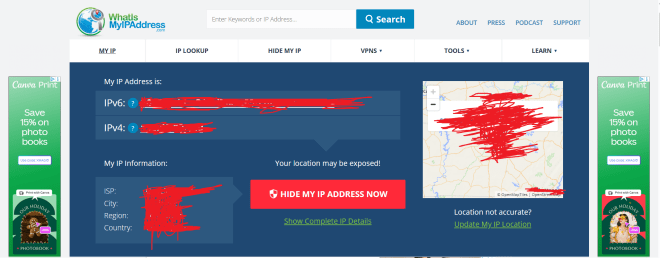
If you want to know your device’s IP address, go to this site-https://whatismyipaddress.com/. Here’s what the results were for my device’s IP address (and yes, I redacted my IP address information):

What can you deduce just from the information on this homepage? Let’s explain:

  • You can see both the IPv4 (IP version 4) and IPv6 (IP version 6) addresses for the device. Don’t worry, I’ll get into the differences between IPv4 and IPv6 later in this post.
  • You can also see the ISP (Internet Service Provider such as AT&T) along with the user’s current city, region and country. Even though the ISP field is a constant for the user, the user’s city, region, and country will reflect where the user is at the current moment, even if it’s not the user’s home city.
  • The map shows you where a user is currently located.

The two versions of IP addresses

As I mentioned above, your device will more often than not have both an IPv4 and an IPv6 address. However, you may be wondering what the differences are between these two types of IP addresses. Let’s dive in!

IP version 4

First off, let’s explore the world of IPv4 addresses. What exactly do they look like?

In this example, I’m showing the structure of IPv4 addresses using the most common IPv4 address-192.168.1.1 (which is a common default IP address for many home routers). Here are some things to know about the structure of IPv4 addresses:

  • IPv4 addresses are 32-bit/4-byte addresses, with each byte being represented by an octet (each of the 4 numbers represent one octet).
  • The reason each number in the IPv4 address is called an octet is because each number is stored as an 8-bit binary number.
  • Since each octet can be represented by a number from 0 to 255, there are roughly 4.2 billion possible combinations for IPv4 addresses (255^4).

IP version 6

Granted, 4.2 billion possible IP address combinations sounds like a lot, but given the amount of devices connected to the Internet these days, let’s just say we’ll need a lot more unique identifiers!

This is where IPv6 comes in. Let’s break down the structure of IPv6 addresses:

In this example, I’m showing the structure of IPv6 addresses, which is quite different from the structure of IPv4 addresses. Here’s a breakdown of the structure of IPv6 addresses:

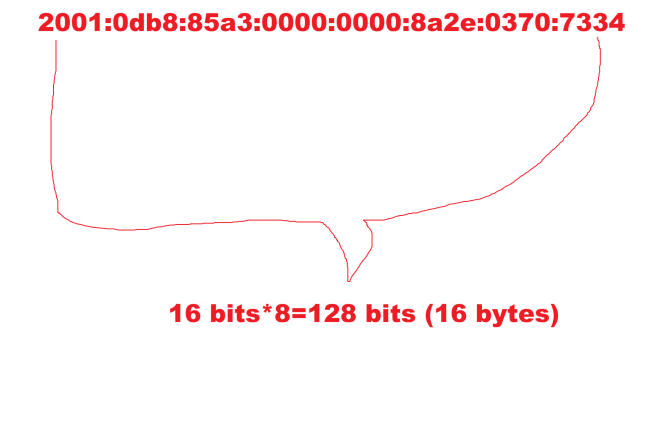
  • Unlike IPv4 addresses, IPv6 addresses are stored in 8 sections of 16 bits apiece with each section being represented by a hexadecimal number.
  • In total, IPv6 addresses are 128 bits long.
  • Since each section of the IPv6 address can have up to 65,536 possible values, and there are 8 sections in an IPv6 address, there are 3.4*10^38 possible combinations for an IPv6 address. Just for context, that number is 340 undecillion (one with 66 zeroes)-this allows for a considerably larger range of IP addresses under IPv6 since IPv4 only allows for 4.2 billion possible IP addresses.

It’s subnetting time!

One more concept I want to discuss regarding IP addresses is subnetting. What are subnets in the world of IP addresses?

All IP addresses exist on a network on the wider Internet. However, these networks where IP addresses exist can be quite large. How can we make device-to-device communication more efficient on these networks?

Subnets (or subnet masks) help make device-to-device communication more manageable by splitting a network into two parts-a network ID and a host (or device) ID. Subnets are represented as 32-bit numbers that look like standard IPv4 addresses (e.g.: 255.255.255.0). The main benefit of subnets is that they allow devices to know which other devices are in their same network and which devices are in different networks and adjusts device-to-device communication accordingly.

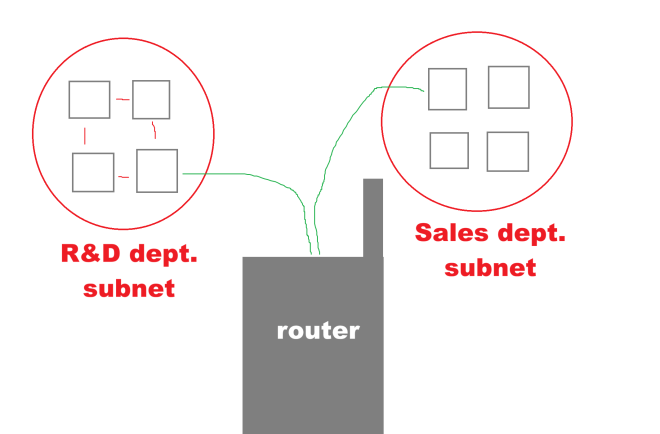
Let’s illustrate how subnets work:

Let’s say we’ve got two departments of a certain company-R&D (research and development) and sales and each department is part of the larger company’s Internet network. Let’s also assume that the R&D and the sales departments have their own distinct subnets. If one device on the R&D subnet wanted to send some information to another device on the R&D subnet, the first device would simply need to send a direct message to the second device. However, if a device on the R&D network wanted to send some information to a device on the Sales subnet, you’d be getting the handy-dandy router (or default gateway) to assist you in directing the information to the right network.

Now, how might subnetting work in the context of IP addresses? Let’s take the following two IP addresses-184.122.1.14 and 184.122.1.33 and let’s use the following subnet mask-255.255.255.0. Are these two IPs on the same subnet? Yes!

These two IPs are on the same subnet as the subnet (255.255.255.0) indicates that the first three octets of each IP must match, which they do!

CIDR, not CIDER

I did mention that subnets are written like standard IPv4 addresses (e.g.:255.255.255.0) but did you know there’s a convenient shorthand way to represent those subnets.

Introducing CIDR (not CIDER) notation, which stands for Classless Inter-Domain Routing Notation! The one thing you should know about CIDR notation is that it serves as an effective shorthand way of writing subnet masks.

How do you calculate a subnet mask in CIDR notation?

It’s actually pretty easy! Just convert each octet in the subnet into its binary form and count how many 1s appear. Since the subnet mask 255.255.255.0 has 24 ones in binary form, the subnet mask in CIDR notation can be represented as /24.

  • In other words, CIDR notation is represented as /[number of binary ones found in subnet].

Does IPv6 use subnets?

Yes and no. While IPv6 doesn’t use the same subnetting as IPv4, it does use something called prefixing, which works quite similar to subnetting in IPv4.

Both IPv4 and IPv6 use CIDR notation, but IPv6 tends to mostly work with the /64 mask as IPv6 addresses use the 64-bit-network/64-bit-host split.

Thank you for reading and following along on another great year of coding and tech! From C# to Tesseract readings to NBA predictions to IP addresses and even a little fun with HTML, I’ve certainly had fun with the content slate this year! Have a very merry and festive holiday season with your loved ones and see you in:

Yes dear readers, I’ve got so much awesome content to come in 2026 (including this blog’s 200th post)! Who knows what I’ll be covering-though you can bet on some juicy cybersecurity content headed your way!

Michael