Hello everyone,
Michael here, and to continue our cybersecurity explorations, let’s explore a common concept in cybersecurity-the three-way handshake (and don’t worry, I’ll certainly build upon this concept in subsequent posts)!
What is this three-way handshake?
The three-way handshake is a good cybersecurity concept to understand as it’s the central process to understand how data is transferred between devices on a network. The three-way handshake runs on the TCP, or transmission control protocol, which is the protocol used to ensure data can reliably be transferred between applications on an IP network.
Fair enough, but how does this three-way handshake work?
Now that we’ve explained the basics of the three-way handshake, let’s explore how it actually works:


Let’s explore what goes on during a three-way handshake:
- First, the client tries to connect or SYN (synchronize) with the server by sending a segment with a SYN (synchronize sequence number-more on that later) to the server which lets the server know that the client wants to establish a connection.
- Next comes the SYN-ACK (acknowledgement), where the server acknowledges the client’s request with its own synchronize sequence number along with an acknowledgement number (which is SYN number + 1)
- Finally, the client acknowledges the server’s request by sending the acknowledgement number from the SYN-ACK step back to the server to establish a connection to begin the data transfer.
What exactly goes into a TCP segment?
The data that works its way through the three-way handshake takes the form of a TCP segment. What do TCP segments look like?
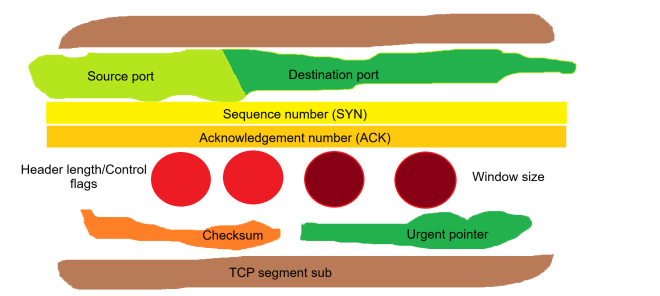
Using the (admittedly cheesy) analogy of a meatball sub, let’s see what a TCP segment is made of:
- Source port/destination port (lettuce)-The ports that are used to send and receive applications, respectively
- Sequence number (yellow cheese)-The synchronize sequence number sent out by the client to initiate a connection with the server
- Acknowledgement number (orange cheese)-The acknowledgement number sent out by the server that confirms that the server received the data
- Header length (bright red meatballs)-Specifies the length of the TCP header; the header contains all the information needed for successful data transfer, so by extension, the header encompasses all the information in the TCP segment.
- Control flags (also bright red meatballs)-There are six TCP control flags to know:
- SYN (synchronize)-used by the client to initialize a connection with the server
- ACK (acknowledge)-used by the server to acknowledge that the data was successfully received from the client
- FIN (finish)-used to indicate that the connection has completed and there is no more data to be transferred
- RST (reset)-used to indicate that the connection has been terminated due to invalid or unrecoverable data
- PSH (push)-tells the host to immediately push the data to the server without waiting for any additional data buffering on the client’s side
- URG (urgent)-tells the server that the data being transferred is urgent and should be handled promptly
- Window size (dark red meatballs)-this specifies the size of the server’s receiving window to the client; in other words, the window size tells the client exactly how much data the server can handle
- Checksum (orange bell pepper)-this is a mechanism used to ensure data integrity and detect any possible data corruption during data transfer; checksums are 16-bit values used by both the client and server. If the checksum isn’t the same between the client and server, the data is discarded and a retransmission is requested.
- Urgent pointer (green bell pepper)-this field points to the location of any urgent data in the TCP segment and is only used if the URG flag is set
Thanks for reading,
Michael