OCR Scenario 4: How Well Can Tesseract Read My Handwriting?

Advertisements

Hello everyone,

Michael here, and in today’s post, we’ll take a look at how well Tesseract could possibly read a sample of my handwriting.

So far, we’ve tested Tesseract against standard computer-font text, a photo of a banner with text, and a common US tax document. Aside from the standard computer-font text, Tesseract didn’t work well with either the banner or the tax document.

However, can Tesseract work well with reading my handwriting? Let’s find out!

But first, a little pre-processing…

Before we test Tesseract on my handwriting, let’s follow the pre-processing steps we’ve followed for the other three Tesseract scenarios: pip install the necessary packages and import them onto the IDE.

First, the pip installing:

!pip install pytesseract
!pip install opencv-python

Next, let’s import the necessary packages:

import pytesseract
import numpy as np
from PIL import Image

And now, the initial handwriting Tesseract test

Now, upon initial testing, how well can Tesseract read this sample of my handwriting?:

Let’s find out, shall we:

testImage = 'handwriting.png'
testImageNP = np.array(Image.open(testImage))
testImageTEXT = pytesseract.image_to_string(testImageNP)
print(testImageTEXT)

Output: 

Interestingly, Tesseract didn’t seem to pick up any text. I thought it might’ve picked up something, as the image simply contains black text on a white background. After all, there are no other objects in the image, nor is the information arranged like a document.

Could a little bit of image preprocessing be of any use with this image? Let’s find out!

Preprocessing time!

For this example, let’s try the same technique we used in the other two lessons-thresholding!

First off, let’s grayscale this image:

import cv2
from google.colab.patches import cv2_imshow

handwriting = cv2.imread('handwriting.png')
handwriting = cv2.cvtColor(handwriting, cv2.COLOR_BGR2GRAY)
cv2_imshow(handwriting)

Next, let’s do a little thresholding on the image. Since the image is black font with white text, let’s see how a different thresholding technique (THRESH_BINARY_INV) might be able to assist us here:

ret, thresh = cv2.threshold(handwriting, 127, 255, cv2.THRESH_BINARY_INV)
cv2_imshow(thresh)

The technique we used here-THRESH_BINARY_INV-is the opposite of what we used for the previous two lessons. In inverse binary thresholding, pixels above a certain threshold (127 in this case) turn black while pixels below this threshold turn white. I think this type of thresholding could be quite useful for handling black text on a white background, as was the case here.

Any luck reading?

Once we’ve done the thresholding, let’s see if that made a difference in the image’s Tesseract readability:

handwritingTEXT = pytesseract.image_to_string(thresh)
print(handwritingTEXT)

Output: 

Interestingly, unlike the previous two Tesseract scenarios we tested (the photo of the banner and the W-2 document), no text was read at all after thresholding.

Honestly, I thought the handwriting scenario would do far better than the banner photo or W-2 given that the contents of this image are simply black text on a white background. I mean, Tesseract was able to perfectly read the image in The Seven-Year Coding Wonder, and that was red text on a lime-green background. I guess this goes to show that while Tesseract has its potential, it also has several limitations as we’ve discovered.

Here’s the GitHub link to the Google Colab notebook for this post-https://github.com/mfletcher2021/blogcode/blob/main/OCR_handwriting_readings.ipynb.

Thanks for reading,

Michael

OCR Scenario 3: How Well Can Tesseract Read Documents?

Advertisements

Hello everybody,

Michael here, and in today’s post, we’ll be testing out another OCR/Tesseract scenario-how well can Tesseract read documents?

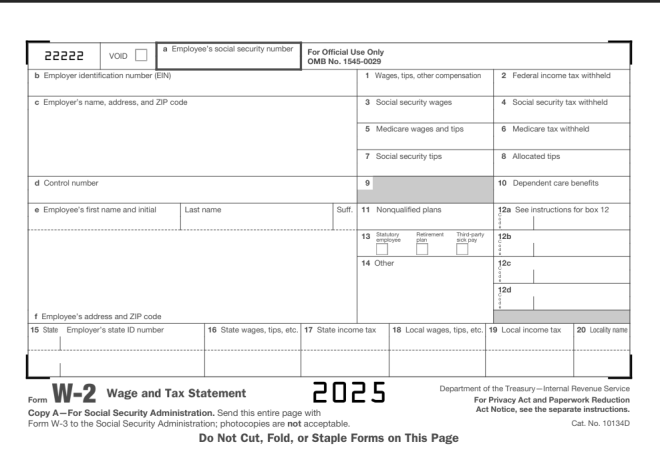
Here’s the document we’ll use for testing:

This is a standard-issue US W-2 form. For my international readers, a W-2 form is how US employees report their taxes to the federal government. All employee earnings and taxes withheld for a given calendar year are reported to the IRS (Internal Revenue Service, the agency that handles US taxpayer matters).

  • If you want to follow along with my Google Colab notebook, please save this image to your local drive and upload it to the IDE.

Let’s read the W-2

And now, let’s read in this W-2 form into our IDE. Before we start reading in the text to our IDE, let’s pip install the necessary packages if we don’t already have them:

!pip install pytesseract
!pip install opencv-python

Next, let’s import all the necessary packages to read in the image to the IDE:

import pytesseract
import numpy as np
from PIL import Image

Last but not least, let’s try to read in the W-2 form into the IDE and see what interesting results we’ll get:

testImage = 'w2 form.png'
testImageNP = np.array(Image.open(testImage))
testImageTEXT = pytesseract.image_to_string(testImageNP)
print(testImageTEXT)

| Deze | vow ] | * mens saat secur number For oficial Use Ory


Li

5 Ebr otcaon abo eR a
© Eglo ra, area, DP Sle 7 Secale wane 7 Secarmeuny ew
Teaco wager mips | aca a
7 Secisecuy oe © mosses
& Conan 3 Deport cars oan
@ Employee's frst name and inal Ee E 11 Nonqualified plans {2a See instructions for box 12
3 ey a =e =
mi
14 Other We
a
f Employee's address and ZIP code u
{5 Sie Empayers mae Dane? Te Sia wagon he, a] 7 Sa icone ax ]16 Losalwagen tp 6] 10 Local oome ax] 20 lyme
I


_|


Department of the Treasury Internal Revenue Service
com Wr=2,_ Wage and Tax statement e025 Ta Pony fl uaa
Copy A—For Social Security Admi 1. Send this entire page with ‘Act Molios, see the seperate insimuctions.

Form W-8 to the Social Security Administration; photocopies are not acceptable.
Do Not Cut, Fold, or Staple Forms on This Page

Cat. No, 10134D

OK, so using Tesseract, it appears we have some improvement from the previous scenario detailed in OCR Scenario 2: How Well Can Tesseract Read Photos? in the sense that text was even picked up at all. It appears that some sections of the W-2 form were even read perfectly (such as the line that read Do Not Cut, Fold, or Staple Forms on This Page). However, the bulk of the results appear to be complete gibberish, with a surprising amount of misread words (insimuctions instead of instructions, for example).

Now that we know how well Tesseract reads documents, let’s work some preprocessing magic to see if it yields any improvements in the text-reading process.

W-2 preprocessing

Could thresholding actually improve the Tesseract reading’s accuracy like it did for the photo test (granted, that was a marginal improvement, but it was still something).

First, let’s grayscale the image:

import cv2
from google.colab.patches import cv2_imshow

w2 = cv2.imread('w2 form.png')
w2 = cv2.cvtColor(w2, cv2.COLOR_BGR2GRAY)
cv2_imshow(w2)

Now that the image has been gray-scaled, let’s try and threshold it using the same techniques we learned from the last post:

ret, thresh = cv2.threshold(w2, 127, 255, cv2.THRESH_BINARY)
cv2_imshow(thresh)

Now that we’ve run the thresholding process on the image, let’s see how well it read the text:

w2TEXT = pytesseract.image_to_string(thresh)
print(w2TEXT)

vag


jen -urtbee EINE

" ¢ kirpleyo"s -ane. adeross. a


D Errplayers social


code

uray sunt

For Official Use Only
‘OMB No. 1545-0029

4 sans,

3. Seca seounty wae


5 Mo


7 Seca seounty 198,


andtps


|


B Allocaree s198


4 Corte naib 8 10. Lope~dent sare oe-otts
Te Eirpleyors frat “ar 1 Wa See natruct ons to Bax Te
° 13 125
14 Oe We
ta
f Eirployos's adaross ave £ * ence
18 Se EB Deiter 2 sraaes. ips. ote 18 Loca sages tps cto] 19 Lea noone tax


com WE=-2 wage and Tax Statement

Copy A—For Social Security Administration. Sere ths entire page
te the Social Securty Admin stratio7: onotoccpies are not acceptan e

born Ww.


cOes


Do Not Cut, Fold, or Staple Forms on This Page

ane


ot the


‘easy inter
For Privacy Act and Paperwork Reduction
‘Act Notice. see the separate instructions.

No.


349)

Granted, the original Tesseract reading of the W-2 form wasn’t that great, but wow this is considerably worse! I mean, what kind of a phrase is Errplayers social? However, I’ll give Tesseract some credit for surprisingly reading phrases such as the For Privacy Act and Paperwork Reduction correctly. Then again, I noticed the phrases in the document that Tesseract read the most accurately were the phrases in bold typeface.

Another one of Tesseract’s limitations?

Just as we saw when we tested Tesseract on the photo of the banner, we see that Tesseract has its limitations on reading documents as well. Interestingly enough, when we ran preprocessing on the photo of the banner, the preprocessing helped extract some text from the photo of the banner. However, when we ran the same preprocessing on the photo of the W-2, the reading came out worse than the reading we got from the original, un-processed image.

Why might that be? As you can see from the thresholding we did on the image of the W-2, most of the text in the form itself (namely the sections that contain people’s taxpayer information) comes out like it had been printed on a printer that was overdue for a black ink cartridge replacement. Thus, Tesseract wouldn’t have been able to properly read the text that came out of the image with the thresholding.

Then again, when Tesseract tried to read the text on the original, un-processed image, the results weren’t that great either. This could be because W-2 forms, like many legal forms, have a complex, multi-row layout that isn’t suited for Tesseract’s reading capabilities.

  • Personally, one reason I thought Tesseract would read this document better than the photo from the previous post is that the document’s text is not in a weird font and there’s nothing in the background of the document. I guess the results go to show that even with the things I just mentioned about the document, Tesseract still has its limitations.

Here’s the GitHub containing my Google Colab notebook for this post-https://github.com/mfletcher2021/blogcode/blob/main/OCR_document_readings.ipynb.

Thanks for reading,

Michael