Hello everyone,
Michael here, and in today’s post, let’s explore some more ways to analyze Wireshark traffic. In previous posts we’ve explored how to analyze packet capture statistics (Wireshark Statistics Exploration) and how to find possible errors in the packet capture (What To Look Out For In Wireshark).
For this post, we’ll analyze the same PCAP file that we’ve used since the April 20, 2026 post (Welcome to Wireshark)
IP address filtering
First off, let’s explore how we can filter our PCAP traffic based off of the IP address. There are technically three ways to filter the PCAP based off the IP address-using the destination IP, source IP, or either of these two IPs.
Destination, IP!
First off, let’s see how to filter the PCAP file based off the destination IP:

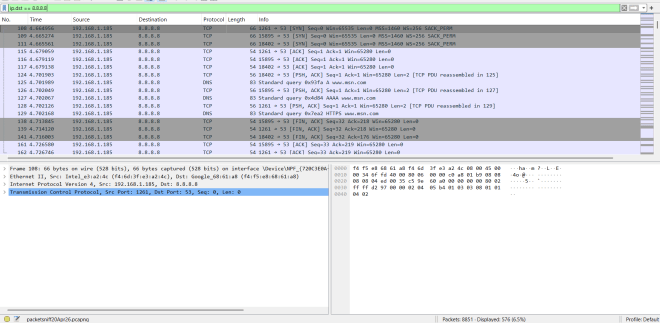
In this case, I used the filter query ip.dst == 8.8.8.8 to see how much traffic is going to the IP address 8.8.8.8 (which is the Google Public DNS IP address). After looking at the filtered results, it appears only 576 packets (or 6.5% of all traffic in this PCAP file) are going to the Google Public DNS.
- You know you’ve got a good filter query if the filter query bar at the top (above all the captured packets) turns green. If the filter query bar at the top is red, you’ll need to fix the filter query
Source: IP
Now let’s see how we can filter the PCAP file for source IP:

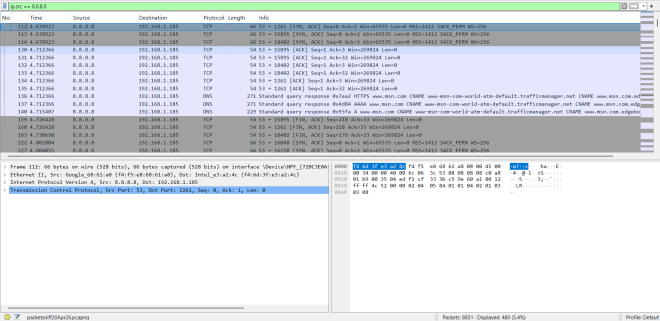
This time let’s use the ip.src == 8.8.8.8 filter query to see how much traffic in this PCAP file originates from the 8.8.8.8 IP address. According to the filtered results, only 480 (or 5.4%) of the packets originate from the 8.8.8.8 IP address-which is slightly less than the packets headed to the 8.8.8.8 IP address (576 or 6.5% of packets).
Destination, IP or Source: IP
Now, what if you wanted to find out how much traffic overall contains a specific IP address, regardless of whether it’s a destination or source IP? Here’s how to do that:

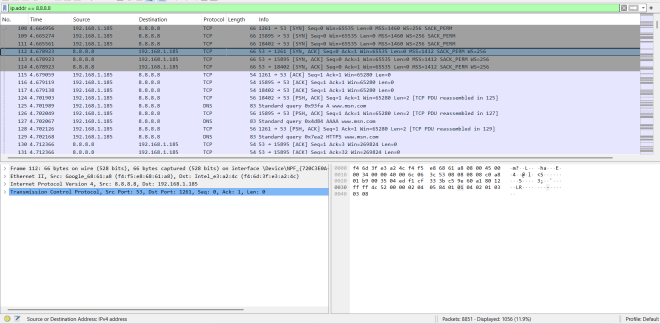
In this case, we used the filter query ip.addr == 8.8.8.8 to see how much overall traffic on this PCAP file involves the 8.8.8.8 IP address, regardless of whether this IP is the source or destination. Since there were 480 packets (5.4% of traffic) with 8.8.8.8 as the source IP and 576 packets (6.5% of traffic) with 8.8.8.8 as the destination IP, it makes sense that there are a total of 1056 packets (or 11.9% of traffic) that involve the 8.8.8.8 IP address in some capacity.
Now, what about IPv6 addresses?
You’ve likely noticed that the last three filter query examples I’ve shown all involve IPv4 addresses. Can you run these same filtering queries with IPv6 addresses? Let’s find out:

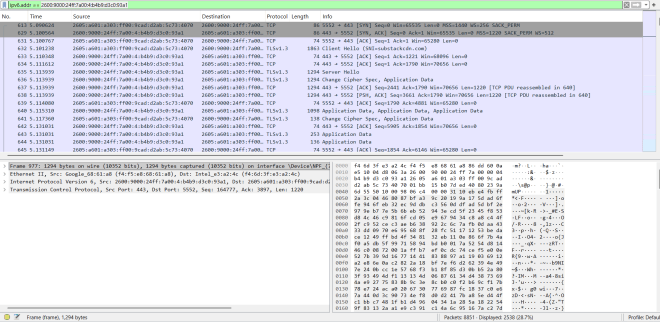
As it turns out, yes you can run these same filter queries with IPv6 addresses, but keep in mind you’ll need to use ipv6.dst == ... , ipv6.src == ... and ipv6.addr == ... for these queries as the ip.dst, ip.src and ip.addr will only work for IPv4 addresses. Other than that, you’re good.
In this example, we’re using the filter query ipv6.addr == 2600:9000:24ff:7a00:4:b4b9:d3c0:93a1 to see how much traffic in the PCAP involves the IPv6 address 2600:9000:24ff:7a00:4:b4b9:d3c0:93a1. In this case, 2,538 packets involve this IPv6 address, which amount to 28.7% of traffic on this PCAP.
Protocol: Filtering
Next up, let’s analyze filtering for certain protocols in Wireshark:
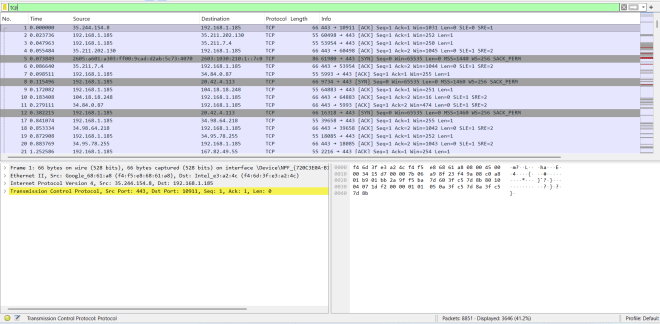
In this example, we’re analyzing how much traffic in the PCAP utilizes the TCP (transmission control protocol). In this case, 3,646 packets (or 41.2% of the traffic) utilizes the TCP, which makes sense as TCP is the protocol that’s used to establish a connection between a client and server machine before any data is sent.
How do we write Wireshark filter queries for protocols? Simply use the name of the protocol as the filter query. That’s it. All I did in the above example was use tcp to query the PCAP to filter for TCP packets.
Let’s try another protocol:
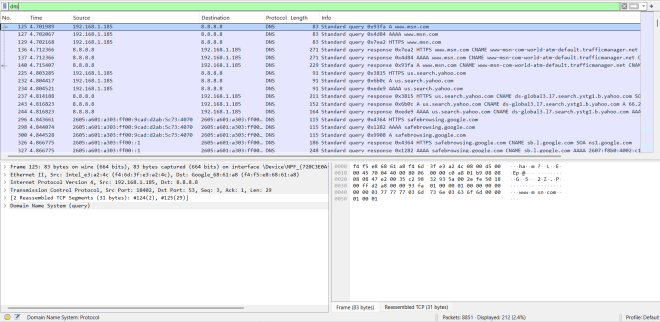
In this case, we’re analyzing the PCAP to see how many packets use the DNS (domain name system) protocol. According to the PCAP, only 212 packets (or 2.4%) use the DNS protocol. What’s the filter query we use? Simply dns.
I know I haven’t covered the DNS protocol here on this blog, but to summarize it, DNS is the protocol that makes it easier for you and me to navigate the Internet using regular web hostnames (like www.google.com) instead of numeric IP addresses.
Port: Filter
I also want to demonstrate how you can filter the Wireshark PCAP by port. Let’s take a look:

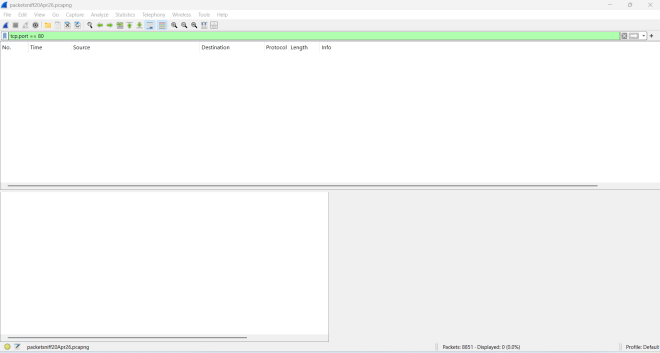
In this example, we’re using the filter query tcp.port == 80 to see how much of the PCAP traffic is either coming from or going to TCP port 80 (port 80 is the default HTTP port). Apparently, it’s pretty quiet since there’s no traffic either coming from or going to TCP port 80.
Now let’s see how much traffic is coming from or going to TCP port 443 with the query tcp.port == 443 (the default HTTPS port):

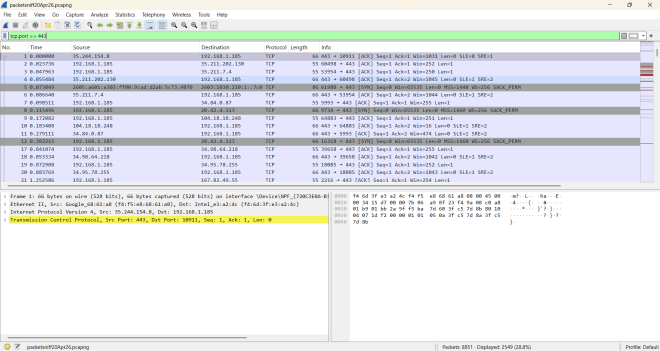
Unlike TCP port 80 traffic, there’s actually some traffic coming from and going to TCP port 443-in fact, TCP port 443 traffic accounts for 2,549 packets (or 28.8%).
Now, here are some things to keep in mind when figuring out a good port-based filter query in Wireshark:
- A query like
port == 443won’t work because in order to filter based on port, you’ll need to include a protocol like I did for the two examples above. TCP and UDP are the most common protocols on this PCAP, but other protocols should work when you want to filter the PCAP results by port. - Similar to the logic we discussed for filtering PCAP traffic based off IPs, if you only want to find traffic coming from a certain port or only want traffic going to a ceratin port, you’ll use
srcportordstportrespectively. Also remember to include the protocol in the query!
The Juicy Boolean Operators in the Filter Query
Yes, you can use Boolean operators in the filter query. Let’s have a look!
First, let’s test the Boolean operators on a protocol query:
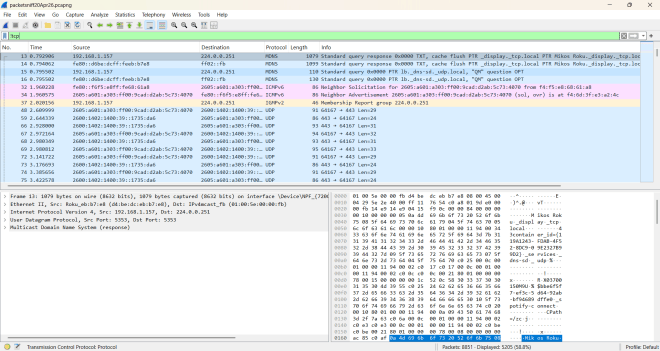
In this simple query-!tcp-we’re using the handy negation operator (!) to see which traffic does NOT use the TCP protocol. There’s apparently a lot of traffic that was returned-5,205 packets to be exact (or 58.8%).
Next up, let’s check and see how much traffic involves either TCP port 443 OR UDP port 443:

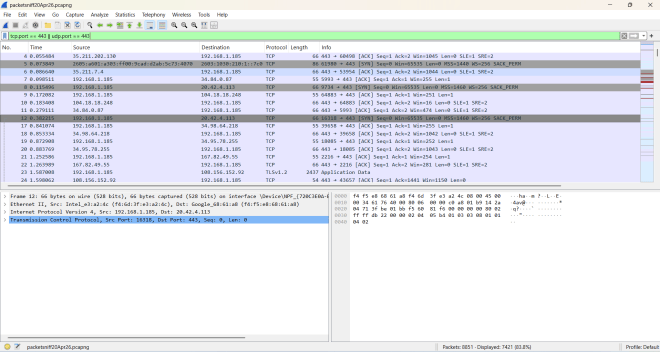
Using the filter query tcp.port == 443 || udp.port == 443, we can see that the majority of the PCAP traffic-7,421 packets (or 83.8%)-involve either TCP or UDP port 443 in some capacity.
Now let’s check and see how much traffic originates from TCP port 443 AND IP address 8.8.8.8:
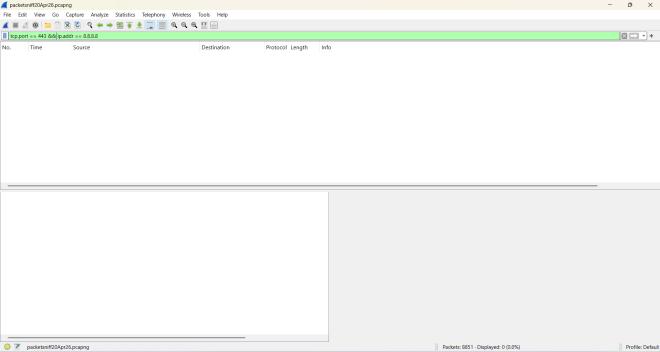
Using the filter query tcp.port == 443 && ip.addr == 8.8.8.8, we can see that even though there’s a bunch of PCAP traffic that involves TCP port 443, none of it involves the IP address 8.8.8.8.
Now, you may be wondering if there are other Boolean operators you can use for Wireshark filter queries. The answer to that is yes, yes you can! Let’s take a look at an example:

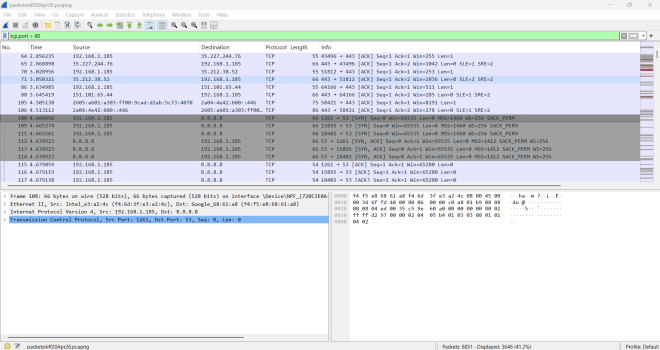
Using the filter query tcp.port > 80, we can see that 3,646 packets (or 41.2%) either come from or go to a TCP port with a value over 80.
Let’s try one more!
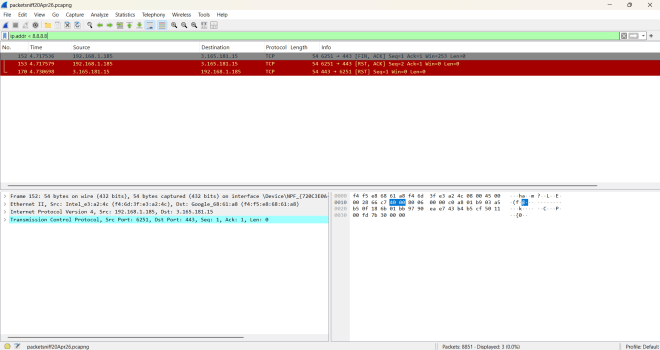
Using the filter query ip.addr < 8.8.8.8, we can see that there are only 3 packets (or less than 0.1%) that involve an IP address less than 8.8.8.8 (either as the source or destination IP)
Thanks for reading!
Michael