Hello everybody,
Michael here, and in today’s post, we’ll be having a little fun with R (and that means two things in this post). Now, I’ve focused all of my R posts on data analysis/data manipulation, but this time, I thought I’d do something a little different with R. Something a little more fun.
Now, the title of this post-R Lesson 20: Fun with R-means two things. First of all, I’m going to show you some of the fun things you can do with R (aside from data analysis/data manipulation, which I think are pretty fun to cover). Second, the name of the package to access the fun functionalities is literally called fun.
First of all, to start discovering all of these neat functionalities, let’s install the fun package:


Now, let’s starting having some fun with R (see what I did there). First, let’s start off by opening up a sliding puzzle game. To open up the sliding puzzle, use this line of code: sliding_puzzle()

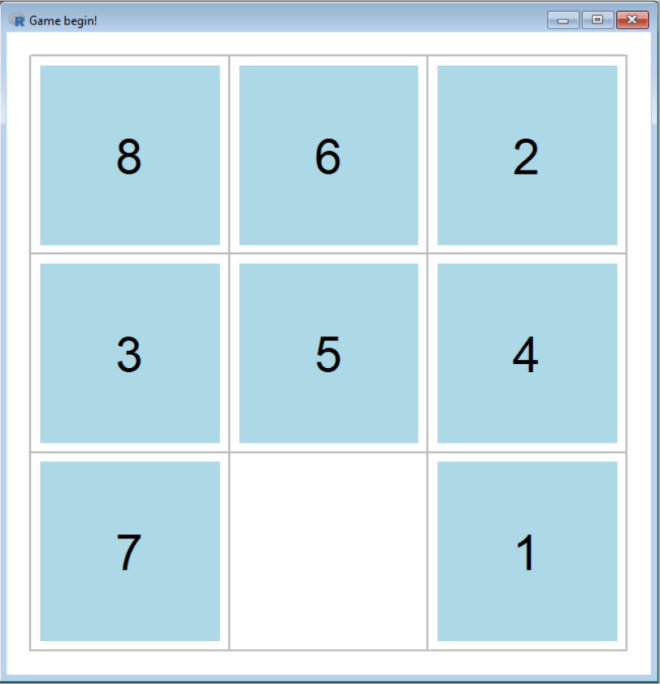
As you can see, I have managed to generate a 3-by-3 sliding puzzle with just one line of code! Now let’s see what happens when I complete the game:


While I’m playing the game, R keeps track of how many moves I’ve made and how long I took to complete the puzzle (34.62 seconds…not bad):


Now, one thing to keep in mind when calling a function from the fun package is to always include the parentheses. If you were to call the sliding_puzzle function without the pair of parentheses, here’s the output you would get (which is just the code that was used to create the game):


One thing I wanted to mention about the sliding puzzle game (or any of the functions in the fun package) is that it’s customizable. The 3-by-3 board with blue squares are just the default for the sliding puzzle game, but I can customize the size of the board and the color of the squares to my choosing. Let’s see what happens when I use a 6-by-6 board with yellow square:
But first, to create the 6-by-6 board with yellow squares, use this line of code:
sliding_puzzle(size=c(6,6), bg="yellow")
Now let’s see what the new sliding puzzle looks like:


Great! Now let’s see what it looks like once I’ve completed it:

Awesome! Now, just out of curiosity, how long did it take me to complete this puzzle?


So it took me 1,060 moves and 702.34 seconds (roughly 11 minutes and 43 seconds) to solve this puzzle! Not bad for a 6-by-6 sliding puzzle.
Now, for the sliding tile puzzle, even though you can customize the size of the board and the color of the squares, here are some things you unfortunately can’t customize:
- The text that appears on the squares; you will always get the numbers from 1 to the size of the board-1.
- The shapes of the tiles; no, you can’t use circles/triangles/diamonds, etc. on the game
Now let’s check out another fun R game-Minesweeper. For those who don’t know, Minesweeper is a classic puzzle game where you have to clear a rectangular board without clicking on a square with a hidden “mine”. Clues are given in certain squares as to how many mines are in a neighboring square.
To create a Minesweeper board, use this line of code: mine_sweeper(). Here’s what the default Minesweeper board looks like:

Now here’s what the board looks like after I complete a game:


As you can see, I clicked on a square with a “mine” and lost the game. To be honest, I was never that good at Minesweeper anyway.
Now, let’s customize the Minesweeper board. Let’s use this line of code-mine_sweeper(width = 11, height = 9, mines = 25, cheat = FALSE)-and see what the board looks like:


Now let’s see what the board looks like after I complete the game:


Well, that was just bad luck on my part.
OK, something I didn’t mention is that there is a hack in R’s version of Minesweeper that would help you win. All you would need to do is set cheat to TRUE.
Now let’s create a board with the same line of code we used last time-mine_sweeper(width = 11, height = 9, mines = 25, cheat = FALSE)-except change the FALSE to TRUE. Let’s see what the board looks like:


It’s the same board we got last time. But take a look at this:


This matrix shows you where all of the mines are hidden (indicated by a -1) along with the number that will be in each square (a 0 indicates a blank square).
With this handy little cheat code, I can easily find out where all of the mines are and win the game (though this does take some of the fun out of the game):

Now, if only R could generate a Minesweeper game that looks something like this:


Another fun game that R has in it’s fun package is Gomoku, which is a five-in-a-row version of Tic-Tac-Toe that uses white and black circles in place of Xs and Os.
Let’s see what a basic Gomoku board looks like (use this line of code-gomoku()):


Now let’s see what happens when I complete a game of Gomoku (against myself, since there isn’t a way to play against the computer yet):

As you can see, black managed to get five in a row before white, so black wins the game (though the function doesn’t have a programmed way to determine a winner, so you’ll need to figure it out yourself)
Now, you can also change the size of the Gomoku board, but you can’t have different numbers of rows and columns on the board (so 4-by-6 and 9-by-7 boards won’t work with R’s version of Gomoku). Let’s create a 6-by-6 Gomoku board using this line of code-gomoku(n=6):


Now here’s what my completed 6-by-6 Gomoku game looks like:

OK, so I’ve shown all of the games that the fun package has to offer. However, the fun package has more than just games.
An interesting non-game function in the fun package is random_password(), which generates a random password of a certain length (or a default length of 13 characters). This function comes in handy when you’re creating an account on any service (e-mail, streaming, etc.) and can’t think of a good strong password.
Let’s see what we get when we use the random_password() function:
random_password()
[1] "di_8WLK=GgI4"
As you can see, the random_password() function has generated a random 13-character password. Each time you use the random_password() function, you’ll get a different 13-character password.
- The more random the password is, the harder it will be for hackers to break into your account. Just a helpful cybersecurity tip.
But what if you wanted to set some parameters for your random password? Here’s how you would do that:
random_password(length=14, extend=FALSE)
[1] "13QEiz0D6nJF7d"
In this example, I set a password with a length of 14 characters. The extend = FALSE indicates that the random password should only have letters and numbers and contain no special characters (e.g. !, :, -, (, ]). This functionality comes in handy when you need to generate a strong password on a website that doesn’t allow you to use special characters for the password.
- If you set
extendtoTRUE, the randomly generated password will contain special characters.
Another interesting non-game function in the fun package is shutdown(), which automatically shuts down your computer. Shutdown() takes one parameter-wait=X-which tells the computer to wait X seconds before shutting down. For instance, shutdown (x=20) will shut down your computer after 20 seconds.
- I didn’t try to run this function because I still had files open on my computer that I wanted to save, and running
shutdown()would’ve caused me to lose all my work. Just keep this in mind before runningshutdown().
By the way, the functions I discussed aren’t the only functions the fun package has to offer. For more information on everything the fun package has to offer, please check out this document-
And one more thing-wouldn’t it be cool if R’s fun package had a pinball game that was similar to this? (2000s kids like myself will recognize this):


Thanks for reading,
Michael