Python Lesson 36: Named Entity Recognition (NLP pt. 5)

Advertisements

Hello everybody,

Michael here, and today’s lesson will be on named entity recoginition in Python NLP.

Intro to named entity recognition

What is named entity recogintion exactly? Well, it’s NLP’s process of identifying named entities in text. Named entities are bascially anything that is a place, person, organization, time, object, or geographic entity-in other words, anything that can be denoted with a proper name.

Take a look at this headline from ABC News from July 21, 2022:

Former Minneapolis police officer sentenced in George Floyd killing

How many named entities can you find? If you answered two, you’d be correct-Minneapolis and George Floyd.

Python’s SPACY package

Before we begin any named-entity recognition analysis, we must first pip install the spacy package using this line of code-pip install spacy. Unlike the last four NLP lessons I’ve posted, this lesson won’t use the NLTK package (or any modules within) as Python’s spacy package is better suited for this task.

In case you need assistance with installing the spacy package, click on this link-https://spacy.io/usage#installation. This link will show you how to install spacy based on what operating system you have.

If you go to this link, you will see an interface like the one pictured above (picture current as of July 2022). Toggling the filters on this interface will show you the commands you’ll need to use to install not only the spacy module itself but also a trained spacy pipeline in whatever language you choose (and there are 23 options for languages here). The commands needed to install spacy will depend on things like the OS you’re using (whether Mac, Windows, or Linux), the package manage you’re using to install Python packages (whether pip, conda, or from source), among other things.

The Spacy pipeline

Similar to how we downloaded the punkt and stopwords modules in NTLK, we will also need to install a seprate module to work with spacy-in this case, the spacy pipeline. See, to ensure the spacy package works to its fullest capabilites, you’ll need to download a spacy pipeline in whatever language you choose (I’m using English for this example)

  • Remember to install the spacy pipeline AFTER installing the spacy package!

For this lesson, I’ll be using the en_core_web_md pipeline, which is a medium-sized English spacy pipeline. If you wish, you can download the en_core_web_sm or en_core_web_lg pipelines-these are the small-sized and large-sized English spacy pipelines, respectively. The larger the spacy pipeline you choose, the better its named-entity recognition functionalities would be-the small pipeline has 12 megabytes of info, the medium pipeline has 40 megabytes of info, and the large pipeline has 560 megabytes of info.

To install the medium-sized English spacy pipeline, run this command-python -m spacy download en_core_web_md.

  • If you’re downloading the small-sized or large-sized English spacy pipelines, replace en_core_web_md with en_core_web_sm or en_core_web_lg depending on the pipeline size you’re using.

However, even after installing the pipeline, you’ll still need to download it in your code using this line of code-spacy.load('en_core_web_md'). Remember that even though I’m using the en_core_web_md spacy pipeline, pass whatever pipeline you’ll be using as the parameter for the spacy.load() method.

Spacy in action

Now that I’ve explained the basics of setting up spacy, it’s time to show named-entity recognition in action. For the example I’ll show you, I’ll use this XLSX file containing twelve different news headlines from the Associated Press published on July 25 and 26, 2022:

Let’s see how we can find all of the named entities in these twelve headlines:

import spacy
nlp = spacy.load('en_core_web_md')
import pandas as pd

headlines = pd.read_excel(r'C:\Users\mof39\OneDrive\Documents\headlines.xlsx')

for h in headlines['Headline']:
    doc = nlp(h)
    
    for ent in doc.ents:
        print(ent.text)
    
    print(h)
    print() 

North Dakota
final day
North Dakota abortion clinic prepares for likely final day

Paul Sorvino
83
‘Goodfellas,’ ‘Law & Order’ actor Paul Sorvino dies at 83

Biden
Biden fights talk of recession as key economic report looms

Hobbled
GM
40%
Hobbled by chip, other shortages, GM profit slides 40% in Q2

Mike Pence
Nov.
Former Vice President Mike Pence to release memoir in Nov.

September
Elon Musk
Twitter sets September shareholder vote on Elon Musk buyout

Choco Taco
summer
Sorrow in Choco Taco town after summer treat is discontinued

Texas
Appeals court upholds Texas block on school mask mandates

QB Kyler Murray
Cardinals say QB Kyler Murray focused on football

Jack Harlow
Lil Nas X
Kendrick Lamar
MTV
Jack Harlow, Lil Nas X, Kendrick Lamar top MTV VMA nominees

New studies bolster theory coronavirus emerged from the wild

Northwest swelters under ‘uncomfortable’ multiday heat wave

In this example, I first performed all the necessary imports and read in the headlines dataset as a pandas dataframe. I then looped through all the values in the Headline column in the pandas dataframe, converted each value into a spacy doc (this is necessary for the named-entity recognition), and looped through all the tokens in the headline in order to find and print out any named entities that spacy finds-the headline itself is printed below all (or no) named entities that are found.

As you can see, spacy found named entities in 10 of the 12 headlines. However, you may notice that spacy’s named-entity recognition isn’t completely accurate, as it missed some tokens that are clearly named entities. Here are some surprising omissions:

  • Goodfellas and Law & Order on headline #2-referring to a movie and TV show, respectively
  • Q2 on headline #4-in the context of this article, refers to GM’s Q2 2022 profits
  • Twitter on headline #6-Twitter is one of the world’s most popular social media sites after all
  • Cardinals on headline #9-This headline refers to Arizona Cardinals QB Kyler Murray
  • VMA on headline #10-VMA refers to the MTV VMAs, or Video Music Awards
  • Northwest on headline #12-Northwest referring to the Northwest US region

Along with these surprising omissions, here are some other interesting observations I found:

  • Spacy read QB Kyler Murray as a single entity but not Vice President Mike Pence
  • MTV VMA wasn’t read as a single entity-rather, MTV was read as the entity
  • Hobbled shouldn’t be read as an entity at all

Now, what if you wanted to know each entity’s label? Take a look at the code below, paying attention to the red highlighted line (the line I revised from the above example):

import spacy
nlp = spacy.load('en_core_web_md')
import pandas as pd

headlines = pd.read_excel(r'C:\Users\mof39\OneDrive\Documents\headlines.xlsx')

for h in headlines['Headline']:
    doc = nlp(h)
    
    for ent in doc.ents:
        print(ent.text + ' --> ' + ent.label_)
    
    print(h)
    print() 

North Dakota --> GPE
final day --> DATE
North Dakota abortion clinic prepares for likely final day

Paul Sorvino --> PERSON
83 --> CARDINAL
‘Goodfellas,’ ‘Law & Order’ actor Paul Sorvino dies at 83

Biden --> PERSON
Biden fights talk of recession as key economic report looms

Hobbled --> PERSON
GM --> ORG
40% --> PERCENT
Hobbled by chip, other shortages, GM profit slides 40% in Q2

Mike Pence --> PERSON
Nov. --> DATE
Former Vice President Mike Pence to release memoir in Nov.

September --> DATE
Elon Musk --> ORG
Twitter sets September shareholder vote on Elon Musk buyout

Choco Taco --> ORG
summer --> DATE
Sorrow in Choco Taco town after summer treat is discontinued

Texas --> GPE
Appeals court upholds Texas block on school mask mandates

QB Kyler Murray --> PERSON
Cardinals say QB Kyler Murray focused on football

Jack Harlow --> PERSON
Lil Nas X --> PERSON
Kendrick Lamar --> PERSON
MTV --> ORG
Jack Harlow, Lil Nas X, Kendrick Lamar top MTV VMA nominees

New studies bolster theory coronavirus emerged from the wild

Northwest swelters under ‘uncomfortable’ multiday heat wave

To print out each entity’s label, I added a text arrow after each entity pointing to that entity’s label. What do each of the entity labels mean?

  • ORG-any sort of organization (like a company, educational institution, etc)
  • NORP-nationality/religious or political groups (e.g. American, Catholic, Democrat)
  • GPE-geographical entity
  • PERSON
  • LANGUAGE
  • MONEY
  • DATE
  • TIME
  • PRODUCT
  • EVENT
  • CARDINAL-as in cardinal number (one, two, three, etc.)
  • ORDINAL-as in ordinal number (first, second, third, etc.)
  • WORK OF ART-a book, movie, song; really anything that you can consider a work of art

All in all, the label matching seems to be pretty accurate. However, one mislabelled entity can be found on headline #6-Elon Musk is mislabelled as ORG (or organization) when he clearly isn’t an ORG. Another mislabelled entity is Hobbled-it is listed as a PERSON when it shouldn’t be listed as an entity at all.

Now, what if you wanted a neat way to visualize named-entity recognition? Well, Spacy’s Displacy module would be the answer for you. See, the Displacy module will help you visualize the NER (named-entity recognition) that Spacy conducts.

Let’s take a look at Displacy in action:

import spacy
nlp = spacy.load('en_core_web_md')
import pandas as pd

headlines = pd.read_excel(r'C:\Users\mof39\OneDrive\Documents\headlines.xlsx')

for h in headlines['Headline']:
    doc = nlp(h)
    displacy.render(doc, style='ent')
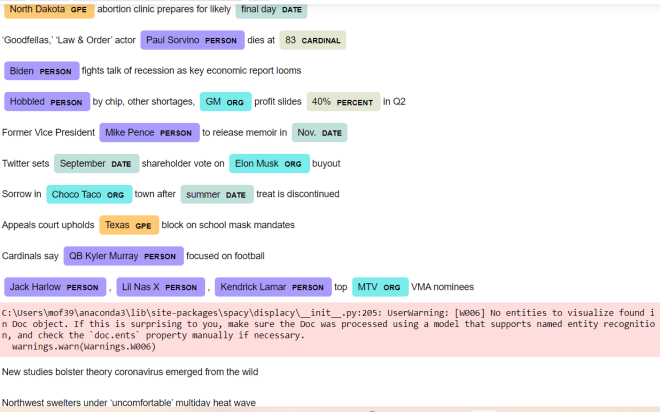
Pay attention to the code that I used here. Unlike the previous examples, I actually save the spacy pipeline I downloaded as a variable (nlp). I then read in the data-frame containing the headlines, loop through each value in the Headline column, and run the displacy.render() method, passing in the string I’m parsing (doc) and the displacy style I want to use (ent) as this method’s parameters.

After running the code, you can see a nice, colorful output showing you all the named entities (at least the named entities spacy found) in the text along with the entitiy’s corresponding label. You’ll also notice that each entity is color-coded according to its label; for instance, geographical entites (e.g. Texas, North Dakota) are colored in orange while peoples’ names (e.g. Kendrick Lamar, Lil Nas X) are colored in purple.

While running this code, you’ll also see the UserWarning above-in this case, don’t worry, as this warning simply means that spacy couldn’t find any named entities for a particular string (in this example, spacy couldn’t find any named entities for two of the 12 strings).

Oh, and one more reminder. In the displacy.render() method, you’ll need to include style='ent' as a parameter if you want to work with named-entity recognition, as here’s the default diagram that you get as an output if you don’t specify a style:

In this case, the code still works fine, but you’ll get a dependency parse diagram, which shows you how words in a string are syntactically related to each other.

Thanks for reading,

Michael

Python Lesson 35: Parts-of-speech tagging (NLP pt. 4)

Advertisements

Hello everybody,

Michael here, and today’s post will cover parts-of-speech tagging as it relates to Python NLP (this is part 4 in my NLP Python series).

Intro to parts-of-speech tagging

What is parts-of-speech (POS) tagging, exactly? See, Python NLP can do some really cool things, such as getting the roots of words (Python Lesson 34: Stemming and Lemmatization (NLP pt. 3)) and finding commonly used words (stopwords) in 24 different languages (Python Lesson 33: Stopwords (NLP pt.2)). In Python, parts-of-speech tagging is a quite self-explanatory process, as it involves tokenizing a string and identifying each token’s part-of-speech (such as a noun, verb, etc.). Keep in mind that this isn’t going to be a grammar lesson, so I’m not going to teach you how to use POS tagging to improve your grammar or proofread something you wrote.

POS tagging in action

Now that I’ve explained the basics of POS tagging, let’s see it in action! Take a look at the example below:

import nltk
nltk.download('punkt')
nltk.download('averaged_perceptron_tagger')

test = input('Please input a test string: ')
tokens = nltk.word_tokenize(test)

tagged = []

for t in tokens:
    tagged = nltk.pos_tag(tokens)
    
print(tagged)

Please input a test string: I had a fun time dancing last night.
[('I', 'PRP'), ('had', 'VBD'), ('a', 'DT'), ('fun', 'JJ'), ('time', 'NN'), ('dancing', 'VBG'), ('last', 'JJ'), ('night', 'NN'), ('.', '.')]

Before getting into the fun POS tagging, you’d first need to import the nltk package and download two of the package’s modules-punkt and averaged_perceptron_tagger. punkt is NLTK’s standard package module which allows Python to work its NLP magic while averaged_perceptron_tagger is the module that enables all the fun POS tagging capabilities.

After including all the necessary imports and downloading all the necessary package modules, I then inputted and word-tokenized a test string. I then created an empty list-tagged-that will store the results of our POS tagging.

To perform the POS tagging, I iterated through each element in the list of tokens (aptly called tokens) and used NLTK’s pos_tag() method to add the appropriate POS tag to the element. I then printed out the tagged list, which contains the results of our POS tagging. As you can see, the tagged list contains a list of tuples-the first element in each tuple is the token itself while the second element is that token’s part-of-speech. Punctuation is also included, as punctuation counts as its own token, but doesn’t belong to any part-of-speech.

You likely noticed that the POS tags are all two or three character abbrevations. Here’s a table explaining all of the POS tags:

TagPart-of-speechExample/Explanation
CCcoordinating conjuctionAny of the FANBOYS conjuctions (for, and,
nor, but, or, yet, so)
CDcardinal digitThe numbers 0-9
DTdeterminerA word in front of a noun to specify quanity
or to clarify what the noun refers to (e.g. one
car, that child)
EXexistential thereThere is a snake in the grass.
FWforeign wordSince I’m using English for this post, any word
that isn’t English (e.g. palabra in Spanish)
INprepositionon, in, at
JJadjective (base form)large, tiny
JJRcomparative adjectivelarger, tinier
JJSsuperlative adjectivelargest, tiniest
LSlist marker1), 2)
MDmodal verbOtherwise known as auxiliary verb (e.g. might
happen, must visit)
NNsingular nouncar, tree, cat, etc.
NNSplural nouncars, trees, cats, etc.
NNPsingular proper nounFord
NNPSplural proper nounAmericans
PDTpredeterminerA word or phrase that occurs before a determiner
that quantifies a noun phrase (e.g. lots of toys,
few students)
POSpossessive endingMichael’s, Tommy’s
PRPpersonal pronounPronouns associated with a grammatical person-be it first person, second person, or third person (e.g.
they, he, she)
PRP$possessive pronounPronouns that indicate possession (e.g. mine, theirs, hers)
RBadverbvery, extremely
RBRcomparative adverbearlier, worse
RBSsuperlative adverbbest, worst
RPparticleAny word that doesn’t fall within the main parts-of-speech (e.g. give up)
TOthe word ‘to’to come home
UHinterjectionYikes! Ummmm.
VBbase form of verbwalk
VBDpast tense of verbwalked
VBGgerund form of verbwalking
VBNpast participle of verbwalked
VBPpresent singular form of verb (non-3rd person)walk
VBZpresent singular form
of verb (3rd-person)
walks
WDT“wh” determinerwhich
WP“wh” pronounwho, what
WP$possessive “wh” pronounwhose
WRB“wh” adverbwhere, when

As you can see, even though English has only eight parts of speech (verbs, nouns, adjectives, adverbs, pronouns, prepositions, conjuctions, and interjections), Python has 35 (!) parts-of-speech tags.

  • Even though I’m working with English here, I imagine these POS tags can work for any language.

If you take a look at the last line of output in the above example (the line containing the list of tuples), you can see two-element tuples containing the token itself as the first element along with the token’s POS tag as the second element. And yes, punctuation in a sentence counts as a token itself, but it has no POS tag. Hence why the tuple-POS tag pair for the period at the end of the sentence looks like this-['.', '.'].

Now, what if there was a sentence that had the same word twice but used as different parts-of-speech (e.g. a sentence that had the same word used as a noun and a verb). Let’s take a look at the example below:

import nltk
nltk.download('punkt')
nltk.download('averaged_perceptron_tagger')

test = input('Please input a test string: ')
tokens = nltk.word_tokenize(test)
tagged = nltk.pos_tag(tokens)
    
print(tagged)

Please input a test string: She got a call at work telling her to call the project manager.
[('She', 'PRP'), ('got', 'VBD'), ('a', 'DT'), ('call', 'NN'), ('at', 'IN'), ('work', 'NN'), ('telling', 'VBG'), ('her', 'PRP'), ('to', 'TO'), ('call', 'VB'), ('the', 'DT'), ('project', 'NN'), ('manager', 'NN'), ('.', '.')]

Take a close look at the sentence I used in this example-She got a call at work telling her to call the project manager. Notice the repeated word here-call. In this example, call is used as both a noun (She got a call at work) and a verb (to call the project manager.). The neat thing here is that NLTK’s POS tagger recognizes that the word call is used as two different parts-of-speech in that sentence.

However, the POS tagger may not always be so accurate when it comes to recognizing the same word used as a different part of speech. Take a look at this example:

import nltk
nltk.download('punkt')
nltk.download('averaged_perceptron_tagger')

test = input('Please input a test string: ')
tokens = nltk.word_tokenize(test)
tagged = nltk.pos_tag(tokens)
    
print(tagged)

Please input a test string: My apartment building is bigger than any other apartment in a 5-block vicinity.
[('My', 'PRP$'), ('apartment', 'NN'), ('building', 'NN'), ('is', 'VBZ'), ('bigger', 'JJR'), ('than', 'IN'), ('any', 'DT'), ('other', 'JJ'), ('apartment', 'NN'), ('in', 'IN'), ('a', 'DT'), ('5-block', 'JJ'), ('vicinity', 'NN'), ('.', '.')]

In this example, I’m using the word apartment twice, as both an adjective (My apartment building) and a noun (any other apartment). However, NLTK’s POS tagger doesn’t recognize that the first instance of the word apartment is being used as an adjective to modify the noun building.

  • Hey, what can you say, programs aren’t always perfect. But I’d say NLTK’s POS tagger works quite well for parts-of-speech analysis.

Thanks for reading,

Michael

Python Lesson 34: Stemming and Lemmatization (NLP pt. 3)

Advertisements

Hello everybody,

Michael here, and today’s lesson will cover stemming and lemmatization in Python NLP (natural language processing).

Stemming

Now that we’ve covered some basic tokenization concepts (like tokenization itself and filtering out stopwords), we can move on to the next important concepts in NLP-stemming and lemmatization. Stemming is an NLP task that involves reducing words to their roots-for instance, stemming the words “liked” and “likely” would result in “like”

Now, the NLTK package has several stemmers you can use, but for this lesson (along with all Python NLP lesson on this blog) I will be using NLTK’s PorterStemmer stemmer. Let’s see stemming in action:

import nltk
nltk.download('punkt')
from nltk.stem import PorterStemmer

test = input('Please input a test string: ')
testWords = nltk.word_tokenize(test)
print(testWords)

stemmer = PorterStemmer()
stemmedWords = [stemmer.stem(word) for word in testWords]
print(stemmedWords)

Please input a test string: Byte sized programming classes for eager coding learners
['Byte', 'sized', 'programming', 'classes', 'for', 'eager', 'coding', 'learners']
['byte', 'size', 'program', 'class', 'for', 'eager', 'code', 'learner']

To start your stemming, include the first three lines of code you see above as the imports and downloads. And yes, you’ll need to import the PorterStemmer separately.

After including all the necessary downloads and imports, I then included code to input a test string, word-tokenize that test string, and print the list of tokens. After performing the word-tokenizing, I then created a PorterStemmer object (aptly named stemmer), performed a list comprehension to stem each token in the input string, and printed the stemmed list of tokens.

What do you notice in the stemmed list of tokens (it’s the last line of output by the way)? First of all, all words are displayed in lowercase, which is nothing remarkable. Secondly, notice how most of the stemmed tokens make perfect sense (e.g. sized = size, programming = program, and so on); sometimes when stemming words in Python NLP, you’ll get some weird outputs.

Now, let’s try another input string and see what kind of results we get:

import nltk
nltk.download('punkt')
from nltk.stem import PorterStemmer

test = input('Please input a test string: ')
testWords = nltk.word_tokenize(test)
print(testWords)

stemmer = PorterStemmer()
stemmedWords = [stemmer.stem(word) for word in testWords]
print(stemmedWords)

Please input a test string: The quick brown fox jumped over the lazy brown dog and jumps over the even lazier brown cat.
['The', 'quick', 'brown', 'fox', 'jumped', 'over', 'the', 'lazy', 'brown', 'dog', 'and', 'jumps', 'over', 'the', 'even', 'lazier', 'brown', 'cat', '.']
['the', 'quick', 'brown', 'fox', 'jump', 'over', 'the', 'lazi', 'brown', 'dog', 'and', 'jump', 'over', 'the', 'even', 'lazier', 'brown', 'cat', '.']

Just like the previous example, this example tokenizes an input string and stems each element in the tokenized list. However, pay attention to the words “lazy” and “lazier”. Although “lazier” is a conjugation of “lazy”, “lazy” has a stem of, “lazi” while “lazier” has a stem of “lazier”.

OK, so if stemming sometimes gives you weird and inconsistent results (like in the example above), there’s a reason for that. See, stemming reduces words to their core meaning. However, unlike lemmatization (which I’ll discuss next), stemming is a lot cruder, so it’s not uncommon to get fragments of words when stemming. Plus, the PorterStemmer tool is based off an algorithm that was developed in 1979-so yea, it’s a little dated. There is a PorterStemmer2 tool that improves upon the PorterStemmer tool we used-just FYI.

Lemmatization

Now that we’ve covered the basics of word stemming, let’s move on to word lemmatization. Lemmatization, like stemming, is an NLP tool that is meant to reduce words to their core meaning. However, unlike stemming, lemmatization usually gives you a complete word rather than a fragment of a word (e.g. “lazi” from the previous example).

import nltk
nltk.download('punkt')
nltk.download('wordnet')
from nltk.stem import WordNetLemmatizer

test = input('Please input a test string: ')
tokens = nltk.word_tokenize(test)
lemmatizer = WordNetLemmatizer()
lemmatizedList = [lemmatizer.lemmatize(word) for word in tokens]

print(lemmatizedList)

Please input a test string: The two friends drove their nice blue cars across the Florida coast.
['The', 'two', 'friend', 'drove', 'their', 'nice', 'blue', 'car', 'across', 'the', 'Florida', 'coast', '.']

So, how did I accomplish the lemmatization? First of all, after adding in all the necessary downloads and imports (and typing in an import string), I first tokenized my input string. I then created a lemmatizer object (aptly named lemmatizer) using NLTK’s WordNetLemmatizer tool. To lemmatize each token in the input string, I ran list comprehension to pass each element of the list of tokens (aptly named tokens) into the lemmatizer tool to lemmatize each word. I stored the results of this list comprehension into the lemmatizedList and printed that list below the text input.

As you can see from the example above, the lemmas of the tokens above are the same as the tokens themselves (e.g. two, across, blue). However, some of the tokens have different lemmas (e.g. cars–>car, friends–>friend). That’s because, as I mentioned earlier, lemmas find the root of a word. In the case of the words cars and friends, the root of the word would be the word’s singular form (car and friend, respectively).

  • Just thought I’d put this out here, but the root word that is generated is called a lemma, and the group of words with a particular lemma is called a lexeme. For instance, the word “try” would be the lemma while the words “trying, tried, tries” could be part of (but not the only words) that are part of the lexeme.

So, from the example above, looks like the lemmatization works much better than stemming when it comes to finding the root of a word. But what if you tried lemmatizing a word that looked very different from its lemma? Let’s see an example of that below (using the lemmatizer object created from the previous example):

lemmatizer.lemmatize("bought")
'bought'

In this example, I’m trying to lemmatize the word “bought” (as in, I bought a new watch.) However, you can see that in this example, the lemma of bought is bought. That can’t be right, can it?

Why do you think that particular output was generated? Simply put, the lemmatizer tool, by default, will assume a word is a noun (even when that clearly isn’t the case).

How can we correct this? Take a look at the example below:

lemmatizer.lemmatize("bought", pos='v')
'buy'

In this example, I added the pos parameter, which specifies a part of speech for a particular word. In this case, I set the value of pos to v, as the word “bought” is a verb. Once I added the pos parameter, I was able to get the correct lemma for the word “bought”-“buy”.

  • When working with lemmatization, you’ll run into the issue quite a bit with adjectives and irregular verbs.

Thanks for reading,

Michael

Python Lesson 33: Stopwords (NLP pt.2)

Advertisements

Hello everybody,

Michael here, and today’s post will be on stopwords in Python NLP-part 2 in my NLP series.

What are stopwords? Simply put, stopwords are words you want to ignore when tokenizing a string. Oftentimes, stopwords are common English words like “a”, “the”, and “is” that are so commonly used in English that they don’t add much meaning in text.

  • Stopwords can be found for any language, but for this series of NLP lessons, I’ll focus on English words.

Now that I’ve explained the basics of stopwords, let’s see them in action:

import nltk
nltk.download('punkt')
nltk.download('stopwords')
from nltk.corpus import stopwords

test = input('Please type in a string: ')
testWords = nltk.word_tokenize(test)

stopwordsList = set(stopwords.words('english'))

filteredList = []

for t in testWords:
    if t.casefold() not in stopwordsList:
        filteredList.append(t)

print(filteredList)

Please type in a string: The puppies and the kitties played in their playpen on the hot summer afternoon.
['puppies', 'kitties', 'played', 'playpen', 'hot', 'summer', 'afternoon', '.']

To utilize NLTK’s stopwords module, you’ll need to run the nltk.download(stopwords) command and import the stopwords module from the nltk.corpus package.

  • Yes, you’ll still need to download the punkt module, as it will enable easy tokenization, which is important to have when working with stopwords.

To store the list of tokens in the string you input, create a testWords variable that stores the output of the nltk.word_tokenize function. To get a list of NLTK’s English stopwords, use the line of code set(stopwords.words('english'))-this line of code creates a set from the list of NLTK’s English stopwords. Recall that sets are like lists, except without duplicate elements.

To gather a list of stopwords in the input string, you’d need to first create an empty list-filteredList in this case-that you’ll need to filter the stopwords out of the list of tokens (testWords in this case). To remove the stopwords, you’ll need to iterate through the list of tokens (again, testWords in this case), check if each token is in the list of stopwords and if not, add the token to the empty list you created earlier (filteredList in this case).

As you can see in the example above, the input string I used has 15 tokens (the punctuation at the end of the sentence counts as a token). After filtering out the stopwords, the resulting list only contains 8 tokens, as 7 tokens have been filtered out-The and the in their on the. Yes, even though I am iterating though a UNIQUE list of stopwords, the loop I am running will check for all instances of a stopword and exclude them from the filtered list (after all, there were three instances of the word “the” in the input string).

Ever want to see all of the words included in NLTK’s English stopwords list? Run the command print(stopwords.words('english') and you’ll see all the stopwords NLTK uses in English:

['i', 'me', 'my', 'myself', 'we', 'our', 'ours', 'ourselves', 'you', "you're", "you've", "you'll", "you'd", 'your', 'yours', 'yourself', 'yourselves', 'he', 'him', 'his', 'himself', 'she', "she's", 'her', 'hers', 'herself', 'it', "it's", 'its', 'itself', 'they', 'them', 'their', 'theirs', 'themselves', 'what', 'which', 'who', 'whom', 'this', 'that', "that'll", 'these', 'those', 'am', 'is', 'are', 'was', 'were', 'be', 'been', 'being', 'have', 'has', 'had', 'having', 'do', 'does', 'did', 'doing', 'a', 'an', 'the', 'and', 'but', 'if', 'or', 'because', 'as', 'until', 'while', 'of', 'at', 'by', 'for', 'with', 'about', 'against', 'between', 'into', 'through', 'during', 'before', 'after', 'above', 'below', 'to', 'from', 'up', 'down', 'in', 'out', 'on', 'off', 'over', 'under', 'again', 'further', 'then', 'once', 'here', 'there', 'when', 'where', 'why', 'how', 'all', 'any', 'both', 'each', 'few', 'more', 'most', 'other', 'some', 'such', 'no', 'nor', 'not', 'only', 'own', 'same', 'so', 'than', 'too', 'very', 's', 't', 'can', 'will', 'just', 'don', "don't", 'should', "should've", 'now', 'd', 'll', 'm', 'o', 're', 've', 'y', 'ain', 'aren', "aren't", 'couldn', "couldn't", 'didn', "didn't", 'doesn', "doesn't", 'hadn', "hadn't", 'hasn', "hasn't", 'haven', "haven't", 'isn', "isn't", 'ma', 'mightn', "mightn't", 'mustn', "mustn't", 'needn', "needn't", 'shan', "shan't", 'shouldn', "shouldn't", 'wasn', "wasn't", 'weren', "weren't", 'won', "won't", 'wouldn', "wouldn't"]

In total, NLTK has 179 stopwords in English, which consist of common English pronouns (I, my, you), commonly used English contracations (don’t, isn’t), conjungations of common English verbs (such as be and have), and surprisingly, contractions that you don’t hear most people use nowadays (be honest, when was the last time you heard someone use a word like shan’t or mightn’t).

  • Of course, you can always append words to NLTK’s stopwords list as you see fit, but when working with stopwords in English (or any language), I’d suggest sticking with the default stopwords list.

Now, I know I mentioned that I’ll mostly be working with English throughout my NLP lessons, but let’s explore stopwords in other languages. For this example, I’ll use the same code and same input string I used in the previous example, except this time use Spanish:

Please type in a string: Los cachorros y los gatitos jugaban en su corralito en la calurosa tarde de verano.
['cachorros', 'gatitos', 'jugaban', 'corralito', 'calurosa', 'tarde', 'verano', '.']

So, the Spanish-translated version of my previous example has 16 tokens, 8 of which appear on the filtered list. Thus, there were 8 stopwords that were removed from the testWords list.

Want to see the Spanish list of stopwords? Run the command print(stopwords.words('spanish') and take a look:

['de', 'la', 'que', 'el', 'en', 'y', 'a', 'los', 'del', 'se', 'las', 'por', 'un', 'para', 'con', 'no', 'una', 'su', 'al', 'lo', 'como', 'más', 'pero', 'sus', 'le', 'ya', 'o', 'este', 'sí', 'porque', 'esta', 'entre', 'cuando', 'muy', 'sin', 'sobre', 'también', 'me', 'hasta', 'hay', 'donde', 'quien', 'desde', 'todo', 'nos', 'durante', 'todos', 'uno', 'les', 'ni', 'contra', 'otros', 'ese', 'eso', 'ante', 'ellos', 'e', 'esto', 'mí', 'antes', 'algunos', 'qué', 'unos', 'yo', 'otro', 'otras', 'otra', 'él', 'tanto', 'esa', 'estos', 'mucho', 'quienes', 'nada', 'muchos', 'cual', 'poco', 'ella', 'estar', 'estas', 'algunas', 'algo', 'nosotros', 'mi', 'mis', 'tú', 'te', 'ti', 'tu', 'tus', 'ellas', 'nosotras', 'vosotros', 'vosotras', 'os', 'mío', 'mía', 'míos', 'mías', 'tuyo', 'tuya', 'tuyos', 'tuyas', 'suyo', 'suya', 'suyos', 'suyas', 'nuestro', 'nuestra', 'nuestros', 'nuestras', 'vuestro', 'vuestra', 'vuestros', 'vuestras', 'esos', 'esas', 'estoy', 'estás', 'está', 'estamos', 'estáis', 'están', 'esté', 'estés', 'estemos', 'estéis', 'estén', 'estaré', 'estarás', 'estará', 'estaremos', 'estaréis', 'estarán', 'estaría', 'estarías', 'estaríamos', 'estaríais', 'estarían', 'estaba', 'estabas', 'estábamos', 'estabais', 'estaban', 'estuve', 'estuviste', 'estuvo', 'estuvimos', 'estuvisteis', 'estuvieron', 'estuviera', 'estuvieras', 'estuviéramos', 'estuvierais', 'estuvieran', 'estuviese', 'estuvieses', 'estuviésemos', 'estuvieseis', 'estuviesen', 'estando', 'estado', 'estada', 'estados', 'estadas', 'estad', 'he', 'has', 'ha', 'hemos', 'habéis', 'han', 'haya', 'hayas', 'hayamos', 'hayáis', 'hayan', 'habré', 'habrás', 'habrá', 'habremos', 'habréis', 'habrán', 'habría', 'habrías', 'habríamos', 'habríais', 'habrían', 'había', 'habías', 'habíamos', 'habíais', 'habían', 'hube', 'hubiste', 'hubo', 'hubimos', 'hubisteis', 'hubieron', 'hubiera', 'hubieras', 'hubiéramos', 'hubierais', 'hubieran', 'hubiese', 'hubieses', 'hubiésemos', 'hubieseis', 'hubiesen', 'habiendo', 'habido', 'habida', 'habidos', 'habidas', 'soy', 'eres', 'es', 'somos', 'sois', 'son', 'sea', 'seas', 'seamos', 'seáis', 'sean', 'seré', 'serás', 'será', 'seremos', 'seréis', 'serán', 'sería', 'serías', 'seríamos', 'seríais', 'serían', 'era', 'eras', 'éramos', 'erais', 'eran', 'fui', 'fuiste', 'fue', 'fuimos', 'fuisteis', 'fueron', 'fuera', 'fueras', 'fuéramos', 'fuerais', 'fueran', 'fuese', 'fueses', 'fuésemos', 'fueseis', 'fuesen', 'sintiendo', 'sentido', 'sentida', 'sentidos', 'sentidas', 'siente', 'sentid', 'tengo', 'tienes', 'tiene', 'tenemos', 'tenéis', 'tienen', 'tenga', 'tengas', 'tengamos', 'tengáis', 'tengan', 'tendré', 'tendrás', 'tendrá', 'tendremos', 'tendréis', 'tendrán', 'tendría', 'tendrías', 'tendríamos', 'tendríais', 'tendrían', 'tenía', 'tenías', 'teníamos', 'teníais', 'tenían', 'tuve', 'tuviste', 'tuvo', 'tuvimos', 'tuvisteis', 'tuvieron', 'tuviera', 'tuvieras', 'tuviéramos', 'tuvierais', 'tuvieran', 'tuviese', 'tuvieses', 'tuviésemos', 'tuvieseis', 'tuviesen', 'teniendo', 'tenido', 'tenida', 'tenidos', 'tenidas', 'tened']

In comparison to the English stopwords list, the Spanish list has 313 stopwords. However, both the English and Spanish lists have the same type of elements, such as conjugations of commonly used verbs (such as ser and estar), common pronouns and prepositions (yo, tu, para, contra), among other things. What you don’t see much of in the Spanish stopwords list are contractions, and that’s because there are only two knwon contractions in Spanish (al and del-both of which are on this list) while English has plenty of contractions.

Now, one cool thing about working with stopwords (and NLP in general) is that you can play around with several foreign languages. Run the command print(stopwords.fileids()) to see all the languages you can play with when working with stopwords:

['arabic', 'azerbaijani', 'bengali', 'danish', 'dutch', 'english', 'finnish', 'french', 'german', 'greek', 'hungarian', 'indonesian', 'italian', 'kazakh', 'nepali', 'norwegian', 'portuguese', 'romanian', 'russian', 'slovene', 'spanish', 'swedish', 'tajik', 'turkish']

In total, you can use 24 languages when working with stopwords-from common languages like English, Spanish and French to more interesting options like Kazakh and Turkish. Interestingly, I don’t see an option to use Mandarin on here, as it’s a commonly spoken language worldwide.

Thank you,

Michael