Hello everybody,
Michael here, and today’s lesson will be on named entity recoginition in Python NLP.
Intro to named entity recognition
What is named entity recogintion exactly? Well, it’s NLP’s process of identifying named entities in text. Named entities are bascially anything that is a place, person, organization, time, object, or geographic entity-in other words, anything that can be denoted with a proper name.
Take a look at this headline from ABC News from July 21, 2022:
Former Minneapolis police officer sentenced in George Floyd killing
How many named entities can you find? If you answered two, you’d be correct-Minneapolis and George Floyd.
Python’s SPACY package
Before we begin any named-entity recognition analysis, we must first pip install the spacy package using this line of code-pip install spacy. Unlike the last four NLP lessons I’ve posted, this lesson won’t use the NLTK package (or any modules within) as Python’s spacy package is better suited for this task.
In case you need assistance with installing the spacy package, click on this link-https://spacy.io/usage#installation. This link will show you how to install spacy based on what operating system you have.


If you go to this link, you will see an interface like the one pictured above (picture current as of July 2022). Toggling the filters on this interface will show you the commands you’ll need to use to install not only the spacy module itself but also a trained spacy pipeline in whatever language you choose (and there are 23 options for languages here). The commands needed to install spacy will depend on things like the OS you’re using (whether Mac, Windows, or Linux), the package manage you’re using to install Python packages (whether pip, conda, or from source), among other things.
The Spacy pipeline
Similar to how we downloaded the punkt and stopwords modules in NTLK, we will also need to install a seprate module to work with spacy-in this case, the spacy pipeline. See, to ensure the spacy package works to its fullest capabilites, you’ll need to download a spacy pipeline in whatever language you choose (I’m using English for this example)
- Remember to install the spacy pipeline AFTER installing the spacy package!
For this lesson, I’ll be using the en_core_web_md pipeline, which is a medium-sized English spacy pipeline. If you wish, you can download the en_core_web_sm or en_core_web_lg pipelines-these are the small-sized and large-sized English spacy pipelines, respectively. The larger the spacy pipeline you choose, the better its named-entity recognition functionalities would be-the small pipeline has 12 megabytes of info, the medium pipeline has 40 megabytes of info, and the large pipeline has 560 megabytes of info.
To install the medium-sized English spacy pipeline, run this command-python -m spacy download en_core_web_md.
- If you’re downloading the small-sized or large-sized English spacy pipelines, replace
en_core_web_mdwithen_core_web_smoren_core_web_lgdepending on the pipeline size you’re using.
However, even after installing the pipeline, you’ll still need to download it in your code using this line of code-spacy.load('en_core_web_md'). Remember that even though I’m using the en_core_web_md spacy pipeline, pass whatever pipeline you’ll be using as the parameter for the spacy.load() method.
Spacy in action
Now that I’ve explained the basics of setting up spacy, it’s time to show named-entity recognition in action. For the example I’ll show you, I’ll use this XLSX file containing twelve different news headlines from the Associated Press published on July 25 and 26, 2022:
Let’s see how we can find all of the named entities in these twelve headlines:
import spacy
nlp = spacy.load('en_core_web_md')
import pandas as pd

headlines = pd.read_excel(r'C:\Users\mof39\OneDrive\Documents\headlines.xlsx')

for h in headlines['Headline']:
    doc = nlp(h)

    for ent in doc.ents:
        print(ent.text)

    print(h)
    print()

North Dakota
final day
North Dakota abortion clinic prepares for likely final day

Paul Sorvino
83
‘Goodfellas,’ ‘Law & Order’ actor Paul Sorvino dies at 83

Biden
Biden fights talk of recession as key economic report looms

Hobbled
GM
40%
Hobbled by chip, other shortages, GM profit slides 40% in Q2

Mike Pence
Nov.
Former Vice President Mike Pence to release memoir in Nov.

September
Elon Musk
Twitter sets September shareholder vote on Elon Musk buyout

Choco Taco
summer
Sorrow in Choco Taco town after summer treat is discontinued

Texas
Appeals court upholds Texas block on school mask mandates

QB Kyler Murray
Cardinals say QB Kyler Murray focused on football

Jack Harlow
Lil Nas X
Kendrick Lamar
MTV
Jack Harlow, Lil Nas X, Kendrick Lamar top MTV VMA nominees

New studies bolster theory coronavirus emerged from the wild

Northwest swelters under ‘uncomfortable’ multiday heat wave
In this example, I first performed all the necessary imports and read in the headlines dataset as a pandas dataframe. I then looped through all the values in the Headline column in the pandas dataframe, converted each value into a spacy doc (this is necessary for the named-entity recognition), and looped through all the tokens in the headline in order to find and print out any named entities that spacy finds-the headline itself is printed below all (or no) named entities that are found.
As you can see, spacy found named entities in 10 of the 12 headlines. However, you may notice that spacy’s named-entity recognition isn’t completely accurate, as it missed some tokens that are clearly named entities. Here are some surprising omissions:
- Goodfellas and Law & Order on headline #2-referring to a movie and TV show, respectively
Q2on headline #4-in the context of this article, refers to GM’s Q2 2022 profitsTwitteron headline #6-Twitter is one of the world’s most popular social media sites after allCardinalson headline #9-This headline refers to Arizona Cardinals QB Kyler MurrayVMAon headline #10-VMA refers to the MTV VMAs, or Video Music AwardsNorthweston headline #12-Northwest referring to the Northwest US region
Along with these surprising omissions, here are some other interesting observations I found:
- Spacy read
QB Kyler Murrayas a single entity but notVice President Mike Pence MTV VMAwasn’t read as a single entity-rather,MTVwas read as the entityHobbledshouldn’t be read as an entity at all
Now, what if you wanted to know each entity’s label? Take a look at the code below, paying attention to the red highlighted line (the line I revised from the above example):
import spacy
nlp = spacy.load('en_core_web_md')
import pandas as pd

headlines = pd.read_excel(r'C:\Users\mof39\OneDrive\Documents\headlines.xlsx')

for h in headlines['Headline']:
    doc = nlp(h)

    for ent in doc.ents:
        print(ent.text + ' --> ' + ent.label_)

    print(h)
    print()

North Dakota --> GPE
final day --> DATE
North Dakota abortion clinic prepares for likely final day

Paul Sorvino --> PERSON
83 --> CARDINAL
‘Goodfellas,’ ‘Law & Order’ actor Paul Sorvino dies at 83

Biden --> PERSON
Biden fights talk of recession as key economic report looms

Hobbled --> PERSON
GM --> ORG
40% --> PERCENT
Hobbled by chip, other shortages, GM profit slides 40% in Q2

Mike Pence --> PERSON
Nov. --> DATE
Former Vice President Mike Pence to release memoir in Nov.

September --> DATE
Elon Musk --> ORG
Twitter sets September shareholder vote on Elon Musk buyout

Choco Taco --> ORG
summer --> DATE
Sorrow in Choco Taco town after summer treat is discontinued

Texas --> GPE
Appeals court upholds Texas block on school mask mandates

QB Kyler Murray --> PERSON
Cardinals say QB Kyler Murray focused on football

Jack Harlow --> PERSON
Lil Nas X --> PERSON
Kendrick Lamar --> PERSON
MTV --> ORG
Jack Harlow, Lil Nas X, Kendrick Lamar top MTV VMA nominees

New studies bolster theory coronavirus emerged from the wild

Northwest swelters under ‘uncomfortable’ multiday heat wave
To print out each entity’s label, I added a text arrow after each entity pointing to that entity’s label. What do each of the entity labels mean?
- ORG-any sort of organization (like a company, educational institution, etc)
- NORP-nationality/religious or political groups (e.g. American, Catholic, Democrat)
- GPE-geographical entity
- PERSON
- LANGUAGE
- MONEY
- DATE
- TIME
- PRODUCT
- EVENT
- CARDINAL-as in cardinal number (one, two, three, etc.)
- ORDINAL-as in ordinal number (first, second, third, etc.)
- WORK OF ART-a book, movie, song; really anything that you can consider a work of art
All in all, the label matching seems to be pretty accurate. However, one mislabelled entity can be found on headline #6-Elon Musk is mislabelled as ORG (or organization) when he clearly isn’t an ORG. Another mislabelled entity is Hobbled-it is listed as a PERSON when it shouldn’t be listed as an entity at all.
Now, what if you wanted a neat way to visualize named-entity recognition? Well, Spacy’s Displacy module would be the answer for you. See, the Displacy module will help you visualize the NER (named-entity recognition) that Spacy conducts.
Let’s take a look at Displacy in action:
import spacy
nlp = spacy.load('en_core_web_md')
import pandas as pd

headlines = pd.read_excel(r'C:\Users\mof39\OneDrive\Documents\headlines.xlsx')

for h in headlines['Headline']:
    doc = nlp(h)
    displacy.render(doc, style='ent')
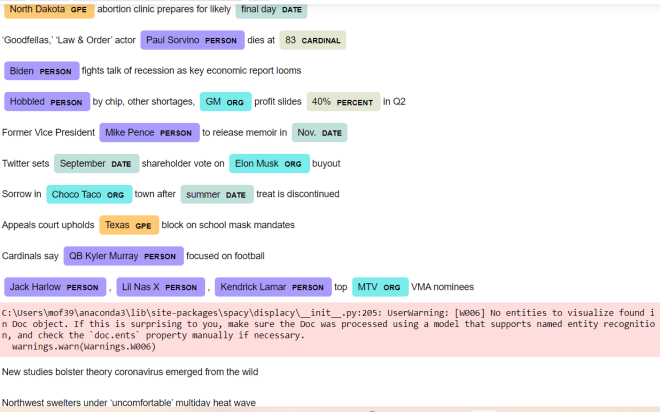
Pay attention to the code that I used here. Unlike the previous examples, I actually save the spacy pipeline I downloaded as a variable (nlp). I then read in the data-frame containing the headlines, loop through each value in the Headline column, and run the displacy.render() method, passing in the string I’m parsing (doc) and the displacy style I want to use (ent) as this method’s parameters.
After running the code, you can see a nice, colorful output showing you all the named entities (at least the named entities spacy found) in the text along with the entitiy’s corresponding label. You’ll also notice that each entity is color-coded according to its label; for instance, geographical entites (e.g. Texas, North Dakota) are colored in orange while peoples’ names (e.g. Kendrick Lamar, Lil Nas X) are colored in purple.
While running this code, you’ll also see the UserWarning above-in this case, don’t worry, as this warning simply means that spacy couldn’t find any named entities for a particular string (in this example, spacy couldn’t find any named entities for two of the 12 strings).
Oh, and one more reminder. In the displacy.render() method, you’ll need to include style='ent' as a parameter if you want to work with named-entity recognition, as here’s the default diagram that you get as an output if you don’t specify a style:


In this case, the code still works fine, but you’ll get a dependency parse diagram, which shows you how words in a string are syntactically related to each other.
Thanks for reading,
Michael