R Analysis 4: Naive Bayes and Amazon Alexa

Advertisements

Hello everybody,

It’s Michael, and today’s post will be an R analysis (my fourth one overall). I’ll be going back to R lessons now, but for those who want more Java content, don’t worry, it will be back soon.

First of all, let’s upload and understand our data. Here is the file-amazon_alexa.

Screen Shot 2019-05-04 at 12.46.49 PM

This dataset contains reviews for various Amazon Alexa products (such as the Echo Sub and Echo Dot) along with information about those reviews (such as star rating). Here’s a variable-by-variable breakdown of the data:

  • rating-the star rating the user gave the product, with 1 being the worst and 5 being the best
  • date-the date the review was posted; all of the reviews are from June or July 2018
  • variation-the exact product that is being reviewed, of which there are 16
  • verified_reviews-what the actual review said
  • feedback-whether the review was positive or negative-0 denotes negative reviews and 1 denotes positive reviews

In total, there are 3,150 reviews along with five aspects of information about the reviews (such as star rating, date posted, etc.)

Next, let’s convert feedback into a factored create a missmap in order to see if we have any missing observations (remember to install the Amelia package):

According to the diagram, there are no missing observations, which is always a good thing.

Now here’s a table using the feedback variable that shows us how many positive (1) and negative (0) reviews are in the dataset:

According to the table, of the 3150 reviews, only 257 are negative, while 2893 are positive. I’m guessing this is because Amazon’s various Alexa products are widely praised (though there are always going to be people who weren’t impressed with the products).

Let’s create some word-clouds next in order to analyze which words are common amongst positive and negative reviews. We’ll create two word-clouds, one for the positive reviews (feedback == 1) and another for the negative reviews (feedback == 0). Remember to install the wordcloud package:

  • Before creating the word-clouds, remember to subset the data. In this case, create subsets for positive (feedback == 1) and negative (feedback == 0) reviews.

Here are the wordclouds for both the positive and negative reviews:

Some of the words that are common amongst both the positive and negative reviews include echo, Alexa, and work. This is likely because customers usually mention the name of the product in the review (most of which contain either Alexa or echo) in both positive and negative reviews. Customers’ reviews, whether positive or negative, are also likely to use the word work because customers usually mention whether or not their product worked (and if it did, how well it worked).

Some of the words that are common amongst positive reviews include great, love, can, like, and easy, which are all words that are commonly found in positive reviews (e.g. “The Echo is super easy to use. Love it will buy again!”). On the other hand, some of the words that are common amongst negative reviews include doesn't, didn't, stopped, and never, which you are very likely to find in critical reviews (e.g.”The Alexa speaker doesn’t work AT ALL! Never gonna buy again!”). An interesting observation is that the word refurbished is commonly found in negative reviews; this could be because many Alexa users who are dissatisfied with their product usually buy refurbished Alexa devices.

Next up, let’s clean up the data and prepare a corpus, which will be the text document that is derived from the actual text of the reviews. Our corpus is then used to create a document term matrix (referred to in the program as dtm), which contains the text of the review in the rows and the words in the reviews in the columns (remember to install the tm package):

You may recall from R Lesson 13: Naive Bayes Classification that there are four functions to include when creating the dtm. They are:

  • toLower-sets all words to lowercase
  • removeNumbers-remove any numbers present in the reviews (like years)
  • removePunctuation-remove any punctuation present in the reviews
  • stemming-simplify analysis by combining similar words (such as verbs in different tenses and pairs of plural/singular nouns). For instance, the words “trying”, “tries”, “tried” would be combined into the word “try”.

Remember to set each function to TRUE.

Next we’ll create training and testing labels for our dataset. I’ve probably said it before, but I always like to use the 75-25 split when it comes to splitting my data into training and testing sets. This means that I like to use 75% of my dataset to train and build the model before testing it on the other 25% of my dataset. Here’s how to split the data:

Using the 75-25 split, observations 1-2363 will be part of my trainLabels while observations 2364-3150 will be part of my testLabels. I included the feedback variable since you should always include the binary variable when creating your trainLabels and testLabels.

Now let’s make some tables analyzing the proportions of positive-to-negative reviews for both our trainLabels and testLabels. Remember to use the prop.table function:

According to the tables, the difference between the proportions of positive-to-negative reviews for our trainLabels and testLabels is rather small-1% to be exact.

Now let’s split our dtm into training and testing sets, using the same guidelines that were used to create trainLabels and testLabels:

To further tidy up the model, let’s only include words that appear at least 3 times:

Our DTM uses 1s and 0s depending on whether a certain word can be found in the review (1 means the word is present and 0 means the word isn’t present). Since Naive Bayes works with categorical features, 1 and 0 are converted into Yes and No. This conversion is applied to every column (hence MARGIN = 2):

Last but not least, it’s time to create the Naive Bayes classifier (remember to install the package e1071):

Now let’s test out the classifier on two words, great and disappoint:

Now, what does all this mean?

Well, the word great:

  • DOESN’T appear in 93% of negative reviews but DOES appear in the other 7% of negative reviews
  • DOESN’T appear in 77.1% of positive reviews but DOES appear in the other 22.9% of positive reviews

These results are a little surprising since I thought the word great would appear in a majority of positive reviews. Then again, great is more prevalent in positive reviews than in negative reviews, which isn’t surprising, since negative reviews aren’t likely to use the word great.

And the word disappoint:

  • DOESN’T appear in 93.5% of negative reviews but DOES appear in the other 6.5% of negative reviews
  • DOESN’T appear in 98.8% of positive reviews but DOES appear in the other 1.2% of positive reviews

Just as with great, these results are and aren’t surprising. The surprising thing is that disappoint only appears in 6.5% of negative reviews, when I thought (and probably you did too) that disappoint would be found in more negative reviews. Then again, disappoint is more common in negative reviews than in positive reviews, which isn’t surprising.

Last but not least, let’s create a confusion matrix, which evaluates the performance of this classifier using our testing dataset (which is the variable test). Remember to install the gmodels package:

The confusion matrix contains 787 observations-the amount of observations in our testing set. The column total for column 1 represents the amount of correctly classified observations-729. The column total for column 0 represents the amount of incorrectly classified observations-58. In other words, 729 reviews were correctly classified while 58 reviews were incorrectly classified. The overall accuracy of the classifier is 93% which is excellent, but for the misclassified reviews, it could complicate customer feedback analysis, in which case a more sophisticated model would be needed.

Thanks for reading.

Michael


R Lesson 12: Hierarchical Clustering

Advertisements

Hey everybody,

It’s Michael, and today’s lesson will be on hierarchical clustering in R. The dataset I will be using is AppleStore, which contains statistics, such as cost and user ratings. for roughly 7200 apps that are sold on the iTunes Store as of July 2017.

  • I found this dataset on Kaggle, which is an excellent source to find massive datasets on various topics (whether politics, sports, or something else entirely). You can even sign up for Kaggle with your Facebook or Gmail account to access the thousands of free datasets. The best part is that Kaggle’s datasets have recent information, which is much better than R’s sample datasets with information between 40-70 years old. (I wasn’t paid to write this blurb, I just really think Kaggle is an excellent resource to find data for analytical projects).

Now, as I had mentioned, today’s R post will be about hierarchical clustering. In hierarchical clustering, clusters are created in such a way that they have a hierarchy. To get a better idea of the concept of hierarchy, think of the US. The US is divided into 50 states. Each state has several counties, which in turn have several cities. Those cities each have their own neighborhoods (like Hialeah, Westchester, and Miami Springs in Miami, Florida). Those neighborhoods have several streets, which in turn have several houses. Get the idea?

So, as we should always do with our analyses, let’s first load the file into R and understand our data:

In this dataset, there are 7197 observations (referring to apps) of 16 variables (referring to aspects of the apps). Here is what each variable means:

  • id-the iTunes ID for the app
  • track_name-the name of the app
  • size_bytes-how much space the app takes up (in bytes)
  • currency-what currency the app uses for purchases (the only currency in this dataset is USD, or US dollars)
  • price-how much the app costs to buy on the iTunes store (0 means its either a free or freemium app)
  • rating_count_tot-the user rating count for all versions of the app
  • rating_count_ver-the user rating count for the current version of the app (whatever version was current in July 2017)
  • user_rating-the average user rating for all versions of the app
  • user_rating_ver-the average user rating for the current version of the app (as of July 2017)
  • ver-the version code for the most recent version fo the app
  • cont_rating-the content rating for the app; given as a number followed by a plus sign (so 7+ would means the app is meant for kids who are at least 7)
  • prime_genre-the category the app falls under
  • sup_devices.num-how many devices the app supports
  • iPadSc_urls.num-how many screenshots of the app are shown for display
  • lang.num-how many languages the app supports
  • vpp_lic-tells us whether the app has VPP Device Based Licensing enabled (this is a special app-licensing service offered by apple)

Now that I’ve covered that, let’s start clustering. But first, let’s make a missmap to see if we’ve got any missing data and if so, how much:

According to the missingness map, there are no missing spots in our data, which is a good thing.

Now, the last thing we need to do before we start clustering is scale the numeric variables in our data, which is something we should do so that the clustering algorithm doesn’t have to depend on an arbitrary variable unit. Scaling changes the means of numeric variables to 0 and the standard deviations to 1. Here’s how you can scale:

I created a data frame using all the numeric variables (of which there are 10) and then scaled that data frame. It’s that simple.

  • I know I didn’t scale the data when I covered k-means clustering; I didn’t think it was necessary to do so. But I think it’s necessary to do so for hierarchical clustering.

Now let’s start off with some agglomerative clustering:

First, we have to specify what distance method we would like to use for cluster distance measurement (let’s stick with Euclidean, but there are others you can use). Next, we have to create a cluster variable –hc1– using the hclust function and specifying a linkage method (let’s use complete, but there are other options). Finally, we plot the cluster with the parameters specified above and we see a funny looking tree-like graph called a dendrogram. I know it’s a little messy, and you can’t see the app names, but that what happens when your dataset is 7.197 data points long.

How do we interpret our dendrogram? In our diagram, each leaf (the bottommost part of the diagram) corresponds to one observation (or in this case, one app). As we move up the dendrogram, you can see that similar observations (or similar apps) are combined into branches, which are fused at higher and higher heights. The heights in this dendrogram range from 0 to 70. Finally, two general rules to remember when it comes to interpreting dendrograms is that the higher the height of the fusion, the more dissimilar two items are and the wider the branch between two observations, the less similar they are.

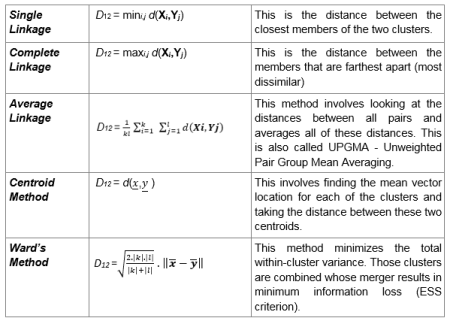
You might also be wondering “What are linkage methods?” They are essentially distance metrics that are used to measure distance between two clusters of observations. Here’s a table of the five major linkage methods:

And in case you were wondering what all the variables in the formula mean:

  • X1, X2, , Xk = Observations from cluster 1
  • Y1, Y2, , Yl = Observations from cluster 2
  • d (x, y) = Distance between a subject with observation vector x and a subject with observation vector y
  • ||.|| = Euclidean norm

Complete linkage is the most popular method for hierarchical clustering.

Now let’s try another similar method of clustering known as AGNES (an acronym for agglomerative nesting):

This method is pretty similar to the previous method (which is why I didn’t plot a dendrogram for this example) except that this method will also give you the agglomerative coefficient, which is a measurement of clustering structure (I used the line hc2$ac to find this amount). The closer this amount is to 1, the stronger the clustering structure; since the ac here is very, very close to 1, then this model has very, very strong clustering structure.

  • Remember to install the package “cluster”!

Now let’s compare the agglomerative coefficient using complete linkage with the agglomerative coefficient using the other linkage methods (not including centroid):

  • Before writing any of this code, remember to install the purrr (yes with 3 r’s) package.

We first create a vector containing the method names, then create a comparison of linkage methods by analyzing which one has the highest agglomerative coefficient (in other words, which method gives us the strongest clustering structure). In this case, ward’s method gives us the highest agglomerative coefficient (99.7%).

Next we’ll create a dendrogram using AGNES and ward’s method:

Next, I’ll demonstrate another method of hierarchical clustering known as DIANA (which is an acronym for divisive analysis). The main difference between this method and AGNES is that DIANA works in a top-down manner (meaning it starts with all objects in a single supercluster and further divides objects into smaller clusters until single-element clusters consisting of each individual observation are created) while AGNES works in a bottom-up manner (meaning it starts with single-element clusters consisting of each observation then groups similar elements into clusters, working its way up until a single supercluster is created). Here’s the code and the dendrogram for our DIANA example:

As you can see, we have a divisive coefficient instead of an agglomerative coefficient, but each serves the same purpose, which is to measure the amount of clustering structure in our data (and in both cases, the closer this number is to 1, the stronger the clustering structure). In this case, the divisive coefficient is .992, which indicates a very strong clustering structure.

Last but not least, let’s assign clusters to the data points. We would use the function cutree, which splits a dendrogram into several groups, or clusters, based on either the desired number of clusters (k) or the height (h). At least one of these criteria must be specified; k will override h if you mention both criteria. Here’s the code (using our DIANA example):

We could also visualize our clusters in a scatterplot using the factoextra package (remember to install this!):

In this graph, the observations are split into 5 clusters; there is a legend to the right of the graph that denotes which cluster corresponds to which shape. There are varying amounts of observations in each cluster, for instance, cluster 1 appears to have the majority of the observations while clusters 3 only has 2 observations and cluster 5 only has 1 observation. The observations, or apps, are denoted by numbers* rather than names, so the 2 apps in cluster 3 are the 116th and 1480th observations in the dataset, which correspond to Proloquo2Go and LAMP Words for Life, both of which are assistive communication tools for non-verbal disabled people. Likewise, the only app in cluster 5 is the 499th observation in the dataset, which corresponds to Infinity Blade, which was a fighting/role-playing game (it was removed from the App Store on December 10, 2018 due to difficulties in updating the game for newer hardware).

*the numbers represent the observation’s place in the dataset, so 33 would correspond to the 33rd observation in the dataset

  • If you’re wondering what Dim1 and Dim2 have to do with our analysis, they are the two dimensions chosen by R that show the most variation in the data. The amount of variation that each dimensions accounts for in the overall dataset are given in percentages; Dim1 accounts for 21.2% of the variation while Dim2 accounts for 13.7% of the variation in the data.

You can also visualize clusters inside the dendrogram itself by insetting rectangular borders in the dendrogram. Here’s how (using our DIANA example):

The first line of code is the same pltree line that I used when I first made the DIANA dendrogram. The second line creates the rectangular borders for our dendrogram. Remember to set k to however many clusters you used in your scatterplot (5 in this case). As for the borders, remember to put a colon in between the two integers you will use. As for which two integers you use, remember that the number to the right of the colon should be (n-1) more than the number to the left of the colon-n being the number of clusters you are using. In this case, the number to the left of the colon is 2, while the number to the right of the colon is 6, which is (5-1) more than 2. Two doesn’t have to be the number to the left of the colon, but it’s a good idea to use it anyway.

As you can see, the red square takes up the bulk of the diagram, which is similar to the case with our scatterplot (where the red area consists of the majority of our observations).

Thanks for reading,

Michael