R Analysis 6: ANOVA & American Cartoons

Advertisements

Hello everybody,

It’s Michael, and today’s post will be the 6th R analysis; the focus of this analysis, as you might have guessed from the title, will be ANOVA. The topic of this ANOVA analysis will be American cartoons.

Here’s the dataset-Cartoons.

Now, as always, let’s load our dataset into R and learn about each variable:

Screen Shot 2019-07-13 at 4.19.13 PM

As you can see, we’ve got 78 cartoons (the observations) listed along with 9 other variables that describe the cartoons (such as the name, rating, network, etc.). Here’s a variable-by-variable breakdown:

  • Name-The name of the cartoon
  • Debut.Year-The year the cartoon premiered
  • Seasons-The number of seasons the cartoon lasted or, if the show is still on the air, the amount of seasons that have aired as of July 1, 2019.
  • Episodes-The number of episodes the cartoon lasted, or, of the show is still on the air, the amount of episodes that have aired as of July 1, 2019.
  • Creator-The creator(s) of the cartoon.
  • Network-The network that currently airs new episodes of the cartoon. Some of the cartoons on this list, such as American Dad, switched networks (in that case, from FOX to TBS), so I list the network that currently airs new episodes.
  • Ended-Whether or not the show ended; this can either be a “Yes” or “No”.
  • Contract.Length-If Ended is a no, then this denotes the length of a show’s current contract. If Ended is a yes, then this field is blank.
  • Rating-The shows TV rating, which can be one of these five:
    • TV-Y
    • TV-Y7
    • TV-PG
    • TV-14
    • TV-MA

Now, let’s check for missing values (remember to install the Amelia package). Also remember to use the line missmap(name of file variable) to see the missmap:

Interestingly, the graph doesn’t list any of our variables as missing, even though the Contract.Length variable has several blank spots. However, those blank spots might’ve counted as a value.

Now, let’s do some one-way ANOVA:

In this model, I used Episodes as the dependent variable and Rating as the independent variable. I am trying to analyze the relationship (if there is any) between how many episodes a cartoon has aired and the cartoon’s TV rating (in other words, whether or not the cartoon is for kids). As you can see, Rating has 3 asterisks beside it, meaning that it is a very significant variable.

Now, let’s do a Tukey’s HSD Test to analyze pair-wise differences:

This Tukey’s HSD Test gives us the pair-wise differences among pairs of TV content ratings. Remember that a pair-wise difference with a p adj that is less than 0.01 is statistically significant. There are three statistically significant pair-wise differences, which include:

  • TV-PG; TV-14-this one is interesting because cartoons with TV-PG and TV-14 ratings often air on network TV. For example, FOX airs the TV-PG Simpsons and Bob’s Burgers along with the TV-14 Family Guy.
  • TV-PG; TV-MA-this one isn’t as interesting. Well, cartoons with both of these ratings air on cartoon network, though you’ll find plenty more cartoons with a TV-MA rating on Cartoon Network’s Adult Swim block (e.g. Robot Chicken, Aqua Teen Hunger Force)
  • TV-Y7; TV-PG-this one is quite interesting, since Cartoon Network has aired several shows with both of these ratings, such as the TV-Y7 Ed, Edd n Eddy and Camp Lazlo along with the TV-PG Regular Show and Adventure Time.

Now let’s create a two-way ANOVA model:

In this model, I once again used Episodes as a dependent variable and Rating as an independent variable. However, I also included Network (the network a show airs on) as another independent variable.

Just as with the previous model, Rating is a statistically significant variable, except this time it has slightly less significance, as there are two asterisks instead of three. Network, on the other hand, isn’t significant at all, as its p-value is much greater than 0.01.

Now let’s do a Tukey’s HSD test to analyze pair-wise differences. Since this is a two-way ANOVA, we will see pair-wise differences for :

Tukey multiple comparisons of means
99% family-wise confidence level

Fit: aov(formula = file$Episodes ~ file$Network + file$Rating)

$`file$Network`
diff lwr upr p adj
Comedy Central-Cartoon Network -18.6166667 -217.13053 179.89720 1.0000000
Crackle-Cartoon Network -79.3666667 -458.47404 299.74071 0.9997177
Disney Channel-Cartoon Network -39.8666667 -312.22545 232.49211 0.9999939
FOX-Cartoon Network 84.7583333 -63.63972 233.15638 0.5350384
FX-Cartoon Network -0.3666667 -379.47404 378.74071 1.0000000
G4-Cartoon Network 25.6333333 -353.47404 404.74071 1.0000000
Hulu-Cartoon Network -77.3666667 -456.47404 301.74071 0.9997826
Netflix-Cartoon Network -80.3666667 -222.10667 61.37334 0.5465350
Nickelodeon-Cartoon Network 0.6333333 -141.10667 142.37334 1.0000000
PBS-Cartoon Network 0.7444444 -140.99556 142.48445 1.0000000
Showtime-Cartoon Network -85.3666667 -464.47404 293.74071 0.9994113
TBS-Cartoon Network 33.6333333 -238.72545 305.99211 0.9999991
Crackle-Comedy Central -60.7500000 -477.71252 356.21252 0.9999942
Disney Channel-Comedy Central -21.2500000 -344.22778 301.72778 1.0000000
FOX-Comedy Central 103.3750000 -125.00478 331.75478 0.8359614
FX-Comedy Central 18.2500000 -398.71252 435.21252 1.0000000
G4-Comedy Central 44.2500000 -372.71252 461.21252 0.9999998
Hulu-Comedy Central -58.7500000 -475.71252 358.21252 0.9999960
Netflix-Comedy Central -61.7500000 -285.86062 162.36062 0.9959708
Nickelodeon-Comedy Central 19.2500000 -204.86062 243.36062 1.0000000
PBS-Comedy Central 19.3611111 -204.74951 243.47173 1.0000000
Showtime-Comedy Central -66.7500000 -483.71252 350.21252 0.9999835
TBS-Comedy Central 52.2500000 -270.72778 375.22778 0.9999815
Disney Channel-Crackle 39.5000000 -417.25956 496.25956 1.0000000
FOX-Crackle 164.1250000 -231.44038 559.69038 0.9020872
FX-Crackle 79.0000000 -448.42051 606.42051 0.9999921
G4-Crackle 105.0000000 -422.42051 632.42051 0.9998317
Hulu-Crackle 2.0000000 -525.42051 529.42051 1.0000000
Netflix-Crackle -1.0000000 -394.11604 392.11604 1.0000000
Nickelodeon-Crackle 80.0000000 -313.11604 473.11604 0.9997889
PBS-Crackle 80.1111111 -313.00492 473.22715 0.9997858
Showtime-Crackle -6.0000000 -533.42051 521.42051 1.0000000
TBS-Crackle 113.0000000 -343.75956 569.75956 0.9985243
FOX-Disney Channel 124.6250000 -170.21203 419.46203 0.8900907
FX-Disney Channel 39.5000000 -417.25956 496.25956 1.0000000
G4-Disney Channel 65.5000000 -391.25956 522.25956 0.9999951
Hulu-Disney Channel -37.5000000 -494.25956 419.25956 1.0000000
Netflix-Disney Channel -40.5000000 -332.04266 251.04266 0.9999966
Nickelodeon-Disney Channel 40.5000000 -251.04266 332.04266 0.9999966
PBS-Disney Channel 40.6111111 -250.93154 332.15377 0.9999965
Showtime-Disney Channel -45.5000000 -502.25956 411.25956 0.9999999
TBS-Disney Channel 73.5000000 -299.44262 446.44262 0.9998485
FX-FOX -85.1250000 -480.69038 310.44038 0.9996265
G4-FOX -59.1250000 -454.69038 336.44038 0.9999922
Hulu-FOX -162.1250000 -557.69038 233.44038 0.9094227
Netflix-FOX -165.1250000 -346.34254 16.09254 0.0287424
Nickelodeon-FOX -84.1250000 -265.34254 97.09254 0.8118260
PBS-FOX -84.0138889 -265.23143 97.20365 0.8131464
Showtime-FOX -170.1250000 -565.69038 225.44038 0.8778977
TBS-FOX -51.1250000 -345.96203 243.71203 0.9999609
G4-FX 26.0000000 -501.42051 553.42051 1.0000000
Hulu-FX -77.0000000 -604.42051 450.42051 0.9999940
Netflix-FX -80.0000000 -473.11604 313.11604 0.9997889
Nickelodeon-FX 1.0000000 -392.11604 394.11604 1.0000000
PBS-FX 1.1111111 -392.00492 394.22715 1.0000000
Showtime-FX -85.0000000 -612.42051 442.42051 0.9999823
TBS-FX 34.0000000 -422.75956 490.75956 1.0000000
Hulu-G4 -103.0000000 -630.42051 424.42051 0.9998622
Netflix-G4 -106.0000000 -499.11604 287.11604 0.9966917
Nickelodeon-G4 -25.0000000 -418.11604 368.11604 1.0000000
PBS-G4 -24.8888889 -418.00492 368.22715 1.0000000
Showtime-G4 -111.0000000 -638.42051 416.42051 0.9997021
TBS-G4 8.0000000 -448.75956 464.75956 1.0000000
Netflix-Hulu -3.0000000 -396.11604 390.11604 1.0000000
Nickelodeon-Hulu 78.0000000 -315.11604 471.11604 0.9998375
PBS-Hulu 78.1111111 -315.00492 471.22715 0.9998351
Showtime-Hulu -8.0000000 -535.42051 519.42051 1.0000000
TBS-Hulu 111.0000000 -345.75956 567.75956 0.9987571
Nickelodeon-Netflix 81.0000000 -94.80684 256.80684 0.8192765
PBS-Netflix 81.1111111 -94.69572 256.91795 0.8179377
Showtime-Netflix -5.0000000 -398.11604 388.11604 1.0000000
TBS-Netflix 114.0000000 -177.54266 405.54266 0.9335787
PBS-Nickelodeon 0.1111111 -175.69572 175.91795 1.0000000
Showtime-Nickelodeon -86.0000000 -479.11604 307.11604 0.9995591
TBS-Nickelodeon 33.0000000 -258.54266 324.54266 0.9999997
Showtime-PBS -86.1111111 -479.22715 307.00492 0.9995533
TBS-PBS 32.8888889 -258.65377 324.43154 0.9999997
TBS-Showtime 119.0000000 -337.75956 575.75956 0.9975931

$`file$Rating`
diff lwr upr p adj
TV-MA-TV-14 46.329035 -63.199178 155.85725 0.6047355
TV-PG-TV-14 147.497292 8.667629 286.32695 0.0052996
TV-Y-TV-14 56.355123 -77.349896 190.06014 0.6079772
TV-Y7-TV-14 51.949774 -50.169122 154.06867 0.4226375
TV-PG-TV-MA 101.168257 -32.481774 234.81829 0.0874937
TV-Y-TV-MA 10.026088 -118.292607 138.34478 0.9988693
TV-Y7-TV-MA 5.620739 -89.336747 100.57822 0.9996220
TV-Y-TV-PG -91.142168 -245.229589 62.94525 0.2719733
TV-Y7-TV-PG -95.547518 -223.196137 32.10110 0.0934011
TV-Y7-TV-Y -4.405350 -126.460775 117.65008 0.9999471

Just like the Tukey’s Test for the model I created in R Lesson 18: ANOVA part 2, each variable’s pair-wise differences are analyzed separately. In other words,  the pair-wise differences for Network are analyzed separately from the pair-wise differences for Rating.

Another thing I want to note is that since all of the p-values for the Network pair-wise differences are well above 0.01, there aren’t any statistically significant pair-wise differences for Network. On the other hand, there is a statistically significant pair-wise difference for Rating, which would be the TV-PG - TV-14 pair. Unlike the one-way ANOVA, Rating has a lower statistical significance (since there are two asterisks by Rating instead of three) and thus has fewer statistically significant pair-wise differences.

From the data, I can conclude that a cartoon’s rating (if you don’t factor in any other variables) is a good indicator as to how many episodes that cartoon will air. However, the combination of a cartoon’s rating and the network it airs on makes it less certain to predict how many episodes might air.

Thanks for reading,

Michael


R Analysis 3: K-Means vs Hierarchical Clustering

Advertisements

Hello everybody,

It’s Michael, and I will be doing an R analysis on this post. More specifically, I will be doing a comparative clustering analysis, which means I’ll take a dataset and perform both k-means and hierarchical clustering analysis with that dataset to analyze the results of each method. However, this analysis will be unique, since I will be revisiting of the earliest datasets I used for this blog-TV shows-which first appeared in R Lesson 4: Logistic Regression Models on July 11, 2018 (exactly nine months ago!) In case you forgot what this dataset was about, it basically gives 85 shows that aired during the 2017-18 TV season and whether or not they were renewed for the 2018-19 TV season along with other aspects of those shows (such as the year they premiered and the network they air on). I’ll admit I chose this dataset because I wanted to analyze one of my old datasets in a different way (remember I performed linear and logistic regression the first time I used this dataset).

So, as always, let’s load the file and get a basic understanding of our data:

As you can see, we have 85 observations of 10 variables. Here’s a detailed breakdown of each variable:

  • TV.Show-The name of the show
  • Genre-The genre of the show
  • Premiere.Year-The year the show premiered; for revivals like Roseanne, I used the original premiere year (1988) as opposed to the revival premiere year (2018)
  • X..of.seasons..17.18.-How many seasons the show had aired as of the end of the 2017-18 TV season
  • Network-The network (or streaming service) the show airs on
  • X2018.19.renewal.-Whether or not the show was renewed for the 2018-19 TV season; 1 denotes renewal and 0 denotes cancellation
  • Rating-The content rating for the show. Here’s a more detailed breakdown:
    • 1 means TV-G
    • 2 means TV-PG
    • 3 means TV-14
    • 4 means TV-MA
    • 5 means not applicable
  • Usual.Day.of.Week-The usual day of the week the show airs its new episodes. Here’s a more detailed breakdown:
    • 1 means the show airs on Mondays
    • 2 means the show airs on Tuesdays
    • 3 means the show airs on Wednesdays
    • 4 means the show airs on Thursdays
    • 5 means the show airs on Fridays
    • 6 means the show airs on Saturdays
    • 7 means the show airs on Sundays
    • 8 means the show doesn’t have a regular air-day (usually applies to talk shows or shows on streaming services)
  • Medium-the type of network the show airs on. Here’s a more detailed breakdown:
    • 1 means the show airs on either one of the big 4 broadcast networks (ABC, NBC, FOX or CBS) or the CW (which isn’t part of the big 4)
    • 2 means the show airs on a cable channel (AMC, Bravo, etc.)
    • 3 means the show airs on a streaming service (Hulu, Amazon Prime, etc.)
  • Episode Count-the new variable I added for this analysis; this variable shows how many episodes a show has had overall since the end of the 2017-18 TV season. For certain shows whose seasons cross the 17-18 and 18-19 seasons, I will count how many episodes each show has had as of September 24, 2018 (the beginning of the 2018-19 TV season)

Now that we’ve learned more about our variables, let’s start our analysis. But first, I convert the final four variables into factors, since I think it’ll be more appropriate for the analysis:

Ok, now onto the analysis. I’ll start with k-means:

Here, I created a data subset using our third and tenth columns (Premiere.Year and Episode.Count respectively) and displayed the head (the first six observations) of my cluster.

Now let’s do some k-means clustering:

I created the variable tvCluster to store my k-means model using the name of my data subset-cluster1-the number of clusters I wanted to include (4) and nstart, which tells the models to start with 35 random points then select the one with the lowest variation.

I then type in tvCluster to get a better idea of what my cluster looks like. The first thing I see is “K-means clustering with (X) clusters of sizes”, before mentioning the amount of observations in each cluster (which are 17, 64, 1 and 3, respectively). In total, all 85 observations were used since I didn’t have any missing data points.

The next thing that is mentioned is cluster means, which gives the mean for each variable used in the clustering analysis (in this case, Episode.Count and Premiere.Year). Interestingly enough, Cluster 2 has the highest mean Premiere.Year (2015) but the lowest mean Episode.Count (49. rounded to the nearest whole number).

After that, you can see the clustering vector, which shows you which observations belong to which cluster. Even though the position of the observation (e.g. 1st, 23rd) isn’t explicitly mentioned, you can tell which observation you are looking at since the vector starts with the first observation and works its way down to the eighty-fifth observation (and since there is no missing data, all 85 observations are used in this clustering model). For instance, the first three observations all correspond to cluster 1 (the first three shows listed in this dataset are NCISBig Bang Theory, and The Simpsons). Likewise, the final three observations all correspond to cluster 2 (the corresponding shows are The Americans, Baskets, and Comic Book Men).

Next you will see the within cluster sum of squares for each cluster, which I will abbreviate as WCSSBC; this is a measurement of the variability of the observations in each cluster. Remember that the smaller this amount is, the more compact the cluster. In this case, 3 of the 4 WCSSBC are above 100,000, while the other WCSSBC is 0 (which I’m guessing is cluster 3, which has only one observation).

Last but not least is between_SS/total_SS=94.5%, which represents the between sum-of-squares and total sum-of-squares ratio, which as you may recall from the k-means lesson is a measure of the goodness-of-fit of the model. 94.5% indicates that there is an excellent goodness-of-fit for this model.

Last but not least, let’s graph our model:

In this graph, the debut year is on the x-axis, while the episode count is on the y-axis. As you can see, the 2 largest clusters (represented by the black and red dots) are fairly close together while the 2 smallest clusters (represented by the blue and green dots) are fairly spread out (granted, the two smallest clusters only have 1 and 3 observations, respectively). An observation about this graph that I wanted to point out is that the further back a show premiered doesn’t always mean the show has more episodes than another show that premiered fairly recently (let’s say anytime from 2015 onward). This happens for several reasons, including:

  • Revived series like American Idol (which took a hiatus in 2017 before its 2018 revival) and Roseanne (which had been dormant for 21 years before its 2018 revival)
  • Different shows air a different number of episodes per season; for instance, talk shows like Jimmy Kimmel live have at least 100 episodes per season while shows on the Big 4 networks tend to have between 20-24 episodes per season (think Simpsons, The Big Bang Theory, and Grey’s Anatomy). Cable and streaming shows usually have even less episodes per season (between 6-13, like how South Park only does 10 episode seasons)
  • Some shows just take long breaks (like how Jessica Jones on Netflix didn’t release any new episodes between November 2015 and March 2018)

Now time to do some hierarchical clustering on our data. And yes, I plan to use all the methods covered in the post R Lesson 12: Hierarchical Clustering.

Let’s begin by scaling all numerical variables in our data (don’t include the ones that were converted into factor types):

Now let’s start off with some agglomerative clustering (with both the dendrogram and code):

After setting up the model using Euclidean distance and complete linkage, I then plot my dendrogram, which you can see above. This dendrogram is a lot neater than the ones I created in R Lesson 12, but then again, this dataset only has 85 observations, while the one in that post had nearly 7,200. The names of the shows themselves aren’t mentioned, but each of the numbers displayed correspond to a certain show. For instance, 74 corresponds to The Voice, since it is the 74th show listed in our dataset. Look at the spreadsheet to figure out which number corresponds to which show.

You may recall that I mentioned two general rules for interpreting dendrograms. They are:

  • The higher the height of the fusion, the more dissimilar two items are
  • The wider the branch between two observations, the more dissimilar they are

Those rules certainly apply here, granted, the highest height is 8 in this case, as opposed to 70. For instance, since the brand between shows 7 and 63 is fairly narrow, these two shows have a lot in common according to the model (even though the two shows in question are Bob’s Burgers and The Walking Dead-the former being a cartoon sitcom and the latter revolving around the zombie apocalypse). On the other hand, the gap between shows 74 and 49 is wider, which means they don’t share much in common (even though the two shows are The Voice and Shark Tank, which both qualify as reality shows, though the former is more competition-oriented than the latter). All in all, I think it’s interesting to see how these clusters were created, since the shows that were grouped closer together seem to have nothing in common.

Now let’s try AGNES (remember that stands for agglomerative clustering):

First of all, remember to install the package cluster. Also, remember that the one important result is the ac, or agglomerative coefficient, which measures the strength of clustering structure. As you can see, our ac is 96.1%, which indicates very strong clustering structure (I personally think any ac at east 90% is good).

Now let’s compare this ac (which used complete linkage) to the ac we get with other linkage methods (not including centroid). Remember to install the purrr package:

Of the four linkage method’s, Ward’s method gives us the highest agglomerative coefficient (98.2%), so that’s what we’ll use for the next part of this analysis.

Using ward’s method and AGNES, here’s a dendrogram of our data (and the corresponding code):

Aside from having a greater maximum height than our previous dendrogram (the latter had a maximum height of 8 while this diagram has a maximum height of presumably 18), the observations are also placed differently. For instance, unlike in the previous dendrogram, observations 30 and 71 are side by side. But just as with the last dendrogram, shows that have almost nothing in common are oddly grouped together; for instance, the 30th and 71st observations correspond to The Gifted and Transparent; the former is a sci-fi show based off the X-Men universe while the latter is a transgender-oriented drama. The 4th and 17th observations are another good example of this, as the corresponding shows are The Simpsons and Taken; the former is a long-running cartoon sitcom while the latter is based off of an action movie trilogy.

The last method I will use for this analysis is DIANA (stands for divisive analysis). Recall that the main difference between DIANA and AGNES is that DIANA works in a top-down manner (objects start in a single supercluster and are divided into smaller clusters until single-element clusters are created) while AGNES works in a bottom-up (objects start in single-element clusters and are morphed into progressively larger clusters until a single supercluster is created). Here’s the code and dendrogram for our DIANA analysis:

Remember that the divisive coefficient is pretty much identical to the agglomerative coefficient, since both measure strength of clustering structure and the closer each amount is to 1, the stronger the clustering structure. Also, in both cases, a coefficient of .9 (or 90%) or higher indicates excellent clustering structure. In this case, the dc (divisive coefficient) is 95.9%, which indicates excellent clustering structure.

Just as with the previous two dendrograms, most of the observation pairs still have nothing in common. For instance, the 41st and 44th observations have nothing in common, since the corresponding shows are House of Cards (a political drama) and Brooklyn 99 (a sitcom), respectively. An exception to this would be the 9th and 31st observations, since both of the corresponding shows-Designated Survivor and Bull respectively-are dramas and both are on the big 4 broadcast networks (though the former airs on ABC while the latter airs on FOX).

Now, let’s assign clusters to the data points. I’ll go with 4 clusters, since that’s how many I used for my k-means analysis (plus I think it’s an ideal amount). I’m going to use the DIANA example I just mentioned:

Now let’s visualize our clusters in a scatterplot (remember to install the factoextra package):

As you can see, cluster 3 has the most observations while cluster 4 has the least (only one observation corresponding to Jimmy Kimmel Live). Some of the observations in each cluster have something in common, like the 1st and 2nd observations (NCIS and The Big Bang Theory in cluster 1, both of which air on CBS) and the 42nd and 80th observations in cluster 3 (Watch What Happens Live! and The Chew-both talk shows).

Now, let’s visualize these clusters on a dendrogram (using the same DIANA example):

The first line of code is exactly the same line I used when I first plotted my DIANA dendrogram. The rect.hclust line draws the borders to denote each cluster; remember to set k to the amount of clusters you created for your scatterplot (in this case, 4). Granted, the coloring scheme is different from the scatterplot, but you can tell which cluster is which judging by the size of the rectangle (for instance, the rectangle for cluster 4 only contains the 79th observation, even though it is light blue on our dendrogram and purple on our scatterplot). Plus, all the observations are in the same cluster in both the scatterplot and dendrogram.

Thanks for reading.

Michael


R Analysis 1: Logistic Regression & The 2017-18 TV Season

Advertisements

Hello everybody,

Yes, I know you all wanted to learn about MySQL queries, but I am still preparing the database (don’t worry it’s coming, just taking a while to prepare). And since I did mention I’ll be doing analyses on this blog, that is what I will be doing on this post. It’s basically an expansion of the TV show set from R Lesson 4: Logistic Regression Models & R Lesson 5: Graphing Logistic Regression Models with 3 new variables.

So, as we should always do, let’s load the file into R and get an understanding of our variables, with str(file).

As for the new variables, let’s explain. By the way, the numbers you see for the new variables are dummy variables (remember those?). I thought the dummy variables would be a better way to categorize the variables.

  • Rating-a TV show’s parental rating (no not how good it is)
    • 1-TV G
    • 2-TV PG
    • 3-TV 14
    • 4-TV MA
    • 5-Not applicable
  • Usual day of week-the day of the week a show usually airs its new episodes
    • 1-Monday
    • 2-Tuesday
    • 3-Wednesday
    • 4-Thursday
    • 5-Friday
    • 6-Saturday
    • 7-Sunday
    • 8-Not applicable (either the show airs on a streaming service or airs 5 days a week like a talk show or doesn’t have a consistent airtime)
  • Medium-what network the show airs on
    • 1-Network TV (CBS, ABC, NBC, FOX or the CW)
    • 2-Cable TV (Comedy Central, Bravo, HBO, etc.)
    • 3-Streaming TV (Amazon, Hulu, etc.)

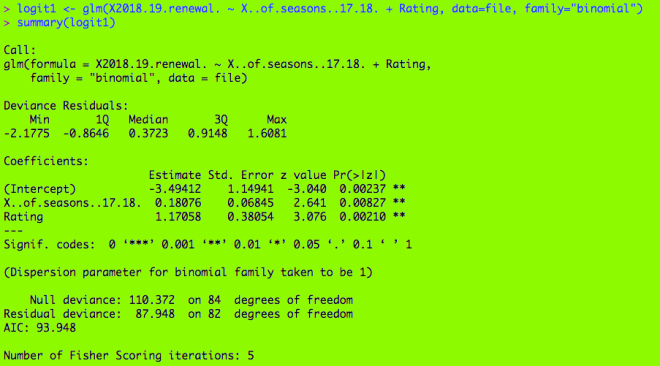
I decided to do three logistic regression models (one for each of the new variables). The renewed/cancelled variable (known as X2018.19.renewal.) is still the binary variable, and the other dependent variable I used for the three models is season count (known as X..of.seasons..17.18.).

First, remember to install (and use the library function for) the ggplot2 package. This will come in handy for the graphing portion.

Here’s my first logistic regression model, with my binary variable and two dependent variables (season count and rating). If you’re wondering what the output means, check out R Lesson 4: Logistic Regression Models for a more detailed explanation.

Here are two functions you need to help set up the model. The top function help set up the grid and designate which categorical variable you want to use in your graph. The bottom function helps predict the probabilities of renewal for each show in a certain category. In this case, it would be the rating category (the ones with TV-G, TV-PG, etc.)

Here’s the ggplot function. Geom_line() creates the lines for each level of your categorical variable; here are 5 lines for the 5 categories.

Here’s the graph. As you see, there are five lines, one for each of the ratings. What are some inferences that can be made?

  • The TV-G shows (category 1) usually have the lowest chance of renewal. In this model, a TV-G show would need to have run for approximately a minimum of 22 seasons for at least 50% chance of renewal. (Granted, the only TV-G show on this database is Fixer Upper, which was not renewed)
  • The TV-PG shows have a slightly better chance at renewal as renewal odds for these shows are at least 25%. To attain at a minimum 50% of renewal, these shows would only need to have run for approximately a minimum of 17 seasons, not 22 (like The Simpsons).
  • The TV-14 shows have a minimum 50% chance of renewal, regardless of how many seasons they have run. They would need to have run for at least 25 seasons to attain a minimum 75% chance of renewal, however (SNL would be the only applicable example here, as it was renewed and has run for 43 seasons).
  • The TV-MA shows have a minimum 76% (approximately) chance of renewal no matter how many seasons they have aired. Shows like South Park, Archer, Real Time, Big Mouth and Orange is the New Black are all TV-MA, and all of them were renewed.
  • The unrated shows had the best chances at renewal, as they had a minimum 92% (approximately) chance at renewal. (Granted, Watch What Happens Live! is the only unrated show on this list)

Next, we repeat the process used to create the plot for the first model for these next two models.

What are some inferences that can be made? (I know this graph is hard to read, but we can still make observations from this graph.

  • The orange line (representing Tuesday shows) is the lowest on the graph, so this means Tuesday shows usually had the lowest chances of renewal. This makes sense, as Tuesday shows like LA to Vegas, The Mick, and Rosanne were all cancelled.
  • On the other end, the pink line (representing shows that either aired on streaming services, did not have a consistent time slot, or aired every day like talk shows) is the highest on the graph, so this means shows without a regular time slot had the best chances at renewal (such as Atypical, Jimmy Kimmel Live!, and House of Cards).

What inferences can we make from this graph?

  • The network shows (from the 5 major broadcast networks CBS, ABC, NBC, FOX and the CW) had the lowest chances at renewal. At least 11 seasons would be needed for a minimum 50% chance of renewal.
    • Some shows would include The Simpsons (29 seasons), Family Guy (16 seasons), The Big Bang Theory (11 seasons), and NCIS (15 seasons), all of which were renewed.
  • The cable shows (from channels such as Comedy Central, HBO, and Bravo) have a minimum 58% (approximately) chance of renewal, but at least 15 seasons would be needed for a minimum 70% chance of renewal.
    • Some shows would include South Park (21 seasons) and Real Time (16 seasons), both of which were renewed.
  • The streaming shows (from services such as Netflix, Hulu, or CBS All Access) had the best odds for renewal (approximately 76% minimum chance at renewal). At least 30 seasons would be needed for a 90% chance at renewal.
    • This doesn’t make any sense yet, as streaming shows have only been around since the early-2010s.

Thanks for reading, and I’ll be sure to have the MySQL database ready so you can start learning about querying.

Michael


R Lesson 5: Graphing Logistic Regression Models

Advertisements

Hello everybody,

It’s Michael, and today I’ll be discussing graphing with logistic regression. This will serve as a continuation of R Lesson 4: Logistic Regression Models (I’ll be using the dataset and the models from that post).

Let’s start by graphing the second model from R Lesson 4. That’s the one that includes season count and premiere year (I feel this would be more appropriate to graph as it is the more quantitative of the two models).

Here’s the formula for the model if you’re interested (as well as the output):

Now let’s plot the model (but first, let’s remember to install the ggplot2 package).

Next we have to figure out the probabilities that each show will be renewed (or not).

And finally, let’s plot the model.

What are some conclusions we can draw from the model?

  • The shows with less than 25 seasons and that premiered between 1975 and the early 90s (such as Roseanne which had 10 seasons and premiered in 1988) had no chance at renewal.
  • For shows with less than 25 seasons, the more recently the show premiered, the more likely it was renewed (as shown by the progressively brighter colors).
  • For the few outlier shows with more than 25 seasons (regardless of when they premiered) they had a 100% chance at renewal.
    • The two notable examples would be The Simpsons (at 29 seasons) and SNL (at 43 seasons)

Thanks for reading,

Michael


R Lesson 4: Logistic Regression Models

Advertisements

Hello everybody,

It’s Michael, and today’s post will be the first to cover data modeling in R. The model I will be discussing is the logistic regression model. For those that don’t know, logistic regression models explore the relationship between a binary* dependent variable and one or more independent variables.

*refers to variable with only 2 possible values, like yes/no, wrong/right, healthy/sick etc.

The data set I will be using is-TV shows-which gives a list of 85 random TV shows of various genres that were currently airing during the 2017-18 TV season and whether or not each show was renewed for the 2018-19 TV season. So, like any good data scientist, let’s first load the file and read (as well as understand) the data.

The variables include

  • TV Show-the name of the TV show
  • Genre-the genre of the TV show
  • Premiere Year-the year the TV show premiered (for reboots like Roseanne, I included the premiere date of the original, not the revival)
  • X..of.seasons..17.18. (I’ll refer to it as season count)-how many seasons the show had aired at the conclusion of the 2017-18 TV season (in the case of revived shows like American Idol, I counted both the original run and revival, which added up to 16 seasons)
  • Network-the network the show was airing on at the end of the 2017-18 TV season
  • X2018.19.renewal. (my binary variable)-Whether or not the show was renewed for the 2018-19 TV season
    • You’ll notice I used 0 and 1 for this variable; this is because it is a good idea to use dummy variables (the 0 and 1) for your binary dependent variable to help quantify qualitative data.
      • The qualitative data in this case being whether a show was renewed for the 2018-19 TV season (shown by 1) or not (shown by 0)


Now that we know the variables in our data set, let’s figure out what we want to analyze.

  • Let’s analyze the factors (eg. network, genre) that affected a certain TV show’s renewal or cancellation (the binary variable represented by 0/1)

So here’s the code to build the model, using the binary dependent variable and two of the independent variables (I’ll use genre and premiere year)

What does all of this output mean?

  • The call just reprints the model we created.
  • The estimate represents the change in log odds (or logarithm of the odds) for the dependent variable should a certain independent variable variable be increased by 1.
    • Log odds function–>log(p/(1-p))
    • For instance, if the premiere year increases by 1 (let’s say from 2009 to 2010), the odds that it was renewed for the 18-19 TV season decrease by 6.73% (as evidenced by the -0.06763 as the premiere year estimate)
  • Standard error represents how far the sample mean is from the population mean. In the case of premiere year, the two means are close together. In the case of genre however, the two means are mostly far apart (then again, genre isn’t numerical).
  • Z-value is the ratio of the estimate to the standard error
  • P-value (denoted by Pr(|>z|)) helps you determine the significance of your results by giving you a number between 0 and 1
    • P-values are used to either prove or disprove your null hypothesis (a claim you are making about your data)
      • Let’s say you think a show’s genre and premiere year affected its chances of renewal; this would be your null hypothesis.
      • Your alternative hypothesis would be the opposite of your null hypothesis; that is, genre and premiere year don’t affect a shows chances of renewal
    • Small p-values (those <=0.05) indicate strong evidence against the null hypothesis, so in these cases, you can reject the null hypothesis. For p-values larger than 0.05, you should accept the null hypothesis.
      • Since all the p-values are well above 0.05, you can accept the null hypothesis
  • Null deviance shows how well our dependent variable (whether or not a show got renewed) is predicted by a model that includes only the intercept
  • Residual deviance shows how well our dependent variable (whether or not a show got renewed) is predicted by a model that includes the intercept as well as any independent variables
    • As you can see here, the residual deviance is 89.496 on 71 degrees of freedom, a decrease of 20.876 from null deviance (as well as a decrease of 13 degrees of freedom).
  • AIC (or Akaike Information Criterion) is a way to gauge the quality of your model through comparison of related models; the point of the AIC is to prevent you from using irrelevant independent variables.
    • The AIC itself is meaningless unless we have another model to compare it to, which I will include in this post.
  • The number of Fisher scoring iterations shows how many times the model ran to attain maximum likelihood, 17 in this case. This number isn’t too significant.

Now let’s create another model, this time including season count in place of genre.

How does this compare to the previous model?

  • There is a smaller difference between null & residual deviance (12.753 and 2 degrees of freedom, as opposed to 20.876 and 13 degrees of freedom)
  • The AIC is 13.88 smaller than that of the previous model, which indicates a better quality of the model
  • The number of Fisher scoring iterations is also lower than the previous model (5 as opposed to 17), which means it took less tries to attain maximum likelihood (that a show was renewed)
  • The estimate for premiere year also increased
    • This time, if premiere year increases by 1, the odds that a show was renewed for the 2018-19 TV season increased by 14.81%, rather than decreased.
    • If season count increased by 1 (say from 4 to 5 seasons), then the odds a show was renewed increased by 31.45%
  • The asterisk by season count just gives an idea of the range of p-values of season count (denoted by Pr(|>z|))
    • The p-value of season count is >0.01 but <0.05 (which makes perfect sense as Pr(|>z|) is 0.027
  • Let’s create two null hypotheses-premiere year and season count affects a show’s chances of renewal (we are treating these as separate hypotheses).
    • Premiere year is greater than 0.05, so accept this null hypothesis.
      • In other words, premiere year did affect a show’s chances for renewal.
    • Season count is less than 0.05, so reject this null hypothesis.
      • In other words, season count didn’t affect a show’s chances for renewal.

That’s all for now. Thanks for reading.

Michael