R Analysis 4: Naive Bayes and Amazon Alexa

Advertisements

Hello everybody,

It’s Michael, and today’s post will be an R analysis (my fourth one overall). I’ll be going back to R lessons now, but for those who want more Java content, don’t worry, it will be back soon.

First of all, let’s upload and understand our data. Here is the file-amazon_alexa.

Screen Shot 2019-05-04 at 12.46.49 PM

This dataset contains reviews for various Amazon Alexa products (such as the Echo Sub and Echo Dot) along with information about those reviews (such as star rating). Here’s a variable-by-variable breakdown of the data:

  • rating-the star rating the user gave the product, with 1 being the worst and 5 being the best
  • date-the date the review was posted; all of the reviews are from June or July 2018
  • variation-the exact product that is being reviewed, of which there are 16
  • verified_reviews-what the actual review said
  • feedback-whether the review was positive or negative-0 denotes negative reviews and 1 denotes positive reviews

In total, there are 3,150 reviews along with five aspects of information about the reviews (such as star rating, date posted, etc.)

Next, let’s convert feedback into a factored create a missmap in order to see if we have any missing observations (remember to install the Amelia package):

According to the diagram, there are no missing observations, which is always a good thing.

Now here’s a table using the feedback variable that shows us how many positive (1) and negative (0) reviews are in the dataset:

According to the table, of the 3150 reviews, only 257 are negative, while 2893 are positive. I’m guessing this is because Amazon’s various Alexa products are widely praised (though there are always going to be people who weren’t impressed with the products).

Let’s create some word-clouds next in order to analyze which words are common amongst positive and negative reviews. We’ll create two word-clouds, one for the positive reviews (feedback == 1) and another for the negative reviews (feedback == 0). Remember to install the wordcloud package:

  • Before creating the word-clouds, remember to subset the data. In this case, create subsets for positive (feedback == 1) and negative (feedback == 0) reviews.

Here are the wordclouds for both the positive and negative reviews:

Some of the words that are common amongst both the positive and negative reviews include echo, Alexa, and work. This is likely because customers usually mention the name of the product in the review (most of which contain either Alexa or echo) in both positive and negative reviews. Customers’ reviews, whether positive or negative, are also likely to use the word work because customers usually mention whether or not their product worked (and if it did, how well it worked).

Some of the words that are common amongst positive reviews include great, love, can, like, and easy, which are all words that are commonly found in positive reviews (e.g. “The Echo is super easy to use. Love it will buy again!”). On the other hand, some of the words that are common amongst negative reviews include doesn't, didn't, stopped, and never, which you are very likely to find in critical reviews (e.g.”The Alexa speaker doesn’t work AT ALL! Never gonna buy again!”). An interesting observation is that the word refurbished is commonly found in negative reviews; this could be because many Alexa users who are dissatisfied with their product usually buy refurbished Alexa devices.

Next up, let’s clean up the data and prepare a corpus, which will be the text document that is derived from the actual text of the reviews. Our corpus is then used to create a document term matrix (referred to in the program as dtm), which contains the text of the review in the rows and the words in the reviews in the columns (remember to install the tm package):

You may recall from R Lesson 13: Naive Bayes Classification that there are four functions to include when creating the dtm. They are:

  • toLower-sets all words to lowercase
  • removeNumbers-remove any numbers present in the reviews (like years)
  • removePunctuation-remove any punctuation present in the reviews
  • stemming-simplify analysis by combining similar words (such as verbs in different tenses and pairs of plural/singular nouns). For instance, the words “trying”, “tries”, “tried” would be combined into the word “try”.

Remember to set each function to TRUE.

Next we’ll create training and testing labels for our dataset. I’ve probably said it before, but I always like to use the 75-25 split when it comes to splitting my data into training and testing sets. This means that I like to use 75% of my dataset to train and build the model before testing it on the other 25% of my dataset. Here’s how to split the data:

Using the 75-25 split, observations 1-2363 will be part of my trainLabels while observations 2364-3150 will be part of my testLabels. I included the feedback variable since you should always include the binary variable when creating your trainLabels and testLabels.

Now let’s make some tables analyzing the proportions of positive-to-negative reviews for both our trainLabels and testLabels. Remember to use the prop.table function:

According to the tables, the difference between the proportions of positive-to-negative reviews for our trainLabels and testLabels is rather small-1% to be exact.

Now let’s split our dtm into training and testing sets, using the same guidelines that were used to create trainLabels and testLabels:

To further tidy up the model, let’s only include words that appear at least 3 times:

Our DTM uses 1s and 0s depending on whether a certain word can be found in the review (1 means the word is present and 0 means the word isn’t present). Since Naive Bayes works with categorical features, 1 and 0 are converted into Yes and No. This conversion is applied to every column (hence MARGIN = 2):

Last but not least, it’s time to create the Naive Bayes classifier (remember to install the package e1071):

Now let’s test out the classifier on two words, great and disappoint:

Now, what does all this mean?

Well, the word great:

  • DOESN’T appear in 93% of negative reviews but DOES appear in the other 7% of negative reviews
  • DOESN’T appear in 77.1% of positive reviews but DOES appear in the other 22.9% of positive reviews

These results are a little surprising since I thought the word great would appear in a majority of positive reviews. Then again, great is more prevalent in positive reviews than in negative reviews, which isn’t surprising, since negative reviews aren’t likely to use the word great.

And the word disappoint:

  • DOESN’T appear in 93.5% of negative reviews but DOES appear in the other 6.5% of negative reviews
  • DOESN’T appear in 98.8% of positive reviews but DOES appear in the other 1.2% of positive reviews

Just as with great, these results are and aren’t surprising. The surprising thing is that disappoint only appears in 6.5% of negative reviews, when I thought (and probably you did too) that disappoint would be found in more negative reviews. Then again, disappoint is more common in negative reviews than in positive reviews, which isn’t surprising.

Last but not least, let’s create a confusion matrix, which evaluates the performance of this classifier using our testing dataset (which is the variable test). Remember to install the gmodels package:

The confusion matrix contains 787 observations-the amount of observations in our testing set. The column total for column 1 represents the amount of correctly classified observations-729. The column total for column 0 represents the amount of incorrectly classified observations-58. In other words, 729 reviews were correctly classified while 58 reviews were incorrectly classified. The overall accuracy of the classifier is 93% which is excellent, but for the misclassified reviews, it could complicate customer feedback analysis, in which case a more sophisticated model would be needed.

Thanks for reading.

Michael


R Analysis 3: K-Means vs Hierarchical Clustering

Advertisements

Hello everybody,

It’s Michael, and I will be doing an R analysis on this post. More specifically, I will be doing a comparative clustering analysis, which means I’ll take a dataset and perform both k-means and hierarchical clustering analysis with that dataset to analyze the results of each method. However, this analysis will be unique, since I will be revisiting of the earliest datasets I used for this blog-TV shows-which first appeared in R Lesson 4: Logistic Regression Models on July 11, 2018 (exactly nine months ago!) In case you forgot what this dataset was about, it basically gives 85 shows that aired during the 2017-18 TV season and whether or not they were renewed for the 2018-19 TV season along with other aspects of those shows (such as the year they premiered and the network they air on). I’ll admit I chose this dataset because I wanted to analyze one of my old datasets in a different way (remember I performed linear and logistic regression the first time I used this dataset).

So, as always, let’s load the file and get a basic understanding of our data:

As you can see, we have 85 observations of 10 variables. Here’s a detailed breakdown of each variable:

  • TV.Show-The name of the show
  • Genre-The genre of the show
  • Premiere.Year-The year the show premiered; for revivals like Roseanne, I used the original premiere year (1988) as opposed to the revival premiere year (2018)
  • X..of.seasons..17.18.-How many seasons the show had aired as of the end of the 2017-18 TV season
  • Network-The network (or streaming service) the show airs on
  • X2018.19.renewal.-Whether or not the show was renewed for the 2018-19 TV season; 1 denotes renewal and 0 denotes cancellation
  • Rating-The content rating for the show. Here’s a more detailed breakdown:
    • 1 means TV-G
    • 2 means TV-PG
    • 3 means TV-14
    • 4 means TV-MA
    • 5 means not applicable
  • Usual.Day.of.Week-The usual day of the week the show airs its new episodes. Here’s a more detailed breakdown:
    • 1 means the show airs on Mondays
    • 2 means the show airs on Tuesdays
    • 3 means the show airs on Wednesdays
    • 4 means the show airs on Thursdays
    • 5 means the show airs on Fridays
    • 6 means the show airs on Saturdays
    • 7 means the show airs on Sundays
    • 8 means the show doesn’t have a regular air-day (usually applies to talk shows or shows on streaming services)
  • Medium-the type of network the show airs on. Here’s a more detailed breakdown:
    • 1 means the show airs on either one of the big 4 broadcast networks (ABC, NBC, FOX or CBS) or the CW (which isn’t part of the big 4)
    • 2 means the show airs on a cable channel (AMC, Bravo, etc.)
    • 3 means the show airs on a streaming service (Hulu, Amazon Prime, etc.)
  • Episode Count-the new variable I added for this analysis; this variable shows how many episodes a show has had overall since the end of the 2017-18 TV season. For certain shows whose seasons cross the 17-18 and 18-19 seasons, I will count how many episodes each show has had as of September 24, 2018 (the beginning of the 2018-19 TV season)

Now that we’ve learned more about our variables, let’s start our analysis. But first, I convert the final four variables into factors, since I think it’ll be more appropriate for the analysis:

Ok, now onto the analysis. I’ll start with k-means:

Here, I created a data subset using our third and tenth columns (Premiere.Year and Episode.Count respectively) and displayed the head (the first six observations) of my cluster.

Now let’s do some k-means clustering:

I created the variable tvCluster to store my k-means model using the name of my data subset-cluster1-the number of clusters I wanted to include (4) and nstart, which tells the models to start with 35 random points then select the one with the lowest variation.

I then type in tvCluster to get a better idea of what my cluster looks like. The first thing I see is “K-means clustering with (X) clusters of sizes”, before mentioning the amount of observations in each cluster (which are 17, 64, 1 and 3, respectively). In total, all 85 observations were used since I didn’t have any missing data points.

The next thing that is mentioned is cluster means, which gives the mean for each variable used in the clustering analysis (in this case, Episode.Count and Premiere.Year). Interestingly enough, Cluster 2 has the highest mean Premiere.Year (2015) but the lowest mean Episode.Count (49. rounded to the nearest whole number).

After that, you can see the clustering vector, which shows you which observations belong to which cluster. Even though the position of the observation (e.g. 1st, 23rd) isn’t explicitly mentioned, you can tell which observation you are looking at since the vector starts with the first observation and works its way down to the eighty-fifth observation (and since there is no missing data, all 85 observations are used in this clustering model). For instance, the first three observations all correspond to cluster 1 (the first three shows listed in this dataset are NCISBig Bang Theory, and The Simpsons). Likewise, the final three observations all correspond to cluster 2 (the corresponding shows are The Americans, Baskets, and Comic Book Men).

Next you will see the within cluster sum of squares for each cluster, which I will abbreviate as WCSSBC; this is a measurement of the variability of the observations in each cluster. Remember that the smaller this amount is, the more compact the cluster. In this case, 3 of the 4 WCSSBC are above 100,000, while the other WCSSBC is 0 (which I’m guessing is cluster 3, which has only one observation).

Last but not least is between_SS/total_SS=94.5%, which represents the between sum-of-squares and total sum-of-squares ratio, which as you may recall from the k-means lesson is a measure of the goodness-of-fit of the model. 94.5% indicates that there is an excellent goodness-of-fit for this model.

Last but not least, let’s graph our model:

In this graph, the debut year is on the x-axis, while the episode count is on the y-axis. As you can see, the 2 largest clusters (represented by the black and red dots) are fairly close together while the 2 smallest clusters (represented by the blue and green dots) are fairly spread out (granted, the two smallest clusters only have 1 and 3 observations, respectively). An observation about this graph that I wanted to point out is that the further back a show premiered doesn’t always mean the show has more episodes than another show that premiered fairly recently (let’s say anytime from 2015 onward). This happens for several reasons, including:

  • Revived series like American Idol (which took a hiatus in 2017 before its 2018 revival) and Roseanne (which had been dormant for 21 years before its 2018 revival)
  • Different shows air a different number of episodes per season; for instance, talk shows like Jimmy Kimmel live have at least 100 episodes per season while shows on the Big 4 networks tend to have between 20-24 episodes per season (think Simpsons, The Big Bang Theory, and Grey’s Anatomy). Cable and streaming shows usually have even less episodes per season (between 6-13, like how South Park only does 10 episode seasons)
  • Some shows just take long breaks (like how Jessica Jones on Netflix didn’t release any new episodes between November 2015 and March 2018)

Now time to do some hierarchical clustering on our data. And yes, I plan to use all the methods covered in the post R Lesson 12: Hierarchical Clustering.

Let’s begin by scaling all numerical variables in our data (don’t include the ones that were converted into factor types):

Now let’s start off with some agglomerative clustering (with both the dendrogram and code):

After setting up the model using Euclidean distance and complete linkage, I then plot my dendrogram, which you can see above. This dendrogram is a lot neater than the ones I created in R Lesson 12, but then again, this dataset only has 85 observations, while the one in that post had nearly 7,200. The names of the shows themselves aren’t mentioned, but each of the numbers displayed correspond to a certain show. For instance, 74 corresponds to The Voice, since it is the 74th show listed in our dataset. Look at the spreadsheet to figure out which number corresponds to which show.

You may recall that I mentioned two general rules for interpreting dendrograms. They are:

  • The higher the height of the fusion, the more dissimilar two items are
  • The wider the branch between two observations, the more dissimilar they are

Those rules certainly apply here, granted, the highest height is 8 in this case, as opposed to 70. For instance, since the brand between shows 7 and 63 is fairly narrow, these two shows have a lot in common according to the model (even though the two shows in question are Bob’s Burgers and The Walking Dead-the former being a cartoon sitcom and the latter revolving around the zombie apocalypse). On the other hand, the gap between shows 74 and 49 is wider, which means they don’t share much in common (even though the two shows are The Voice and Shark Tank, which both qualify as reality shows, though the former is more competition-oriented than the latter). All in all, I think it’s interesting to see how these clusters were created, since the shows that were grouped closer together seem to have nothing in common.

Now let’s try AGNES (remember that stands for agglomerative clustering):

First of all, remember to install the package cluster. Also, remember that the one important result is the ac, or agglomerative coefficient, which measures the strength of clustering structure. As you can see, our ac is 96.1%, which indicates very strong clustering structure (I personally think any ac at east 90% is good).

Now let’s compare this ac (which used complete linkage) to the ac we get with other linkage methods (not including centroid). Remember to install the purrr package:

Of the four linkage method’s, Ward’s method gives us the highest agglomerative coefficient (98.2%), so that’s what we’ll use for the next part of this analysis.

Using ward’s method and AGNES, here’s a dendrogram of our data (and the corresponding code):

Aside from having a greater maximum height than our previous dendrogram (the latter had a maximum height of 8 while this diagram has a maximum height of presumably 18), the observations are also placed differently. For instance, unlike in the previous dendrogram, observations 30 and 71 are side by side. But just as with the last dendrogram, shows that have almost nothing in common are oddly grouped together; for instance, the 30th and 71st observations correspond to The Gifted and Transparent; the former is a sci-fi show based off the X-Men universe while the latter is a transgender-oriented drama. The 4th and 17th observations are another good example of this, as the corresponding shows are The Simpsons and Taken; the former is a long-running cartoon sitcom while the latter is based off of an action movie trilogy.

The last method I will use for this analysis is DIANA (stands for divisive analysis). Recall that the main difference between DIANA and AGNES is that DIANA works in a top-down manner (objects start in a single supercluster and are divided into smaller clusters until single-element clusters are created) while AGNES works in a bottom-up (objects start in single-element clusters and are morphed into progressively larger clusters until a single supercluster is created). Here’s the code and dendrogram for our DIANA analysis:

Remember that the divisive coefficient is pretty much identical to the agglomerative coefficient, since both measure strength of clustering structure and the closer each amount is to 1, the stronger the clustering structure. Also, in both cases, a coefficient of .9 (or 90%) or higher indicates excellent clustering structure. In this case, the dc (divisive coefficient) is 95.9%, which indicates excellent clustering structure.

Just as with the previous two dendrograms, most of the observation pairs still have nothing in common. For instance, the 41st and 44th observations have nothing in common, since the corresponding shows are House of Cards (a political drama) and Brooklyn 99 (a sitcom), respectively. An exception to this would be the 9th and 31st observations, since both of the corresponding shows-Designated Survivor and Bull respectively-are dramas and both are on the big 4 broadcast networks (though the former airs on ABC while the latter airs on FOX).

Now, let’s assign clusters to the data points. I’ll go with 4 clusters, since that’s how many I used for my k-means analysis (plus I think it’s an ideal amount). I’m going to use the DIANA example I just mentioned:

Now let’s visualize our clusters in a scatterplot (remember to install the factoextra package):

As you can see, cluster 3 has the most observations while cluster 4 has the least (only one observation corresponding to Jimmy Kimmel Live). Some of the observations in each cluster have something in common, like the 1st and 2nd observations (NCIS and The Big Bang Theory in cluster 1, both of which air on CBS) and the 42nd and 80th observations in cluster 3 (Watch What Happens Live! and The Chew-both talk shows).

Now, let’s visualize these clusters on a dendrogram (using the same DIANA example):

The first line of code is exactly the same line I used when I first plotted my DIANA dendrogram. The rect.hclust line draws the borders to denote each cluster; remember to set k to the amount of clusters you created for your scatterplot (in this case, 4). Granted, the coloring scheme is different from the scatterplot, but you can tell which cluster is which judging by the size of the rectangle (for instance, the rectangle for cluster 4 only contains the 79th observation, even though it is light blue on our dendrogram and purple on our scatterplot). Plus, all the observations are in the same cluster in both the scatterplot and dendrogram.

Thanks for reading.

Michael


R Lesson 13: Naive Bayes Classification

Advertisements

Hello everybody,

It’s Michael, and today’s lesson will be on Naive Bayes classification in R.

But first, what exactly is Naive Bayes classification? It’s a simple probability mechanism based on Bayes’ Theorem.

OK, so what is Bayes’ Theorem? Well, let me give you a little math and history lesson, The theorem was devised sometime in the 18th century by a guy named Reverend Thomas Bayes. Bayes’ Theorem essentially describes the likelihood that an event will occur, based on prior knowledge of conditions that might be related to the event, For instance, if the likelihood of getting into a car accident was based on how much driving experience someone had, then, with Bayes’ Theorem, we can more accurately assess the likelihood that someone will get into a car accident based on the amount of driving experience they have, as opposed to trying to figure out the chances that someone will get into a car accident without knowledge of the person’s driving experience.

Here’s a mathematical representation of Bayes’ Theorem:

Here’s an explanation of each part in the equation:

  • P(A|B)-The conditional probability that event A will occur depending on the occurrence of event B
  • P(B|A)-The conditional probability that event B will occur depending on the occurrence of event A
  • P(A)-The probability that event A will occur independent of the occurrence of event B
  • P(B)-The probability that event B will occur independent of the occurrence of event A

Here’s an example. Let’s say there’s a 55% chance that the Miami Heat will win their game on 3/30/19 against the NY Knicks. If they win that game, then there is a 30% chance the Miami Heat will win their game on 4/1/19 against the Boston Celtics. However, if the Heat don’t beat the Knicks, then there is only a 25% chance that they will beat the Celtics. (Keep in mind I made up all of these odds)

So let’s say “Heat beat Knicks” is event A, and “Heat beat Celtics” is event B. Here’s a probability breakdown of all possible outcomes:

  • P(A)-55%
  • P(A’)-45%
    • the apostrophe right by the A means NOT, as in the likelihood event A will NOT happen (or in this case, the odds that the Heat will lose to the Knicks)
  • P(B|A)-30%
  • P(B’|A)-70%
    • the odds that the Heat will NOT beat the Celtics if they beat the Knicks
  • P(B|A’)-25%
  • P(B’|A’)-75%
    • the odds that the Heat will lose to BOTH the Knicks and the Celtics

The first thing we’d calculate is the probability of the Heat beating the Celtics, which would be the sum of the products of the probability of “beating the Knicks and Celtics” AND “losing to the Knicks and Celtics”.

Here’s what I mean by “sum of the products of the probability”:

(.55*.3)+(.45*.7)=48%

So there is a 48% chance the Heat will beat the Celtics on 4/1/19.

If we were wondering what are the odds that the Heat beat the Knicks if they beat the Celtics, we would use Bayes’ Theorem:

(.3*.55)/(.48)=34.4%

So assuming the Heat beat the Celtics, then there is a 34.4% chance that they will beat the Knicks. By the way, the .48 would be P(B), or the probability that event B will occur, which I calculated in the previous problem.

Now, how exactly does Bayes’ Theorem relate to Naive Bayes classification? Naive Bayes is a collection of probability-based classification algorithms based off of Bayes’ Theorem; it’s not a single algorithm but several algorithms that share a common principle-that every feature being classified is independent of every other feature.

For instance, let’s say we were trying to classify vegetables based on their features. Also, let’s assume that a vegetable that is green, long, and comes in an arch shape is a piece of celery. A Naive Bayes classifier considers that each of these three aforementioned features will contribute independently to the likelihood that a certain vegetable is a piece of celery, regardless of any commonalities between these features. However, classification features do sometimes correlate with each other. This is a disadvantage of using Naive Bayes classification, as this method makes strong assumptions regarding the independence between features (the strong assumptions regarding independence among features are why this classification method is referred to as “Naive Bayes”).

The whole point of Naive Bayes classification is to allow us to predict a class given a set of features. To use another vegetable example, let’s say we could predict whether a vegetable is a carrot, piece of celery, or corn cob (the class) based on its taste, shape, etc. (the features).

Even though Naive Bayes is a relatively simple algorithm, it can outperform more complex algorithms like k-means clustering. One real-world use of this algorithm is spam detection (as in e-mail spam detection).

Ok, now that I’ve got that explanation out of the way, it’s time to do some Naive Bayes in R. The dataset I will be using is-Youtube04-Eminem-which gives 453 random comments on Eminem’s “Love The Way You Lie” video (ft. Rihanna). With this dataset, I will show you guys how to do spam detection with Naive Bayes using R by detecting the amount of spam and non-spam comments on this video (after all, Naive Bayes works for any type of spam detection, not just email spam).

  • But first, I wanted to acknowledge that I got this dataset from UCI Machine Learning Repository. Just like Kaggle, this website contains several datasets covering a wide variety of topics (sports, business, etc.) that you can use for analytical projects; here, you can find datasets ranging from the late 1980s to the present year (a lot better than the archaic datasets R offers for free). The website is maintained by the University of California-Irvine Center for Machine Learning and Intelligent Systems.

Now let’s get started. But first, as with any R analysis, let’s try to understand our data:

This dataset contains 453 comments and 5 different variables related to the comments. Here’s what each variable means:

  • COMMENT_ID-YouTube’s alphanumeric comment ID for each comment
  • AUTHOR-The YouTube username of the person who wrote the comment; there are only 396 because some people commented more than once on this video
  • DATE-The date and time a comment was posted; T denotes the comment’s timestamp
    • Only less than half the comments have a corresponding date
  • CONTENT-The content of a comment; there are duplicate comments
  • CLASS-Whether or not a comment might be spam; 0 denotes non-spam and 1 denotes spam

So how exactly does Naive Bayes factor into all of this? In this case, Naive Bayes will calculate the likelihood that a comment is spam based on the words it contains. The strong assumptions about independence that are associated with Naive Bayes will come into play here, since the algorithm will assume that the probability of a certain word being found in a spam comment (e.g. Instagram) will be independent of the probability of another word being found in a spam comment (e.g. likes).

Next we create a table using the CLASS variable to show how the percentage of spam to non-spam comments (denoted by 1 and 0 respectively):

According to the table, 45.9% of our comments are non-spam (0) while 54.1% are spam (1).

Now, let’s create subsets of spam and non-spam comments:

In these subsets, I wanted to include the CONTENT (as in the actual comment) and the value of the CLASS variable (1 for spam and 0 for non-spam).

Now let’s make some wordclouds, which can help us visualize words that frequently occur in spam and non-spam comments (remember to install the wordcloud package). We will make two wordclouds, one for spam comments and the other for non-spam comments. Remember to use the subset variables that I just mentioned (spam and nonspam) when creating the wordcloud.

The basic idea of wordclouds is that the bigger a word appears on the wordcloud, the more common that word is in a certain category (spam or non-spam comments).

As you can see, some of the most common words in the spam category include check, please, channel and subscribe. This is not surprising, as many YouTube spammers often post something along the lines of “Hey guys please check out and subscribe to my channel: <link to spam channel>” in the comments section.

In the non-spam category, some of the most common words include Eminem, love, song, and Megan. This is also not surprising, since many people who leave comments on a music video would say how much they love the song and/or the artist (Eminem), often mentioning the artist’s name in the comments; the music video is for a song called “Love The Way You Lie”, which could be another reason why the word “love” is one of the most common amongst non-spam comments. Megan is also another one of the most common words amongst non-spam comments; this is likely because Megan Fox appears in the video.

One interesting observation is that the names of the two singers-Eminem and Rihanna-appear in both the spam and non-spam wordclouds. I think it’s interesting because I didn’t think spammers would mention the names of the artists in the comments section. However, keep in mind that Eminem and Rihanna are a lot less commonly mentioned in spam comments than they are in non-spam comments.

Now I’ll show you how to prepare the data for statical analysis. But first we must create a corpus, which is a collection of documents from the text in our file; use the CONTENT variable as it contains the comments themselves. Remember to install the tm package:

In case you are wondering what print(fileCorpus) does, it just prints out all the text of the comments; duplicate comments in our dataset are only printed once.

Now we have to make a document term matrix (or dtm) from the corpus; in our dtm, the comments themselves are shown in rows while the words that occur in the comments are shown in the columns:

In order to prepare our dtm, we must first clean our data by making all words lowercase, removing any numbers and punctuation (and presumably emojis) that are in the comments, and stem all of our words. Stemming removes the suffix from words, which makes it easier for analysis since words with similar meanings (such as verbs with different tenses and plural nouns) are combined into one. For instance, “driving”, “drives” and “driven” would be converted into “drive”.

Here is the structure of our dtm, though it isn’t too relevant with regards to our analysis:

Now we must split our data into training and testing datasets. There isn’t a single correct training-to-testing split, but I think 75-25 is ideal; this means we should use 75% of our data to build and train our model which we will then test on the other 25% of the dataset.  First we should split the file, then split the dtm:

In this case, observations 1-340 (for both the file and dtm) will be part of the training set while observations 341-453 (for both the file and dtm) will be part of the testing set. And yes, I had to round here to get the stopping point for my testing set, since 75% of 453 is 339.75.

As you can see, the spam-to-nonspam proportions in our training set are different from those in our testing set. In our training set, the spam-to-nonspam proportions are 55.6%-44.4%. In our testing set, the spam-to-nonspam proportions are 49.6%-50.4%.

Now we must further clean our data by removing infrequent words from dtmTrain (the training dataset derived from our document term matrix), as they are unlikely to be useful in our analysis. I will only include words that are used at least 3 times:

The document term matrix uses 1s and 0s to determine whether or not a word appears in a comment or not; 1 indicates an appearance and 0 indicates no appearance. This is applied to every column (hence the MARGIN = 2).

Now let’s create our Naive Bayes classifier. Remember to install the package e1071:

  • Also remember to use training, not testing datasets!

Now let’s see how our classifier works, using the word check (which is commonly found in comments like “Plz check out my channel”) as an example. Using our trainLabels, the output for the word check is displayed:

In this table, the likelihood that the word check will occur in a spam and non-spam comment is displayed. Here’s a breakdown as to what this table means:

  • There is a 100% chance that the word check will NOT be found in a non spam comment but only a 33.9% chance that check will NOT be found in a spam comment.
  • On the other hand, there is a 0% chance that the word check will be found in a nonspam comment but a 66.1% chance that check will be found in a spam comment.

To evaluate the accuracy of our Naive Bayes classifier, we create a confusion matrix using our testing set. Remember to install the gmodels package:

Our testing set has 113 observations; the amount of comments that are correctly and incorrectly classified is shown in the matrix above. The sum of the numbers in 0A-0P and 1A-1P (A means actual and P means predicted) represents the amount of correctly classified comments-110 (56+54). On the other hand, the sum of the numbers in 0A-1P and 1A-0P represents the amount of incorrectly classified comments-3 (2+1). Since only 3 of our 113 comments were misclassified, our Naive Bayes classifier has fantastic accuracy (97.3%).

Thanks for reading,

Michael

R Lesson 12: Hierarchical Clustering

Advertisements

Hey everybody,

It’s Michael, and today’s lesson will be on hierarchical clustering in R. The dataset I will be using is AppleStore, which contains statistics, such as cost and user ratings. for roughly 7200 apps that are sold on the iTunes Store as of July 2017.

  • I found this dataset on Kaggle, which is an excellent source to find massive datasets on various topics (whether politics, sports, or something else entirely). You can even sign up for Kaggle with your Facebook or Gmail account to access the thousands of free datasets. The best part is that Kaggle’s datasets have recent information, which is much better than R’s sample datasets with information between 40-70 years old. (I wasn’t paid to write this blurb, I just really think Kaggle is an excellent resource to find data for analytical projects).

Now, as I had mentioned, today’s R post will be about hierarchical clustering. In hierarchical clustering, clusters are created in such a way that they have a hierarchy. To get a better idea of the concept of hierarchy, think of the US. The US is divided into 50 states. Each state has several counties, which in turn have several cities. Those cities each have their own neighborhoods (like Hialeah, Westchester, and Miami Springs in Miami, Florida). Those neighborhoods have several streets, which in turn have several houses. Get the idea?

So, as we should always do with our analyses, let’s first load the file into R and understand our data:

In this dataset, there are 7197 observations (referring to apps) of 16 variables (referring to aspects of the apps). Here is what each variable means:

  • id-the iTunes ID for the app
  • track_name-the name of the app
  • size_bytes-how much space the app takes up (in bytes)
  • currency-what currency the app uses for purchases (the only currency in this dataset is USD, or US dollars)
  • price-how much the app costs to buy on the iTunes store (0 means its either a free or freemium app)
  • rating_count_tot-the user rating count for all versions of the app
  • rating_count_ver-the user rating count for the current version of the app (whatever version was current in July 2017)
  • user_rating-the average user rating for all versions of the app
  • user_rating_ver-the average user rating for the current version of the app (as of July 2017)
  • ver-the version code for the most recent version fo the app
  • cont_rating-the content rating for the app; given as a number followed by a plus sign (so 7+ would means the app is meant for kids who are at least 7)
  • prime_genre-the category the app falls under
  • sup_devices.num-how many devices the app supports
  • iPadSc_urls.num-how many screenshots of the app are shown for display
  • lang.num-how many languages the app supports
  • vpp_lic-tells us whether the app has VPP Device Based Licensing enabled (this is a special app-licensing service offered by apple)

Now that I’ve covered that, let’s start clustering. But first, let’s make a missmap to see if we’ve got any missing data and if so, how much:

According to the missingness map, there are no missing spots in our data, which is a good thing.

Now, the last thing we need to do before we start clustering is scale the numeric variables in our data, which is something we should do so that the clustering algorithm doesn’t have to depend on an arbitrary variable unit. Scaling changes the means of numeric variables to 0 and the standard deviations to 1. Here’s how you can scale:

I created a data frame using all the numeric variables (of which there are 10) and then scaled that data frame. It’s that simple.

  • I know I didn’t scale the data when I covered k-means clustering; I didn’t think it was necessary to do so. But I think it’s necessary to do so for hierarchical clustering.

Now let’s start off with some agglomerative clustering:

First, we have to specify what distance method we would like to use for cluster distance measurement (let’s stick with Euclidean, but there are others you can use). Next, we have to create a cluster variable –hc1– using the hclust function and specifying a linkage method (let’s use complete, but there are other options). Finally, we plot the cluster with the parameters specified above and we see a funny looking tree-like graph called a dendrogram. I know it’s a little messy, and you can’t see the app names, but that what happens when your dataset is 7.197 data points long.

How do we interpret our dendrogram? In our diagram, each leaf (the bottommost part of the diagram) corresponds to one observation (or in this case, one app). As we move up the dendrogram, you can see that similar observations (or similar apps) are combined into branches, which are fused at higher and higher heights. The heights in this dendrogram range from 0 to 70. Finally, two general rules to remember when it comes to interpreting dendrograms is that the higher the height of the fusion, the more dissimilar two items are and the wider the branch between two observations, the less similar they are.

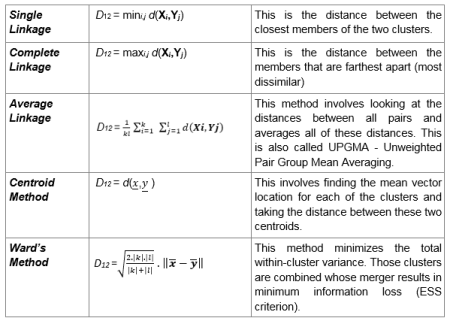
You might also be wondering “What are linkage methods?” They are essentially distance metrics that are used to measure distance between two clusters of observations. Here’s a table of the five major linkage methods:

And in case you were wondering what all the variables in the formula mean:

  • X1, X2, , Xk = Observations from cluster 1
  • Y1, Y2, , Yl = Observations from cluster 2
  • d (x, y) = Distance between a subject with observation vector x and a subject with observation vector y
  • ||.|| = Euclidean norm

Complete linkage is the most popular method for hierarchical clustering.

Now let’s try another similar method of clustering known as AGNES (an acronym for agglomerative nesting):

This method is pretty similar to the previous method (which is why I didn’t plot a dendrogram for this example) except that this method will also give you the agglomerative coefficient, which is a measurement of clustering structure (I used the line hc2$ac to find this amount). The closer this amount is to 1, the stronger the clustering structure; since the ac here is very, very close to 1, then this model has very, very strong clustering structure.

  • Remember to install the package “cluster”!

Now let’s compare the agglomerative coefficient using complete linkage with the agglomerative coefficient using the other linkage methods (not including centroid):

  • Before writing any of this code, remember to install the purrr (yes with 3 r’s) package.

We first create a vector containing the method names, then create a comparison of linkage methods by analyzing which one has the highest agglomerative coefficient (in other words, which method gives us the strongest clustering structure). In this case, ward’s method gives us the highest agglomerative coefficient (99.7%).

Next we’ll create a dendrogram using AGNES and ward’s method:

Next, I’ll demonstrate another method of hierarchical clustering known as DIANA (which is an acronym for divisive analysis). The main difference between this method and AGNES is that DIANA works in a top-down manner (meaning it starts with all objects in a single supercluster and further divides objects into smaller clusters until single-element clusters consisting of each individual observation are created) while AGNES works in a bottom-up manner (meaning it starts with single-element clusters consisting of each observation then groups similar elements into clusters, working its way up until a single supercluster is created). Here’s the code and the dendrogram for our DIANA example:

As you can see, we have a divisive coefficient instead of an agglomerative coefficient, but each serves the same purpose, which is to measure the amount of clustering structure in our data (and in both cases, the closer this number is to 1, the stronger the clustering structure). In this case, the divisive coefficient is .992, which indicates a very strong clustering structure.

Last but not least, let’s assign clusters to the data points. We would use the function cutree, which splits a dendrogram into several groups, or clusters, based on either the desired number of clusters (k) or the height (h). At least one of these criteria must be specified; k will override h if you mention both criteria. Here’s the code (using our DIANA example):

We could also visualize our clusters in a scatterplot using the factoextra package (remember to install this!):

In this graph, the observations are split into 5 clusters; there is a legend to the right of the graph that denotes which cluster corresponds to which shape. There are varying amounts of observations in each cluster, for instance, cluster 1 appears to have the majority of the observations while clusters 3 only has 2 observations and cluster 5 only has 1 observation. The observations, or apps, are denoted by numbers* rather than names, so the 2 apps in cluster 3 are the 116th and 1480th observations in the dataset, which correspond to Proloquo2Go and LAMP Words for Life, both of which are assistive communication tools for non-verbal disabled people. Likewise, the only app in cluster 5 is the 499th observation in the dataset, which corresponds to Infinity Blade, which was a fighting/role-playing game (it was removed from the App Store on December 10, 2018 due to difficulties in updating the game for newer hardware).

*the numbers represent the observation’s place in the dataset, so 33 would correspond to the 33rd observation in the dataset

  • If you’re wondering what Dim1 and Dim2 have to do with our analysis, they are the two dimensions chosen by R that show the most variation in the data. The amount of variation that each dimensions accounts for in the overall dataset are given in percentages; Dim1 accounts for 21.2% of the variation while Dim2 accounts for 13.7% of the variation in the data.

You can also visualize clusters inside the dendrogram itself by insetting rectangular borders in the dendrogram. Here’s how (using our DIANA example):

The first line of code is the same pltree line that I used when I first made the DIANA dendrogram. The second line creates the rectangular borders for our dendrogram. Remember to set k to however many clusters you used in your scatterplot (5 in this case). As for the borders, remember to put a colon in between the two integers you will use. As for which two integers you use, remember that the number to the right of the colon should be (n-1) more than the number to the left of the colon-n being the number of clusters you are using. In this case, the number to the left of the colon is 2, while the number to the right of the colon is 6, which is (5-1) more than 2. Two doesn’t have to be the number to the left of the colon, but it’s a good idea to use it anyway.

As you can see, the red square takes up the bulk of the diagram, which is similar to the case with our scatterplot (where the red area consists of the majority of our observations).

Thanks for reading,

Michael


R Lesson 11: Missing Data and Basic K-Means Clustering

Advertisements

Hello everybody,

It’s Michael, and today I will be discussing an unsupervised machine learning technique (recall that from my previous R post?) known as k-means clustering. I will also discuss what to do with missing data observations in a column. I know those may seem like unrelated topics, but the dataset I will be working with utilizes both of those topics.

Here’s the dataset for those who want to work with it-2018 films (1).

But first, as always, let’s load the dataset into R and try to understand our variables:

This dataset contains all 212 wide-release movies for the year 2018. There are seven variables in this dataset:

  • Title-the title of the movie
  • US.Box.Office.Gross-How much money the movie made in the US (this doesn’t factor in worldwide grosses)
    • I got this data from BoxOfficeMojo.com. Great site to collect movie-related data (IMDB works too).
  • Release.Date-The date a movie was released
    • Remember to use the as.Date function seen in the picture to convert your dates from factor type to date type.
  • Genre-The genre of the movie
  • RT.Score-The movie’s critic score on Rotten Tomatoes; 0 represents a score of 0% while 1 represents a score of 100%
  • Audience.Score-The movie’s audience score on Rotten Tomatoes; just as with RT Score, 0 means 0% and 1 means 100%
  • Runtime-The movie’s runtime in minutes; so 100 minutes represents a movie that is 1 hour 40 minute long.

Now, the datasets I’ve used so far have been perfect and tidy. However, real datasets aren’t like that, as they are often messy and contain missing observations, which is the case with this dataset. So what should we do?

First, let me demonstrate a function called missmap that gives you a visual representation of missing observations (and the locations of those observations):

First, before creating the missmap, you need to install the Amelia package and use the library(Amelia) function. Then all you need to do is write missmap(file)-or whatever you named your file-to display the missingness map (that’s why the function is called missmap)

According to this missmap, there aren’t too many missing observations (only 1% as opposed to the 99% of present observations). The few missing observations are located in the RT Score and Audience Score columns, since some of the movies are missing critic or audience scores.

  • Keep in mind that this dataset is only a warmup; I will be working with messier datasets in future posts, so stay tuned.

So how can we tidy up our dataset? Well, here’s one way of approaching it:

na.rm=TRUE

This line of code would be included in my k-means model to tell it to exclude any NA (or missing) data points. I set na.rm to TRUE since TRUE represents any missing data points.

I could also replace all the missing values with the means for RT Score and Audience Score (62% and 66% respectively), but since missing values only make up 1% of all my data, I’ll just stick with excluding missing values.

Now, it’s time to do some k-means clustering. But first of all, what is k-means clustering?

K-means clustering is an unsupervised machine learning algorithm that tries to group data into k amount of clusters by minimizing the distance between individual observations. The aim of k-means clustering is to keep all the data points in a cluster as close to the centroid (center data point) as possible. In order do so, each data point must be assigned to the closest centroid   utilizing Euclidean distance. Euclidean distance is data science lingo for straight line distance between a point in a cluster and the cluster’s centroid.

So the next step in our analysis would be to select the variables to use in our k-means clustering. We can do so by subsetting the data like this:

I chose two columns to include in my subset (US Box Office Gross and RT Score), which creates a data frame that I will use in my k-means clustering. The head function simply displays the first six rows of my subset (the first six box office grosses listed along with their corresponding RT score).

  • For k-means clustering, you should only include two columns in your subset

Now the next step would be to create our clusters. Here’s how:

I first created the movieCluster variable to store my k-means model using the name of my data subset-data1-, the number of clusters I wish to include (5), and nstart (which tells the model to start with 35 random points then select the one with the lowest variation).

  • I didn’t mention it here, but I included the line data1 <- na.omit (data1) in order to omit any rows with NA in them from my subset (remember RT Score had NA values). The k-means model won’t run if you don’t omit NA values (or replace them with means, but for now let’s stick to omitting the values).

I then type in movieCluster to get a better idea of what my cluster looks like. The first thing that is displayed is “K-means clustering with (x) clusters of sizes:”, which shows you  the sizes of each cluster. In this case, the clusters in my k-means model have 62, 22, 3, 10, and 102 observations, respectively. In total, 199 observations were used, which means 13 weren’t used since their RT Scores were missing.

The next thing you see is cluster means, which give you the means of each variable in a certain cluster; in this case, the means for US Box Office Gross and RT Score are displayed for all 5 clusters.

After that, you will see the clustering vector, which will tell you what cluster each observation belongs to (labelled 1-5). As you can see, there are some missing observations (such as 201 and 211); this is because I omitted all NA rows from my data subset (and in turn, my k-means model).

Next you will see the within cluster sum of squares for each cluster; this is a measurement of the variability of the observations in each cluster . Usually the smaller this amount is, the more compact the cluster. As you can see, all of the WCSSBC (my acronym for within cluster sum of squares by cluster) are quite large; this is possibly due to the fact that most of the values in the US Box Office Gross column are over 500,000. I’d probably have smaller WCSSBC if the US Box Office Gross values were smaller, but that’s neither here nor there.

The last thing you will see is between_SS/total_SS=95.4%, which represents the between sum-of-squares and total sum-of-squares ratio; this is a measure of the goodness-of-fit of the model. 95.4% indicates that there is an excellent goodness-of-fit for this model.

Last but not least, let’s graph our model. Here’s how:

The movies are clustered by US Box Office Gross (referred here as simply Box Office Gross); the colors of the dots represent each cluster. Here’s what each color represents:

  • Light blue-movies that made between $0 to $25 million
  • Black-movies that made between $25 to $100 million (many limited releases)
  • Red-movies that made between $100 to $200 million
  • Dark blue-movies that made between $200 to $400 million
  • Green-movies that made between $600 to $700 million

As you can see, the green cluster is the outlier among the data, since only 3 movies in our dataset made at least $600 million (Black Panther, Avengers Infinity War, and Incredibles 2).

Thanks for reading,

Michael


R Lesson 9: Time Series Data

Advertisements

Hello everybody,

It’s Michael, and today’s post will be on time series analysis, which analyzes time-dependent data (such as the weather in Miami, Florida over the course of 2018 or the Cleveland Browns’ records over the last decade or the price of bitcoin in the last 2 years, just to give some examples) over a certain period of time.

In the post, I will be utilizing search data from Google Trends to analyze how often certain famous people are searched. For those that don’t know, Google Trends is a fascinating tool that allows you to see how often something (whether a food, person, event, animal, etc.) is searched on Google over a certain timeframe (all the way back to January 1, 2004). Google Trends also has several fascinating analyses, like The Year in Search (which details the most popular worldwide Google searches in a given year).

Here’s the spreadsheet-Google Trends-I swapped out <1s for 0s so that R would be everything as an int and not a factor.

Anyway, I’ll be making several graphs, analyzing two people at a time in each graph that have something in common.

Now, let’s load our file and try to understand the data:

This data basically consists of 52 dates (shown by the Week variable), and the search popularity in the US for 22 people over the last year (from the week of December 17, 2017 to December 9, 2018). The numbers 0-100 are used as a metric to determine how often a certain person’s name was searched in a given week; 0 means there either wasn’t enough data or that person’s name wasn’t searched at all while 100 means the person’s name was searched for (presumably) millions of times that week. All the dates listed are Sundays (12/17/17, 12/24/17, etc.), meaning in this case, a week is measured from Sunday-Saturday,

Now before we start graphing, we need to be sure the strings in the Week variable are converted to dates for the purpose of the graph, which is what this line does (more specifically, dates are converted into month/day/year format-exactly the way they are listed in the spreadsheet)

Now time to graph (remember to install the ggplot2 package). I will be looking at two people (who have something in common) at a time and doing a comparative analysis.

I’ll start by analyzing Jared Fogle and Bill Cosby-two celebrities who had very public falls from grace and are both currently incarcerated.

As you can see, Bill Cosby was more popular than Jared Fogle in American Google Searches. This is likely because Fogle has been incarcerated for his crimes since November 2015, while Cosby was re-tried, convicted and ultimately sent to prison in the span of five months (April-September 2018). Cosby had plenty of legal drama this year, which could explain the greater fluctuation in his graph (compared to Fogle’s). Cosby also has two major peaks in his search history graph for the weeks of April 22 and September 23-the weeks he was convicted and sent to prison, respectively.

  • The peaks aren’t the only things you should be analyzing. Check the numbers on the y-axis to get an idea of the maximum search history metric. For instance, Jared Fogle’s highest search metric is 1, while Bill Cosby’s is 100. This indicates that more Americans searched Cosby’s name than Fogle’s (Cosby was also the more newsworthy of the two this past year)

Now let’s analyze US search history trends for Kyle Kulinski and Ana Kasparian-two famous left-wing commentators. Kulinski hosts the Secular Talk YouTube channel while Kasparian is a member of progressive YouTube news channel The Young Turks.

As you can see, even though Kasparian’s graph has more fluctuation than Kulinski’s, searches for Kulinski’s name were more popular than searches for Kasparian because the search history metric for Kulinski goes above 75 two times, while the metric for Kasparian doesn’t exceed 25. The discrepancy between Kulinski’s search history metric and Kasparian’s could be because more people subscribe to Secular Talk than The Young Turks (I’m just theorizing here).

Now let’s analyze the search metric history for Mike Shinoda and Chester Bennington-two members of Linkin Park.

As you can see, Chester Bennington’s highest metric is 100, while Mike Shinoda’s highest metric is 44. I’m guessing the reason Bennington’s metric is higher is that many people still enjoy listening to Linkin Park’s music-and hear his voice-after his death. Also worth noting is that Bennington’s metric peaked on the week of July 15, which was around the one-year anniversary of his death on 7-20-17. Shinoda’s search history metric peaked on the week of June 17, which was when his solo album Post Traumatic was released in its entirety (and which he created after Bennington’s death).

Now time to compare the American search metric history for JaMarcus Russell and Ryan Leaf-two of the biggest NFL busts of all time (and both quarterbacks).

As you can see, Leaf’s graph has more fluctuation than Russell’s, but Russell’s graph peaks at 100 while Leaf’s only peaks at 26. Then again, the search history metric average for Russell is 5.7 and for Leaf is only 5.3, meaning neither individual’s name widely pops up in US Google Searches. However, the one thing that can explain Russell’s peak of 100 on the week of November 4 could be this article with an interesting story about Russell-https://bleacherreport.com/articles/2804453-david-diehl-raiders-gave-jamarcus-russell-blank-tapes-to-see-if-qb-watched-film.

Now let’s compare the search history metrics of Dwayne Wade and Hassan Whiteside, two current Miami Heat players.

As you can see, Wade’s graph peaks higher than Whiteside’s (100 to Whiteside’s 20). This is likely because Wade had a more eventful year than Whiteside, as he returned to the Heat (week of February 4), announced his retirement (week of September 16), welcomed another baby (week of November 4), and played in his 1000th career game (week of December 9).

Now time to analyze the search history metrics for Samuel J Comroe and Shin Lim-two contestants on AGT Season 13. Samuel J Comroe was a stand-up comedian who finished in 4th place, while Shin Lim was a close-up magician who finished as the season’s winner.

As you can see, Shin Lim’s peak is much higher than Samuel J Comroe’s (100 to 8, respectively). Neither contestant has much fluctuation in their graphs, but both peak on the week of September 16 (this was the week of the AGT Finals, which both Comroe and Lim competed in and finished in the Top 5).

Now let’s analyze the search history metrics for Tom Brady and Nick Foles-the two starting quarterbacks for Super Bowl LII.

As you can see, neither QB’s graph fluctuates much. Both graphs hit their peaks on the weeks of January 21 (AFC/NFC Championships) and February 4 (Super Bowl LII). Interestingly enough, Brady’s graph has the higher peak (100 to Foles’s 54), even though Foles and the Eagles won the Super Bowl. I guess this means that Brady is still the more popular of the two QBs (after all, Foles was a backup after the Eagles lost their main QB Carson Wentz).

Now time to analyze Alexandria Ocasio-Cortez and Rick Scott, two politicians who got elected to Congress during the 2018 midterm elections. Ocasio-Cortez (D-NY) got elected to the House and Scott (R-FL) got elected to the Senate.

Both Scott’s and Ocasio-Cortez’s graphs have relatively high peaks (100 for Scott and 61 for Ocasio-Cortez) since both had quite eventful elections. Ocasio-Cortez’s graph peaks on the weeks of June 24 and November 4, which was the week of her stunning primary upset against 10-term Democrat Joe Crowley and the week of her eventual election to the House. Scott’s graph also peaks on the week of November 4, which was the week he got elected to the Senate (this was right before the tense recount between him and incumbent Bill Nelson, after which Scott was confirmed the winner). One reason I think Scott’s graph has the higher peak is because his name is the more recognized of the two; after all, Scott was governor of Florida when he got elected to the Senate while Ocasio-Cortez was a relatively unknown bartender when she won the primaries and eventually, the house.

Now time to analyze Meghan Markle and Kate Middleton, two women who had very public (and televised) royal weddings (Markle’s being this year while Middleton’s was in 2011). The women’s husbands also happened to be siblings-Prince William (Middleton’s husband) and Prince Harry (Markle’s husband).

Markle’s graph has a much higher peak than Middleton’s (100 to Middelton’s 17), most likely because her royal wedding was this year, while Middleton’s was in 2011. Unsurprisingly, Markle’s graph peaks on the week of May 13, which was the week of her royal wedding. Some other reasons why Markle’s graph peaks higher than Middleton’s could be because Markle is one of the few Americans to marry into British royalty (Wallis Simpson, who married England’s King Edward VII in 1937, is another notable example), she’s also one of the first biracial royal fiancees, she’s older than Prince Harry (most royal grooms are older than the brides), and she was quite famous in the US having had an extensive acting career on shows like Suits.

The next analysis will be comparing Fred Guttenberg and Andrew Pollack, two Parkland parent-activists who lost their daughters in the Stoneman Douglas shooting.

Both individuals have high peaks (Pollack at 100, Guttenberg at 61) likely because both parents have appeared on several media outlets (CNN, Fox News, etc.) plenty of times since the shooting. One reason I think Pollack’s graph peaks higher than Guttenberg’s is because unlike many of the Parkland students and parents, he isn’t campaigning for tighter gun laws. A photo of Pollack in a Trump 2020 shirt also got considerable attention during the few days after the shooting-this could also explain the higher peak.

Finally, let’s analyze Mikaela Shiffrin and Maia Shibutani, two female participants of this year’s Winter Olympics in PyongCheng. Shiffrin is an alpine skier specializing in slalom skiing while Shibutani is a figure skater who competes with her older brother Alex.

Both graphs are pretty stagnant, save for a single peak (Shiffrin’s occurring on the week of February 11 and Shibutani’s occurring on the week of February 18, both during the 2018 Winter Olympics). Shiffrin’s peak is much higher though (100 compared to Shibutani’s 7), likely because Shiffrin won golds and silvers while Shibutani only won bronzes.

Now, before I go, remember that just because a graph fluctuates a lot doesn’t mean the search history metric is always going to be very high. R adjusts the scales on the graphs based on the highest number in a column.

Thanks for reading and happy holidays,

Michael

R Lesson 8: Predictions For Linear & Logistic Regression/Multiple Linear Regression

Advertisements

Hello everybody,

It’s Michael, and today’s lesson will be about predictions for both linear and logistic regression models. I will be using the same dataset that I used for R Analysis 2: Linear Regression & NFL Attendance, except I added some variables so I could create both linear and logistic regression models from the data. Here is the modified dataset-NFL attendance 2014-18

Now, as always, let’s first try to understand our variables:

I described most of these variables in R Analysis 2, but here are what the two new ones mean (I’m referring to the two bottommost variables):

  • Playoffs-whether or not a team made the playoffs. Teams that made playoffs are represented by a 1, while teams that didn’t make playoffs are represented by a 0. Recall that teams who finished 1st-6th in their respective conferences made playoffs, while teams that finished 7th-16th did not.
  • Division-What division a team belongs to, of which there are 8:
    • 1-AFC East (Patriots, Jets, Dolphins, Bills)
    • 2-AFC North (Browns, Steelers, Ravens, Bengals)
    • 3-AFC South (Colts, Jaguars, Texans, Titans)
    • 4-AFC West (Chargers, Broncos, Chiefs, Raiders)
    • 5-NFC East (Cowboys, Eagles, Giants, Redskins)
    • 6-NFC North (Packers, Bears, Vikings, Lions)
    • 7-NFC South (Falcons, Saints, Panthers, Buccaneers)
    • 8-NFC West (Seahawks, 49ers, Cardinals, Rams)

I added these two variables so that I could create logistic regression models from the data. In both cases, I used dummy variables (remember those?).

Another function I think will help you in your analyses is sapply. Here’s how it works:

As you can see, you can do two things with supply-find out if there are any missing variables (as seen on the top function) or find out how many unique values there are for a certain variable (as seen on the bottom function). According to the output, there are no missing values for any variables (in other words, there are no blank spots in any column of the spreadsheet). Also, on the bottom function, you can see how many distinct values correspond to a certain variable (e.g. Conference Standing has 16 distinct values).

Before I get into analysis of the models, I want to introduce two new concepts-training data and testing data:

The difference between training and testing data is that training data are used as guidelines for how a model (whether linear or logistic) should make decisions while testing data just gives us an idea as to how well the model is performing. When splitting up your data, a good rule of thumb is 80-20, meaning that 80% of the data should be for training while 20% of the data should be for testing (It doesn’t have to be 80-20, but it should always be majority of the data for training and the minority of the data for testing). In this model, observations 1-128 are part of the training dataset while observations 129-160 are part of the testing dataset.

I will post four models in total-two using linear regression and two using logistic regression. I will start with the logistic regression:

In this model, I chose playoffs as the binary dependent variable and Division and Win Total as the independent variables. As you can see, intercept (referring to Playoffs) and Win Total are statistically significant variables, while Division is not statistically significant. Also, notice the data = train line, which indicates that the training dataset will be used for this analysis (you should always use the training dataset to create the model)

Now let’s create some predictions using our test dataset:

The fitted.results variable calculates the predictions while the ifelse function determines whether each of the observations in our test dataset (observations 129-160) is significant to the model. A 1 under an observation number indicates that the observation has at least a 50% significance to the model while a 0 indicates that the observation has less than a 50% significance to the model.

If we wanted to figure out exactly how significant each observation is to the model (along with the overall accuracy of the model), here’s how:

The misClasificError basically indicates the model’s margin of error using the fitted.results derived from the test dataset. The accuracy is calculated by subtracting 1 from the misClasificError, which turns out to be 87%, indicating very good accuracy (and indicating that the model’s margin of error is 13%).

Finally, let’s plot the model:

We can also predict various what-if scenarios using the model and the predict function. Here’s an example:

Using the AFC South as an example, I calculated the possible odds for a team in that division to make the playoffs based on various possible win totals. As you can see, an AFC South team with 10 or 14 wins is all but guaranteed to make the playoffs, as odds for both of those win totals are greater than 1. However, AFC South teams with only 2 or 8 wins aren’t likely to go to playoffs because the odds for both of those win totals are negative (however 8 wins will fare better than 2).

Let’s try another example, this time examining the effects of 9 wins across all 8 divisions (I chose 9 because 9 wins sometimes results in playoff berths, sometimes it doesn’t):

As you can see, 9 wins will most likely earn a playoff berth for AFC East teams (55.6% chance) and least likely to earn a playoff spot in the NFC West (35.7% chance)

I know it looks like all the lines are squished into one big line, but you can imply that the more wins a team has, the greater its chances are at making the playoffs. The pink line that appears to be the most visible represents the NFC West (Rams, Seahawks, 49ers, Cardinals). Unsurprisingly, the teams likeliest to make the playoffs were the teams with 9 or more wins (expect for the 2017 Seahawks, who finished 9-7 and missed the playoffs).

Now let’s create another logistic regression model that is similar to the last one except with the addition of the Total Attendance variable

The summary output looks similar to that of the previous model (I also use the training dataset for this model), except that this time, none of the variables have asterisks right by them, meaning none of them are statistically significant (which happens when the p-value is above 0.1).  Nevertheless, I’ll still analyze this model to see if it is better than my first logistic regression model.

Now let’s create some predictions using the test dataset:

Like our previous model, this model also has a nice mix of 0s and 1s, except this model only has 11 1s, while the previous model had 14 1s.

And now let’s find the overall accuracy of the model:

Ok, so I know 379% seems like crazy accuracy for a logistic regression model. Here’s how it was calculated:

R took the sum of these numbers and divided that sum by 32 to find the average of the fitted results. R then subtracted 1 from the average to get the accuracy measure.

Just as we did with the first model, we can also create what-if scenarios. Here’s an example:

Using the AFC North as an example, I analyzed the effect of win total on a team’s playoff chances while keeping total attendance the same (1,400,000). Unsurprisingly (if total attendance is roughly 1.4 million fans in a given season), teams with a losing record (7-8-1 or lower) are less likely to make the playoffs than teams with a split or winning record (8=8 or higher). Given both record and a total attendance of 1,400,000 fans, the threshold for clinching a playoff berth appears to be 12 or 13 wins (though barring attendance, most AFC North teams fare well with 10, 9, or even 8 wins).

Now here’s another example. this time using the NFC East (and changing both win totals and total attendance):

So given increasing win totals and total attendance, an NFC East team’s playoff chances increase. The playoff threshold here, just as it been with most of my predictions, is 9 or 10 wins.

Now let’s see what happens when win totals increase but attendance goes down (also using the NFC East):

Ultimately (with regards to the NFC East), it’s not total attendance that matters, but a team’s win totals. As you can see, regardless of total attendance, playoff clinching odds increase with higher win totals (win threshold remains at 9 or 10).

And here’s our model plotted:

Now, I know this graph is just about as easy-to-read as the last graph (not very, but that’s how R works), but just like with the last graph, you can draw some conclusions. Since this graph factors in Total Attendance and Win Total (even though only Total Attendance is displayed), you can tell that even though a team’s fanbase may love coming to their games, if the wins are low, so are the playoff chances.

Now, before we start the linear regression models, let’s compare the logistic regression models to see which is the better of the two by analyzing various criteria:

  • Difference between null & residual deviance
    • Model 1-73.25 with a decrease of two degrees of freedom
    • Model 2-115.82 with a decrease of three degrees of freedom
    • Better model-Model 1
  • AIC
    • Model 1-101.86
    • Model 2-60.483
    • Better model-Model 2 (41.377 difference)
  • Number of Fisher Scoring Iterations
    • Model 1-5
    • Model 2-7
    • Better model-Model 1 (less Fisher iterations)
  • Overall Accuracy
    • Model 1-87%
    • Model 2-379%
    • Better model-Model 1 (379% sounds too good to be true)

Overall better model: Model 1

Now here’s the first linear regression model:

This model has Win Total as the dependent variable and Total Attendance and Conference Standing as the independent variables. This will also by my first model created with multiple linear regression, which is basically linear regression with more than one independent variable.

And finally, let’s plot the model:

In cases of multiple linear regression such as this, I had to graph each independent variable separately; graphing Total Attendance and Conference Standing separately allows us to examine the effects each independent variable has on our dependent variable (Win Total). As you can see, Total Attendance increases with an increasing Win Total while Conference Standing decreases with a decreasing Win Total. Both graphs make lots of sense, as fans are more tempted to come to a team’s games when the team has a high win total and conference standings tend to decrease with lower win totals (an interesting exception is the 2014 Carolina Panthers, who finished 4th in the NFC despite a 7-8-1 record).

  • In case you are wondering what the layout function does, it basically allowed two graphs to be displayed side by side. I can also alter the function depending on how many independent variables I use; if for instance I used 4 independent variables, I could change c to 2,2 to display the graphs in a 2 by 2 matrix.

Multiple linear regression equations are quite similar to those of simple linear regression, except for an added variable. In this case, the equation would be:

  • Win Total = 6.366e-6(Total Attendance)-5.756e-1(Conference Standing)+5.917

Now, using the predict function that I showed you for my logistic regression models won’t be very efficient here, so we can go the old-fashioned way by plugging numbers into the equation. Here’s an example:

Regardless of what conference a team is part of, a total attendance of at least 750,000 fans and a bottom seed in the conference should at least bring the team a 1-15 record. For teams with a total attendance of at least 1.1 million fans who fall just short of the playoffs with a 7th seed, a 9-7 record would be likely. Top of the conference teams with an attendance of at least 1.45 million should net a 14-2 record.

Now, let’s see what happens when conference standing improves, but attendance decreases:

According to my predictions, bottom-seeded teams with a total attendance of at least 1.5 million fans should net at least a 6-10 record. However, as conference standings improve and total attendance decreases, predicted records stagnate at either 9-7 or 8-8.

Now here’s my second linear model:

In this model, I used two different independent variables-Home Attendance and Average Age of Roster-but I still used Win Total as my dependent variable.

The equation goes like this:

  • Win Total = 1.051e-5(Home Attendance)+5.534e-1(Average Age of Roster)-1.229e+1

Now just like I did with both of my logistic regression models and the linear regression model, let’s create some what-if scenarios:

In this scenario, home attendance is increasing along with the average age of roster. Win total also increases with a higher average age of roster. For instance, teams with a home attendance of at least 350,000 fans and an average roster age of 24 (meaning the team is full of rookies and other fairly-fresh faces) should expect at least a 5-11 record. On the other hand, teams with a roster full of veterans (yes, 28.5 is old for an average roster age)  and a home attendance of at least 1.2 million fans should expect a perfect 16-0 season.

Now let’s try a scenario where home attendance decreases but average age of roster increases:

In this scenario, when home attendance decreases but average age of roster increases, a team’s projected win total also goes down. For teams full of fresh-faces and breakout stars (average age 24) and a home attendance of at least 1.1 million fans, a 13-3 record seems likely. On the other hand, for teams full of veterans (average age 28.5) and a home attendance of at least 300,000 fans, a 7-9 record appears in reach.

One thing to keep in mind with my linear regression predictions is that I rounded projected win totals to the nearest whole number. So I got the 13-3 record projection from the 12.5526 output.

Now let’s plot the model:

Just as I did with linear1, I graphed the two independent variables separately, not only because it’s the easiest way to graph multiple linear regression but also because we can see each variable’s effect on Win Total. As you can see, Home Attendance and Average Age of Roster increases with an increasing win total, though the increase in Average Age of Roster is smaller than that of Home Attendance. Each scenario makes sense, as teams are likelier to have a higher win total if they have more supportive fans in attendance (particularly in their 7 or 8 home games per season) and having more recognizable veterans on a team (like the Saints with QB Drew Brees or the Broncos with LB Von Miller) will be better for the team’s overall record than having a team full of newbies (like the Browns with QB Baker Mayfield or the Giants with RB Saquon Barkley).

  • The Home Attendance numbers are displayed in scientific notation, which is how R displays large numbers. 1e+05 is 100,000, 3e+05 is 300,000, and so on.

Now, before I go, let’s compare the two linear models:

  • Residual Standard Error
    • Model 1-1.09 wins
    • Model 2-2.948 wins
    • Better Model-Model 1 (less deviation)
  • R-Squared (Multiple and Adjusted respectively)
    • Model 1-88.72% and 88.58%
    • Model 2-17.49% and 16.44%
    • Better Model-Model 1 (much higher than Model 2)
  • F-statistic & P-Value (since there are 2 degrees of freedom, this is an important metric)
    • Model 1-617.5 on 2 and 157 degrees of freedom; 2.79e-7
    • Model 2-16.64 on 2 and 157 degrees of freedom; 2.79e-7
    • Better Model-Model 1 (both result in the same p-value, but the f-statistic on Model 1 is much larger)
  • Overall better model-Model 1

Thanks for reading,

Michael


R Analysis 2: Linear Regression & NFL Attendance

Advertisements

Hello everybody,

It’s Michael, and today’s post will be an R analysis post using the concept of linear regression. The dataset I will be using NFL attendance 2014-18, which details NFL attendance for each team from the 2014-2018 NFL seasons along with other factors that might affect attendance (such as average roster age and win count).

First, as we should do for any analysis, we should read the file and understand our variables:

  • Team-The team name corresponding to a row of data; there are 32 NFL teams total
  • Home Attendance-How many fans attend a team’s home games (the NFL’s International games count towards this total)
  • Road Attendance-How many fans attend a team’s road games
    • Keep in mind that teams have 8 home games and 8 away games.
  • Total Attendance-The total number of fans who go see a team’s games in a particular season (attendance for home games + attendance for away games)
  • Win Total-how many wins a team had for a particular season
  • Win.. (meaning win percentage)-the precent of games won by a particular team (keep in mind that ties are counted as half-wins when calculating win percentages)
  •  NFL Season-the season corresponding to the attendance totals (e.g. 2017 NFL season is referred to as simply 2017)
  • Conference Standing-Each team’s seeding in their respective conference (AFC or NFC), which ranges from 1 to 16-1 being the best and 16 being the worst. The teams that were seeded 1-6 in their conference made the playoffs that season while teams seeded 7-16 did not; teams seeded 1-4 won their respective divisions while teams seeded 5 and 6 made the playoffs as wildcards.
    • As the 2018 season is still in progress, these standings only reflect who is LIKELY to make the playoffs as of Week 11 of the NFL season. So far, no team has clinched a playoff spot yet.
  • Average Age of Roster-The average age of a team’s players once the final 53-man roster has been set (this is before Week 1 of the NFL regular season)

One thing to note is that I removed the thousands separators for the Home Attendance, Road Attendance, and Total Attendance variables so that they would read as ints and not factors. The file still has the separators though.

Now let’s set up our model (I’m going to be using three models in this post for comparison purposes):

In this model, I used Total Attendance as the dependent variable and Win Total as the independent variables. In other words, I am using this model to determine if there is any relationship between fans’ attendance at a team’s games and a team’s win total.

Remember how in R Lesson 7 I mentioned that you should pay close attention to the three bottom lines in the output? Here’s what they mean for this model:

  • As I mentioned earlier, the residual standard error refers to the amount that the response variable (total attendance) deviates from the true regression line. In this case, the RSE is 1,828,000, meaning the total attendance deviates from the true regression line by 1,828,000 fans.
    • I didn’t mention this in the previous post, but the way to find the percentage error is to divide the RSE by the average of the dependent variable (in this case, Total Attendance). The lower the percentage error, the better.
    • In this case, the percentage error is 185.43% (the mean for Total Attendance is 985,804 fans, rounded to the nearest whole number).
  • The R-Squared is a measure of the goodness-of-fit of a model-the closer to 1, the better the fit. The difference between the Multiple R-Squared and the Adjusted R-Squared is that the former isn’t dependent on the amount of variables in the model while the latter is. In this model, the Multiple R-Squared is 20.87% while the Adjusted R-Squared is 20.37%, indicating a very slight correlation.
    • Remember the idea that “correlation does not imply causation”, which states that even though there may be a strong correlation between the dependent and independent variable, this doesn’t mean the latter causes the former.
    • In the context of this model, even though a team’s total attendance and win total have a very slight correlation, this doesn’t mean that a team’s win total causes higher/lower attendance.
  • The F-squared measures the relationship (or lack thereof) between independent and dependent variables. As I mentioned in the previous post, for models with only 1 degree of freedom, the F-squared is basically the independent variable’s t-value squared (6.456²=41.68). The F-Squared (and resulting p-value) aren’t too significant to determining the accuracy of simple linear regression models such as this one, but are more significant when dealing with with multiple linear regression models.

Now let’s set up the equation for the line (note the coef function I mentioned in the previous post isn’t necessary):

Remember the syntax for the equation is just like the syntax of the slope-intercept equation (y=mx+b) you may remember from algebra class. The equation for the line is (rounded to 2 decimal places):

  • Total Attendance = 29022(Win Total)+773943

Let’s try the equation out using some scenarios:

  • “Perfect” Season (no wins): 29022(0)+773943=expected total attendance of 773,943
  • Split Season (eight wins): 29022(8)+773943=expected total attendance of 1,006,119
  • Actual Perfect Season (sixteen wins): 29022(16)+773943=expected total attendance of 1,238,295

And finally, let’s create the graph (and the regression line):

As seen in the graph above, few points touch the line (which explains the low Multiple R-Squared of 20.68%). According to the regression line, total attendance INCREASES with better win totals, which indicates a direct relationship. One possible reason for this is that fans of consistently well-performing teams (like the Patriots and Steelers) are more eager to attend games than are fans of consistently struggling teams (like the Browns and Jaguars). An interesting observation would be that the 2015 4-12 Dallas Cowboys had better total attendance than the 2015 15-1 Carolina Panthers had. The 2016 and 2017 Cleveland Browns fared pretty well for attendance-each of those seasons had a total attendance of at least 900,000 fans (the records were 1-15 and 0-16 respectively).

Let’s create another model, once again using Total Attendance as the dependent variable but choosing Conference Standing as the independent variable:

So, is this model better than lr1? Let’s find out:

  • The residual standard error is much smaller than that of the previous model (205,100 fans as opposed to 1,828,000). As a result, the percentage error is much smaller-20.81%-and there is less variation among the observation points around the regression line.
  • The Multiple R-Squared and Adjusted R-Squared (0.4% and -0.2% respectively) are much lower than the R-Squared amounts for lr1. Thus, there is even less of a correlation between Total Attendance and Conference Standing than there is between Total Attendance and Win Total (for.a particular team).
  • Disregard the F-statistic and p-value.

Now let’s set up our equation:

From this information, we get the equation:

  • Total Attendance = -2815(Conference Standing)+1009732

Here are some scenarios using this equation:

  • Top of the conference (1st place): -2815(1)+1009732=expected total attendance of 1,006,917
  • Conference wildcard (5th place): -2815(5)+1009732=expected total attendance of 995,657
  • Bottom of the pack (16th place): -2815(16)+1009732=expected total attendance of 964,692

Finally, let’s make a graph:

As seen in the graph, few points touch the line (less points touch this line than in the line for lr1). The line itself has a negative slope, which implies that total attendance DECREASES with WORSE conference standings (or increases with better conference standings). Yes, I know the numbers under conference standing are increasing, but keep in mind that 1 is the best possible conference finish for a team, while 16 is the worst possible finish for a team. One possible reason that total attendance decreases with lower conference standings is that fans are possibly more enticed to come to games for consistently top conference teams and division winners (like the Patriots and Panthers) rather than teams who miss playoffs year after year (like the Jaguars, save for the 2017 squad that made it to the AFC Championship). Interestingly enough, the 2015 4-12 Dallas Cowboys rank second overall in total attendance (16th place in their conference), just behind the 2016 13-3 Dallas Cowboys (first in their conference).

Now let’s make one more graph, this time using Average Age of Roster as the independent variable:

Is this model better than lr2? Let’s find out:

  • The residual standard error is the smallest one of the three (204,600 fans) and thus, the percentage error is the smallest of the three-20.75%.
  • The Multiple R-Squared and Adjusted R-Squared are smaller than those of lr1 but larger than that of lr2 (0.84% and 0.22% respectively). Thus, Average Age of Roster correlates better with Total Attendance than does Conference Standing, however Win Total correlates the best with Total Attendance.
  • Once again, disregard the F-Statistic & corresponding p-value.

Now let’s create the equation:

  • Total Attendance = 36556(Average Age of Roster)+33594

Here are some scenarios using this equation

  • Roster with mostly rookies and 2nd-years (an average age of 24)=36556(24)+33594=expected total attendance of 910,938
  • Roster with a mix of newbies and veterans (an average age of 26)=36556(26)+33594=expected total attendance of 984,050
  • Roster with mostly veterans (an average age of 28)=36556(28)+33594=expected total attendance of 1,057,162

And finally, let’s create a graph:

Like the graph for lr2, few points touch the line. As for the line itself, the slope is positive, implying that Total Attendance INCREASES with an INCREASING Average Age of Roster. One possible reason for this is that fans are more interested in coming to games if the team has several veteran stars* (names like Phillip Rivers, Tom Brady, Jordy Nelson, Antonio Gates, Rob Gronkowski, Richard Sherman, Julius Peppers, Marshawn Lynch and many more) rather than if the team is full of rookies and/or unknowns (Myles Garrett, Sam Darnold, Josh Rosen, Leighton Vander Esch, among others). Interestingly enough, the team with the oldest roster (the 2018 Oakland Raiders, with an average age of 27.4), have the second lowest total attendance, just ahead of the 2018 LA Chargers (with an average age of 25.8).

*I’ll use any player who has at least 6 seasons of NFL experience as an example of a “veteran star”.

So, which is the best model to use? I’d say lr1 would be the best model to use, because even though it has the highest RSE (1,828,000), it also has the best correlation between the independent and dependent variables (a Multiple R-Squared of 20.87%). All in all, according to my three analyses, a team’s Win Total has the greatest influence on how many fans go to their games (both home and away) during a particular season.

Thanks for reading, and happy Thanksgiving to you all. Enjoy your feasts (and those who are enjoying those feasts with you),

Michael

R Lesson 7: Graphing Linear Regression & Determining Accuracy of the Model

Advertisements

Hello everybody,

It’s Michael, and today’s post will be a continuation of the previous post because I will be covering how to graph linear regression models using the dataset and model created in the previous post.

Just to recap, this model is measuring whether the age of a person influenced how many times their name was mentioned on cable news reports (period measured is from October 1-December 7, 2017, at the beginning of the #MeToo movement). Now let’s graph the model:

The basic syntax for creating a plot like this is plot(dataset name$y-axis~dataset name$x-axis); the name of the y-axis is always listed BEFORE the name of the x-axis. The portion of code that reads main = #MeToo coverage, xlab = Age, ylab = Number of Mentions is completely optional, as all it does is allow you to label the x- and y-axes and display a name for the graph.

The abline(linearModel) line adds a line to the graph based on the equation for the model (value=0.09171(age)-3.39221). However, for this function to work, don’t close the window displaying the graph. The line is immediately displayed on the graph after you write the line of code and hit enter.

  • Use the name of your linear regression model in the parentheses so that the line that is created matches the equation for your model.
  • Remember to always hit enter after writing the plot() line, then go back to the coding window, write the abline() line and hit enter again.

So we know how to graph our model, but how do we evaluate the accuracy of the model? Take a look at the summary(linearModel) output below:

Focus on the last three lines of this code block, as they will help determine the accuracy (or goodness-of-fit) of this model. Here’s a better explanation of the output:

  • The residual standard error is a measure of the QUALITY of the fit of the model. Every linear regression model usually contains an error term (E) and as a result, there will be some margin of error in our regression line. The residual standard error refers to the amount that the response variable (value) will deviate from the true regression line. In this case, the actual number of times someone was mentioned on the news deviates from the true regression line is 16.2 mentions.
  • The R-squared is a measure of how well the model ACTUALLY fits within the data. The closer R-squared is to 1, the better the fit of the model. The main difference between Multiple R-Squared and Adjusted R-Squared is that the former isn’t dependent on the amount of variables in the model while the latter is. The Adjusted R-Squared will decrease for variables irrelevant to the model, which makes a good metric to use when trying to find relevant variables for your model
    • As you can see, the Multiple R-Squared and Adjusted R-Squared values are quite low (0.47% and 0.46% respectively), indicating that there isn’t a significant relationship between a person’s age and how many time their name was mentioned in news reports.
    • Keep the idea that “correlation does not imply causation” in mind when analyzing the R-Squared. This idea implies that even though a high R-Squared shows that the independent variable and dependent variable perfectly correlate to each other, this does not indicate the independent variable causes the dependent variable (the opposite is true for models with a low R-Squared). In the context of this model, even though someone’s age and the amount of times their name was mentioned on news reports don’t appear correlated, this doesn’t mean that someone’s age isn’t a factor in the amount of news coverage they receive.
  • The F-statistic is a measure of the relationship (or lack thereof) between the dependent and independent variables. This value (along with the corresponding p-value) isn’t really significant when dealing with simple linear regression models such as this one but it is an important metric to analyze when dealing with multiple linear regression models (just like simple linear regression except with multiple independent variables).
    • I will cover multiple linear regression models in a future post, so keep your eyes peeled.
    • In cases of simple linear regression, the f-statistic is basically the independent variable’s t-value squared. The summary output displayed above proves my point, as the squared t-value for age (8.049) equals the f-statistic (64.78). Keep in mind that the f-statistic=(t-value)² rule only applies to models with 1 degree of freedom, just like the one displayed above.

Thanks for reading,

Michael


R Analysis 1: Logistic Regression & The 2017-18 TV Season

Advertisements

Hello everybody,

Yes, I know you all wanted to learn about MySQL queries, but I am still preparing the database (don’t worry it’s coming, just taking a while to prepare). And since I did mention I’ll be doing analyses on this blog, that is what I will be doing on this post. It’s basically an expansion of the TV show set from R Lesson 4: Logistic Regression Models & R Lesson 5: Graphing Logistic Regression Models with 3 new variables.

So, as we should always do, let’s load the file into R and get an understanding of our variables, with str(file).

As for the new variables, let’s explain. By the way, the numbers you see for the new variables are dummy variables (remember those?). I thought the dummy variables would be a better way to categorize the variables.

  • Rating-a TV show’s parental rating (no not how good it is)
    • 1-TV G
    • 2-TV PG
    • 3-TV 14
    • 4-TV MA
    • 5-Not applicable
  • Usual day of week-the day of the week a show usually airs its new episodes
    • 1-Monday
    • 2-Tuesday
    • 3-Wednesday
    • 4-Thursday
    • 5-Friday
    • 6-Saturday
    • 7-Sunday
    • 8-Not applicable (either the show airs on a streaming service or airs 5 days a week like a talk show or doesn’t have a consistent airtime)
  • Medium-what network the show airs on
    • 1-Network TV (CBS, ABC, NBC, FOX or the CW)
    • 2-Cable TV (Comedy Central, Bravo, HBO, etc.)
    • 3-Streaming TV (Amazon, Hulu, etc.)

I decided to do three logistic regression models (one for each of the new variables). The renewed/cancelled variable (known as X2018.19.renewal.) is still the binary variable, and the other dependent variable I used for the three models is season count (known as X..of.seasons..17.18.).

First, remember to install (and use the library function for) the ggplot2 package. This will come in handy for the graphing portion.

Here’s my first logistic regression model, with my binary variable and two dependent variables (season count and rating). If you’re wondering what the output means, check out R Lesson 4: Logistic Regression Models for a more detailed explanation.

Here are two functions you need to help set up the model. The top function help set up the grid and designate which categorical variable you want to use in your graph. The bottom function helps predict the probabilities of renewal for each show in a certain category. In this case, it would be the rating category (the ones with TV-G, TV-PG, etc.)

Here’s the ggplot function. Geom_line() creates the lines for each level of your categorical variable; here are 5 lines for the 5 categories.

Here’s the graph. As you see, there are five lines, one for each of the ratings. What are some inferences that can be made?

  • The TV-G shows (category 1) usually have the lowest chance of renewal. In this model, a TV-G show would need to have run for approximately a minimum of 22 seasons for at least 50% chance of renewal. (Granted, the only TV-G show on this database is Fixer Upper, which was not renewed)
  • The TV-PG shows have a slightly better chance at renewal as renewal odds for these shows are at least 25%. To attain at a minimum 50% of renewal, these shows would only need to have run for approximately a minimum of 17 seasons, not 22 (like The Simpsons).
  • The TV-14 shows have a minimum 50% chance of renewal, regardless of how many seasons they have run. They would need to have run for at least 25 seasons to attain a minimum 75% chance of renewal, however (SNL would be the only applicable example here, as it was renewed and has run for 43 seasons).
  • The TV-MA shows have a minimum 76% (approximately) chance of renewal no matter how many seasons they have aired. Shows like South Park, Archer, Real Time, Big Mouth and Orange is the New Black are all TV-MA, and all of them were renewed.
  • The unrated shows had the best chances at renewal, as they had a minimum 92% (approximately) chance at renewal. (Granted, Watch What Happens Live! is the only unrated show on this list)

Next, we repeat the process used to create the plot for the first model for these next two models.

What are some inferences that can be made? (I know this graph is hard to read, but we can still make observations from this graph.

  • The orange line (representing Tuesday shows) is the lowest on the graph, so this means Tuesday shows usually had the lowest chances of renewal. This makes sense, as Tuesday shows like LA to Vegas, The Mick, and Rosanne were all cancelled.
  • On the other end, the pink line (representing shows that either aired on streaming services, did not have a consistent time slot, or aired every day like talk shows) is the highest on the graph, so this means shows without a regular time slot had the best chances at renewal (such as Atypical, Jimmy Kimmel Live!, and House of Cards).

What inferences can we make from this graph?

  • The network shows (from the 5 major broadcast networks CBS, ABC, NBC, FOX and the CW) had the lowest chances at renewal. At least 11 seasons would be needed for a minimum 50% chance of renewal.
    • Some shows would include The Simpsons (29 seasons), Family Guy (16 seasons), The Big Bang Theory (11 seasons), and NCIS (15 seasons), all of which were renewed.
  • The cable shows (from channels such as Comedy Central, HBO, and Bravo) have a minimum 58% (approximately) chance of renewal, but at least 15 seasons would be needed for a minimum 70% chance of renewal.
    • Some shows would include South Park (21 seasons) and Real Time (16 seasons), both of which were renewed.
  • The streaming shows (from services such as Netflix, Hulu, or CBS All Access) had the best odds for renewal (approximately 76% minimum chance at renewal). At least 30 seasons would be needed for a 90% chance at renewal.
    • This doesn’t make any sense yet, as streaming shows have only been around since the early-2010s.

Thanks for reading, and I’ll be sure to have the MySQL database ready so you can start learning about querying.

Michael